Ask Cat › AI Tool Summary › Runway
[Pricing] Runway Pricing: The Free Tier's 125 Credits Only Stretch to About 2 Videos
- Free tier: There is
- Cheapest paid plan: US$15/mo and up
- Free quota: A one-time 125 credits, US$0/month; the plan is called Free and the …
- Last checked: 2026-10-08
Article last updated: 2026-10-05



Runway calls its no-cost plan “Free forever,” and technically that’s true — the price stays at US$0 a month for as long as you want. But “forever” is doing a lot of work in that sentence. The free tier’s core resource is 125 credits (credits are a prepaid currency: every image or video you generate burns a set number of them, instead of billing a seat or a subscription). Runway hands you those 125 credits once, not every month, and once they’re gone you either upgrade or buy more credits (minimum purchase: 1,000). We checked Runway’s own pricing page and FAQ to see what 125 credits actually buys, and read through all four paid tiers — Standard, Pro, Max and Enterprise — to find the real gap between “worth paying” and “not worth it.” This piece checked the free tier limits, the pricing math and the catches, so you know exactly what “free” means before you hit a wall mid-project.
What the free tier actually gives you
Runway’s free account comes with 125 credits (one-time, not monthly), 5GB of asset storage, and 3 video editor projects. It also gives you “part of” Runway’s model lineup for testing concepts — not the full set a paid plan unlocks. Specifically, Runway’s free docs list Gen-4 Turbo (image-to-video), Gen-4 (text-to-image and reference images), Gemini 3 Pro, and Gemini 2.5 for image apps. Commercial usage rights for free-tier output are not addressed on the pricing page at all.

Illustration: Free credits do not reset monthly and run out after creating just a couple of clips, making ongoing production impossible without upgrading.
Here’s the part that trips people up: those 125 credits don’t expire, but they also don’t refill. Runway’s own FAQ is explicit about this — the allowance is one-time. So the free tier isn’t really “forever” in the way a free email account is forever; it’s “forever, until you use it up, and then you’re done unless you pay.”
How far does 125 credits actually go? Using Runway’s own published credit costs — 60 credits per 5 seconds of Gen-4.5 video, 8 credits per Gen-4 Image at 1080p, and 2 credits per Turbo image — 125 credits works out to roughly two 5-second Gen-4.5 clips, or about 15 still images. That’s a trial, not a workflow. Two clips is enough to see whether you like Runway’s output quality. It is not enough to finish a project.
Two features are worth flagging because Runway’s own pricing page lists them starting at Standard and above, not on Free: no watermarks, and 4K upscaling. The free tier’s output, in other words, likely carries a watermark and isn’t upscaled — though Runway doesn’t spell out the watermark point explicitly on the main pricing table; it shows up only by comparing which checkmarks appear on which tier.
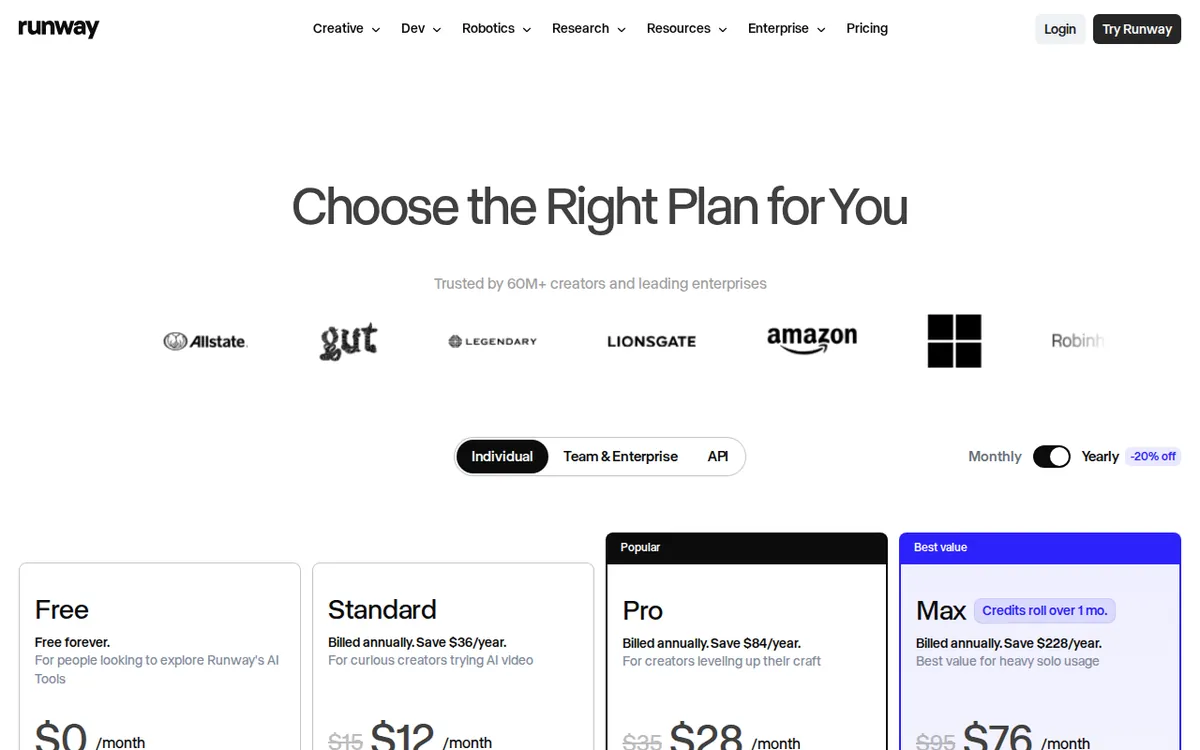
Figure: runway.com official pricing page, captured 2026-10-05.
The three paid plans, side by side
Once you’re past the free allowance, Runway’s ladder has three consumer-facing tiers, all billed in credits per month, with both monthly and annual pricing:
Standard — US$15/month billed monthly, or US$12/month if you pay annually (US$144/year total). You get 625 credits a month, plus — unlike Free — all of Runway’s AI image and video models, 4K upscaling, and no watermarks. Runway pitches this at “curious creators” who want to actually try AI video rather than just sample it. The annual plan bundles in 7,500 credits for the year.
Pro — US$35/month billed monthly, or US$28/month billed annually (US$336/year total, 27,000 credits across the year). Monthly credit allowance is 2,250. Pro adds everything in Standard plus custom voices for lip-sync and text-to-speech, 500GB of storage, access to Runway’s best models, Topaz AI upscaling, and — notably — unlimited Gen-4.5 generation, meaning Gen-4.5 usage stops drawing from your monthly credit pool.
Max — US$95/month billed monthly, or US$76/month billed annually (US$912/year total). You get 9,500 credits a month, and unlike the other tiers, unused credits roll over for one extra month instead of vanishing. This is Runway’s tier for high-volume users who’d otherwise be buying extra credit packs on Standard or Pro every month.
Enterprise sits above Max with no published price — it’s quote-only, and Runway’s pricing page doesn’t disclose what’s different about it beyond “custom.”
The cheapest upgrade path is straightforward: Standard at US$15/month monthly, or US$12/month if you commit to annual billing — a US$3/month saving that only pays off if you were going to stay subscribed for a full year anyway. Right now Runway is also running two offers: a promo code, 30RUNWAY, for 30% off any paid plan, and a standing 25% student/teacher discount. There’s also a time-limited offer on new Max subscriptions only — sign up before August 14th and you get seven days of unlimited use of Runway’s upcoming Seedance 2.5 model once it launches. That one applies only to new Max plans, not existing subscribers or lower tiers.
When paying is not worth it
If you only want to generate a handful of clips to test an idea, or you’re doing a single one-off project under roughly two 5-second Gen-4.5 videos’ worth of output, the free tier covers that and paying is not worth it — you’d be buying a monthly credit allowance you won’t use up. Paying starts making sense the moment you need more than two polished clips, need the watermark gone, or need 4K — all three of which Free doesn’t offer at all.
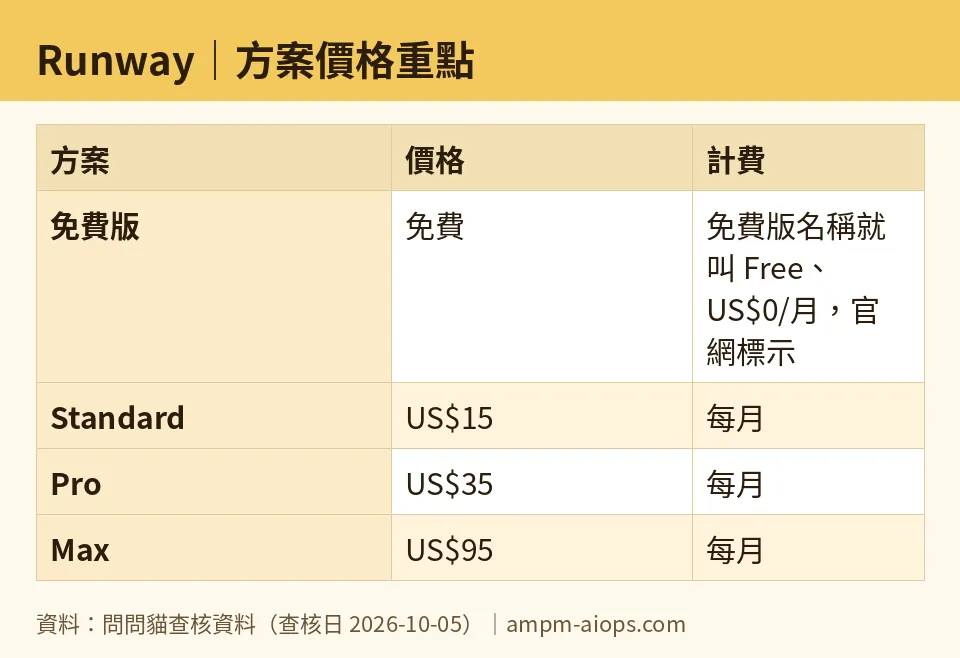
Figure: compiled by AMPM from its verified data (last verified 2026-10-05).
🔍 AMPM exclusive check
Runway’s pricing page states the free plan’s credit limit and that it’s “forever,” but it does not calculate what 125 credits actually buys in finished output. We did that math using Runway’s own per-generation credit costs (60 credits per 5 seconds of Gen-4.5 video, 8 credits per Gen-4 Image, 2 credits per Turbo image): the honest answer is about two 5-second videos, or about 15 still images — not a number Runway states anywhere on the pricing page itself.
We also compared the feature checklists line by line rather than taking the headline “Free forever” at face value. The result: “no watermarks” and “4K upscale” are both listed starting at Standard, and are absent from the Free row — something a reader skimming the top of the pricing page, rather than the full feature table, would likely miss. Beyond that, every dollar figure and credit count in this piece matches Runway’s own pricing page and FAQ, checked 2026-10-05.
☀️ AMO, the budget-minded cat

AMO only cares about one question: is free enough, or is paying worth it? For Runway, the honest answer is “free is enough to look, not enough to work.” 125 credits, spent once, gets you about two 5-second Gen-4.5 clips or 15 images — plenty to decide if Runway’s output quality is good enough for your project, nowhere near enough to finish one. There’s no monthly refill, so once those 125 credits are gone, the free tier is effectively over unless you pay or buy a credit pack starting at 1,000 credits.
If you do need to keep working, the jump to Standard — US$15/month, or US$12/month annually — buys 625 credits a month, roughly five times the one-time free allowance, delivered every single month, plus it removes the watermark and unlocks 4K upscaling that Free doesn’t have at all. That combination — more credits, recurring instead of one-time, plus two features Free lacks outright — is what makes Standard the real “worth it” threshold, not Pro or Max. Skip Pro and Max unless you specifically need the extras they add: custom voice cloning, 500GB storage, or Max’s credit rollover. For most people testing whether AI video is useful at all, free to look, then Standard to work, is the right order, and there’s no in-between tier that makes more sense for a casual user.
Verdict: who should use it, who should skip it
Use Runway’s free tier if you want to see what its models can do and you’re fine with a one-time allowance that won’t come back. Use Standard if you’ve decided you want to actually produce finished, watermark-free, 4K-capable video on a recurring basis — at US$15/month monthly or US$12/month annually, it’s the cheapest plan that removes Free’s two biggest limits. Skip paying entirely if your need is a single quick test; two Gen-4.5 clips from the free allowance will tell you most of what you need to know. Skip Pro and Max unless you specifically need their extras — custom voice, 500GB storage, Topaz upscaling, or credit rollover — since Standard already clears the main free-tier wall.
Written: 2026-10-05 Price last verified: 2026-10-05 Tool last health-checked: 2026-10-05
🔗 Related on AMPM
📎 Sources
All prices and quotas in this article come from AMPM’s verified dataset for Runway (last verified 2026-10-05); primary sources:
🐾 Meet the cats: AMO and PIMI

AMPM is a Taiwan-based AI-tool pricing watchdog. Our motto: ask before you subscribe. Two cats argue every tool from two sides:
- ☀️ AMO — the budget-minded cat. Always asks: is the free tier enough, and is paying actually worth it?
- 🌙 PIMI — the performance-minded cat. Cares about whether it works well, fast, and gets your job done.

When they are done arguing, you know whether to pay. Every number is checked by us, with the verification date at the end.
🐾 Our sister sites also checked
Let's take a look at these
- Runway Comprehensive Introduction: Pricing, Features, and Actual Limitations
- Runway Is the free quota enough?
- Runway Alternatives
- Comprehensive Free Quota List for All Tools
