[How-to] SandBase CLI Is Free and Open Source — But Its Free Tier Credit Amount Isn't Published Anywhere
- Free tier: Yes
- Cheapest paid plan: US$0/mo and up
- Free quota: CLI itself is open source (Apache-2.0) and free; the SandBase platform …
- Last checked: 2026-10-22
Article last updated: 2026-10-08



SandBase CLI is an open-source command-line tool and local MCP server (a small local bridge that lets AI apps like Claude Code or Cursor call outside tools and models) that connects 25 different AI clients to more than 2,000 models and APIs. The code itself — licensed Apache-2.0 — is free, full stop, no catch. But if you want to actually use it to route calls across those 2,000+ models through SandBase’s own platform, you need an account, and that account’s free tier comes with a catch we had to dig for: the official pricing page never states how many free credits (a prepaid usage balance you spend as you make calls) you actually get. Before you install this thinking “free tier” means something fixed and knowable, here’s what we found when we checked.
What’s actually free, and what isn’t
Two different things are free here, and mixing them up is the first mistake people make.

Illustration: The software source code is permanently free, but platform startup credits are given only once and never reset.
The CLI software is free forever. It’s open source under the Apache-2.0 license, hosted on GitHub at sandbaseai/cli, and you can install it and run it offline with no account, no limit, no expiration. If all you want is the local MCP server that plugs into your existing AI client, that part costs nothing and has no usage ceiling.
The SandBase platform — the layer that actually bridges you to the 2,000+ models and APIs — is a separate thing. To use it, you need to create a SandBase workspace and generate an API key. That gets you what SandBase calls “Start: Free credits.” That’s the extent of what the vendor states. No number, no dollar cap, no token count, no expiration date. Once those credits run out, you’re billed based on whatever model or API you called, at that model’s own published rate.
This matters because SandBase isn’t a model — it’s a bridge. You’re not paying SandBase a flat subscription to access models; you’re paying for the thing itself to exist as a connective layer on top of the billing you’d already see from, say, an image generation API or a token-based language model. The site’s own “Pay as you go” plan lists no subscription price: there’s no monthly or annual fee listed at all. You pay only for what you call, tracked per use in an activity log that shows which component and how much usage each run consumed.
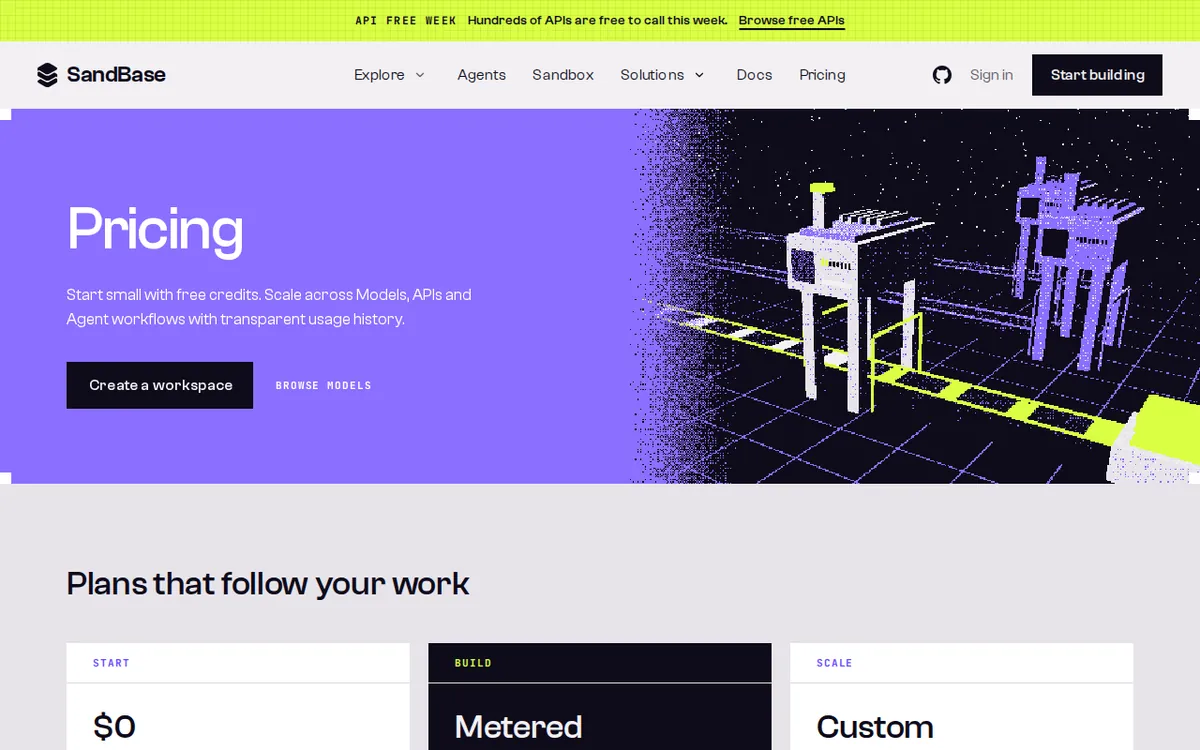
Figure: sandbase.ai official pricing page, captured 2026-10-08.
The free credit mystery, and why it’s not a small detail
For a tool whose whole value proposition is “one key, many models,” not knowing your starting balance is a real planning gap. If you’re testing five different models to see which fits your workflow, you have no way to know in advance whether your free credits will last through that comparison or get used up on the first large request.
We also flag a second cost people miss: SandBase sits on top of the model’s own price, and the official pricing page does not spell out whether there’s an additional platform margin or fee layered on top of what the model provider itself charges. In other words, the “free” part is unambiguous — your starting balance is free — but the ongoing cost structure, beyond “you pay for what you use,” is not fully itemized anywhere we found.
Getting started and the first blockers you’ll hit
Installing the open-source CLI itself is straightforward if you’re comfortable with a terminal — that part has no account requirement and no gate. The blockers show up the moment you want to use SandBase’s bridging feature:
- You must create a SandBase workspace before you can generate the API key needed to call any of the 2,000+ models through the platform. There’s no way around this step if you want the multi-model routing feature, which is the main reason most people install this over a plain CLI.
- OAuth login (sign-in through a third-party account rather than a new password) and rollback (reverting to a previous state) are both included at no extra cost once you’re set up — these aren’t gated behind a paid tier.
- If you’re on a team and want centralized workspace management, access controls, or vendor support, that’s the separate Team/Enterprise plan, and it’s quote-based — you have to contact SandBase directly, there’s no published price.
- Once your free credits are gone, billing starts automatically per the model’s rate. There’s no warning threshold or spending cap mentioned on the pricing page, so if you’re worried about an unexpected bill, keep an eye on the activity log yourself rather than assuming the platform will stop you.
None of this is unusual for a usage-based tool. What’s unusual is that the entry-level number — how much free credit you start with — simply isn’t disclosed. Most usage-based platforms will at least say “US$5 in free credits” or “100 free requests.” SandBase doesn’t.
🔍 AMPM exclusive check
We went to SandBase’s own pricing page directly in a live browser session (not a cached screenshot or a secondhand summary) and confirmed firsthand that the free credit amount for the “Start” tier is genuinely absent from the page — it says free credits exist, but gives no figure, no cap, and no expiration window. We checked this on 2026-09-05 and it has been re-verified as unchanged on every check through 2026-09-26, so this isn’t a page that briefly forgot to post a number — it’s been left unspecified for weeks. We also pulled the GitHub repository (sandbaseai/cli) directly to confirm the Apache-2.0 license and the feature description ourselves, rather than taking the vendor’s framing of “open source” at face value. The gap we’re flagging — a vendor saying “free credits” with zero quantification — is the kind of detail that’s easy to skim past on a pricing page full of other specifics, which is exactly why we checked it twice.
Verdict: who should use it, who should skip it
If you just want a free, open-source local MCP server to wire into Claude Code, Cursor, or another supported client, and you’re comfortable bringing your own API arrangements, the CLI itself costs nothing and there’s no reason to hesitate — install it.
If your plan is to lean on SandBase’s bridge to test a bunch of different models through one key, go in expecting to not know your starting balance. Create the workspace, check the activity log immediately after your first few calls, and treat the “free credits” as an unknown quantity you’re discovering in real time rather than a budget you can plan around in advance. That’s fine for casual experimentation; it’s a genuine planning problem if you need to forecast costs before committing a team to it.
If you’re a team that needs governance, centralized workspace control, or support, you’ll end up talking to SandBase’s sales process anyway, since Team/Enterprise pricing isn’t published — budget for a conversation, not a number you can look up.
Written: 2026-10-08 Price last verified: 2026-09-26 Tool last health-checked: 2026-10-08
🔗 Related on AMPM
📎 Sources
All prices and quotas in this article come from AMPM’s verified dataset for SandBase CLI (last verified 2026-09-26); primary sources:
🐾 Meet the cats: AMO and PIMI

AMPM is an independent AI-tool pricing watchdog tracking official prices worldwide. Our motto: ask before you subscribe. Two cats argue every tool from two sides:
- ☀️ AMO — the budget-minded cat. Always asks: is the free tier enough, and is paying actually worth it?
- 🌙 PIMI — the performance-minded cat. Cares about whether it works well, fast, and gets your job done.

When they are done arguing, you know whether to pay. Every number is checked by us, with the verification date at the end.
🐾 Our sister sites also checked
Read next
- SandBase CLI Full breakdown: pricing, features and real-world limits
- SandBase CLI Is the free quota enough?
- SandBase CLI Alternatives
- Free plan limits for every AI tool we track
More verified articles on this tool
- [Verified] One Key, Thousands of Models: What SandBase CLI's Free Tier Actually Covers
- SandBase's Pricing Page Has No Numbers: Where Free Credits Start, and Your First Call Step by Step
