[How-to] Scenario Free vs Paid: Where the Free Tier Stops Being Useful
- Free tier: Yes
- Cheapest paid plan: US$15/mo and up
- Free quota: 50 free credits per day (no credit card required), for personal …
- Last checked: 2026-10-23
Article last updated: 2026-10-23



Scenario is a style-consistency image generator and model-training platform aimed at game developers — the kind of tool you reach for when every asset in a set needs to look like it came from the same artist. It has a genuine free tier with no credit card required, so you can test it the same afternoon you hear about it. The catch isn’t the price. It’s what the free tier is allowed to do versus what it lets you do. This guide gets you generating in minutes and tells you exactly where you’ll hit a wall.
One housekeeping note before the steps: prices vary by country; we checked from Taiwan, and every figure below is the US$ list price shown on Scenario’s own pricing page.
Start on the free tier: the five-minute setup
The free plan gives you 50 points a day, no card on file. “Points” are Scenario’s generation currency — you spend them each time you run an image generation or a job, and the free allowance refills daily rather than monthly.
To get moving:
- Go to scenario.com and sign up. You do not need to enter payment details for the free tier, so if a signup flow ever demands a card, stop — that’s not the free path.
- Open a new generation. Start from a text prompt describing the asset you want (a prop, a character, a tileable texture).
- Generate, review, and iterate. Each run draws from your 50-point daily balance.
- When the balance runs dry, you’re done for the day. It resets the next day.
That’s the whole on-ramp. There’s no trial countdown in the data we have — the free tier is a standing daily allowance, not a 7-day clock, so you can poke at it across several days without pressure.
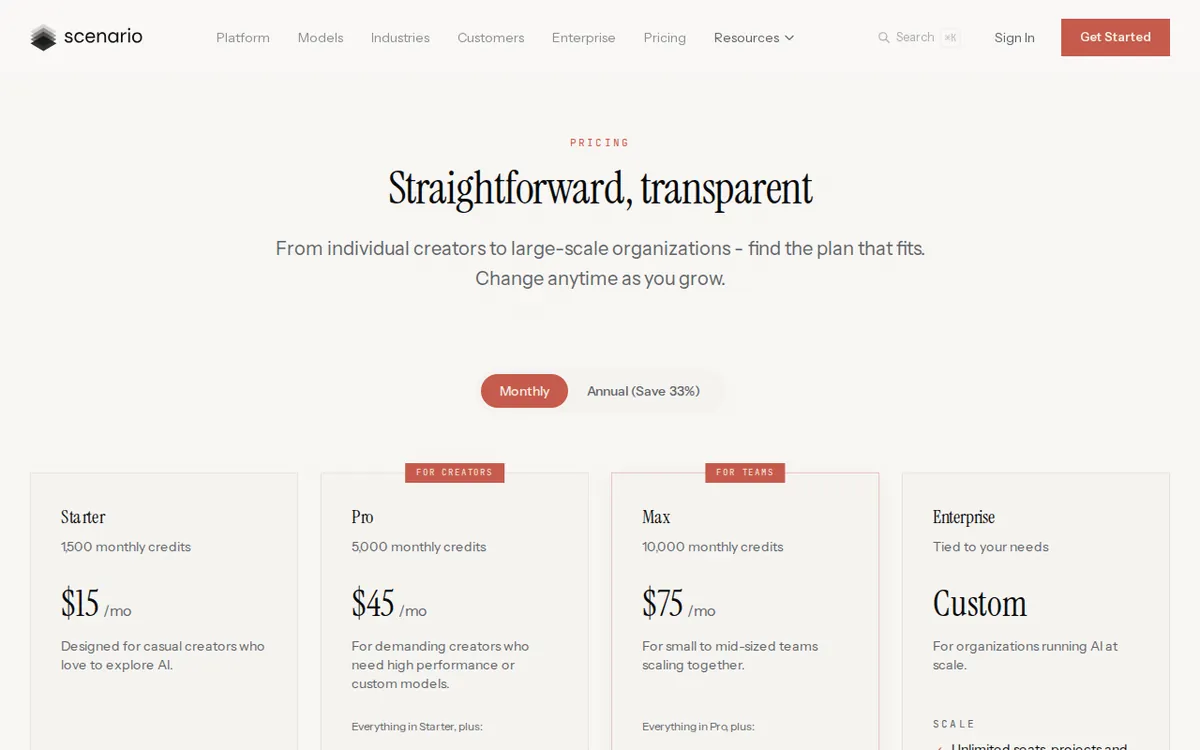
Figure: scenario.com official pricing page, captured 2026-10-23.
What the daily free points are actually for
Read Scenario’s own description of the free tier carefully and one phrase does the heavy lifting: personal, non-commercial evaluation use only. That is the real boundary. The free tier exists so you can judge whether the engine’s style consistency is good enough for your project — not so you can quietly ship assets from it.
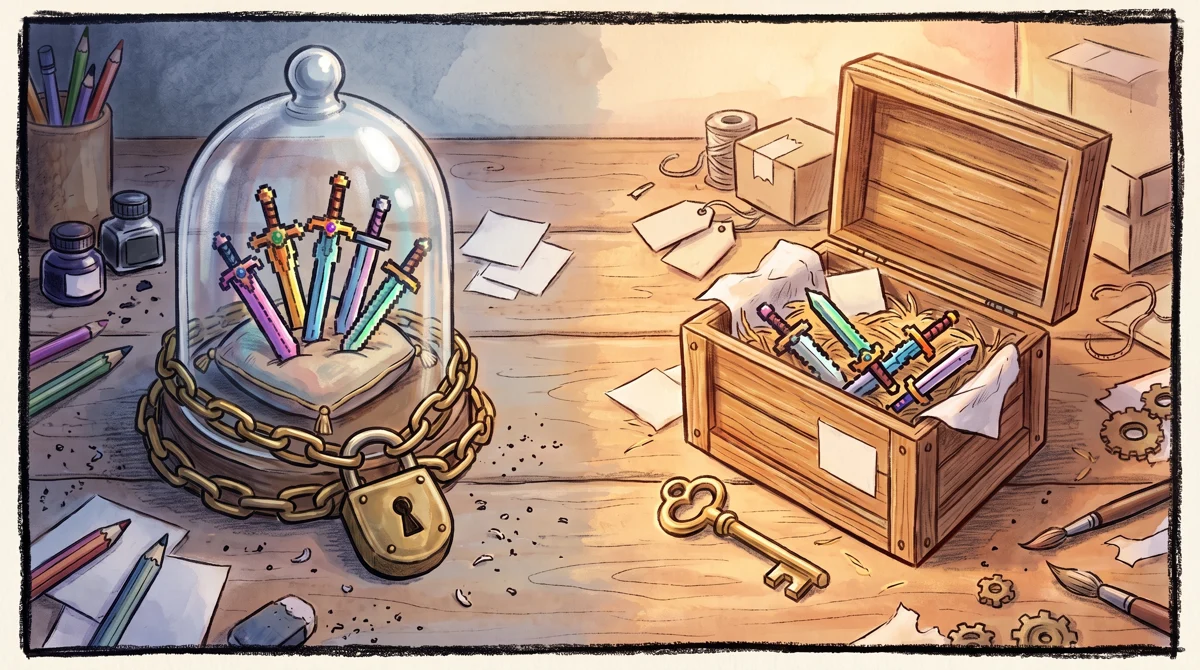
Illustration: Unlicensed assets remain locked under non-commercial evaluation rules, while commercial licensing enables creators to pack and distribute game assets freely.
So the honest answer to “what can 50 points a day build?” is: enough to evaluate the tool. You can test prompts, see how well it holds a consistent look across a batch, and get a feel for the interface. What you cannot do on free is put the output into a game you sell, a client deliverable, or anything commercial. The moment the work stops being a personal test, you’ve outgrown the free tier by its own terms, regardless of how many points you have left.
Two beginner blockers show up fast here:
- You hit the 50-point ceiling mid-session. Fix: there’s no top-up on free — wait for the daily reset or move to a paid plan. Plan your test runs so the highest-value prompts go first.
- You love a result and want to use it for real. Fix: you need a paid plan for the commercial license (covered next). Don’t talk yourself into believing a free-tier asset is fine to ship; the terms say it isn’t.
The three paid steps, and what each unlocks
Scenario’s paid tiers are a monthly subscription — a recurring charge that renews each month. The numbers below are the monthly list prices; our data doesn’t include an annual rate, so we won’t quote one. A quick plain-English note on two more terms: a workspace is your project environment and a seat is one person’s access to it; model training means teaching Scenario your own art style so new generations match it.
Starter — US$15/month. This is the cheapest plan that makes your output usable. You get 1,500 points a month, a single-user workspace, 50 GB of storage, and — the important part — a full commercial license. If your only reason to pay is “I want to actually use what I make,” Starter is the line you cross. Note the billing shift: free points are daily; Starter’s 1,500 points are a monthly pool, so you manage them across the month rather than per day.
Pro — US$45/month. This is the first plan where you stop being a consumer of Scenario’s stock models and start building your own. Pro raises you to 5,000 points a month, adds a priority generation queue (your jobs jump ahead), unlimited Relaxed generation (a slower, no-rush mode that doesn’t eat your point balance the same way), the ability to train custom models, and 500 GB of storage. For a solo developer who wants a repeatable, house-style look across hundreds of assets, custom model training is the feature worth the jump from Starter.
Max — US$75/month. This is the team plan. You get 10,000 points a month, support for a team of up to 25 people, a high-priority queue, and 1 TB of storage, with an extra 1 TB added per seat. If you’re one person, Max’s headline feature — 25-seat collaboration — is wasted on you; the step up from Pro is mostly about more points and more people, not new creative powers.
A blocker worth flagging: if your goal is specifically to train a style model, Starter won’t do it. The custom-model-training feature is listed starting at Pro. Budget for US$45/month, not US$15, if that’s your aim.
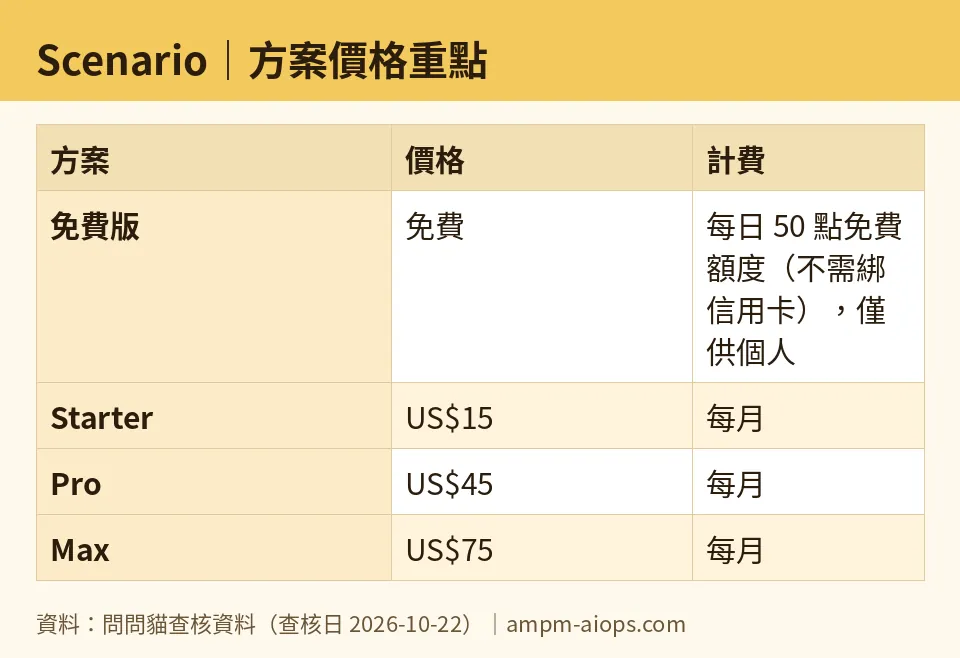
Figure: compiled by AMPM from its verified data (last verified 2026-10-22).
🔍 AMPM exclusive check
Here’s what the vendor’s pricing page does not spell out, and where our check is deliberately cautious.
The missing number is points-per-generation. Both the free tier and the paid plans are priced in points — 50 a day free, 1,500 / 5,000 / 10,000 a month on the paid tiers — but the data we verified does not state how many points a single image costs. That’s the one number that would tell you how far any allowance actually stretches, and it isn’t published in what we read. We will not estimate it. Treat the point totals as relative sizes (Pro gives you roughly three times Starter’s monthly pool) rather than as a promise of a specific image count, and confirm the per-generation cost in-app before you commit.
The commercial line is the real paywall, not the point cap. The free tier can have points to spare and still be off-limits for your project, because it’s restricted to non-commercial evaluation. The feature that unlocks real use is the commercial license bundled into Starter at US$15/month. That distinction is easy to miss on a quick read of the pricing page, so we’re stating it flatly.
On our own confidence: Scenario entered our tracker as a challenger candidate, and this data has been through a single automated verification round, not our full three-way manual cross-check. The prices and quotas were re-confirmed unchanged against the official site on 2026-10-20, 2026-10-21, and again on 2026-10-22, so the numbers are current — but we’d point you to scenario.com/pricing for anything you’re about to pay for, especially the commercial terms. Nothing in our check contradicted the official page; the gap is what the page leaves unsaid, not an error in it.
Verdict: who should use it, who should skip it
Use the free tier if you’re a developer or hobbyist who wants to judge whether Scenario’s style consistency fits your pipeline. It costs nothing, needs no card, and the daily 50 points are enough to form an opinion. Just don’t ship anything you make there.
Pay for Starter (US$15/month) if your evaluation went well and you need the commercial license to actually use the assets. It’s the smallest honest step from testing to shipping for a solo creator.
Pay for Pro (US$45/month) if you want to train custom models on your own art, skip the generation queue, and use unlimited Relaxed mode. This is the plan for someone producing a real volume of style-matched assets alone.
Jump to Max (US$75/month) only if you have a team — up to 25 people — sharing the work, or you genuinely need the larger point pool and terabyte-plus storage. A solo user gets little from it that Pro doesn’t already cover.
Skip Scenario entirely if you need commercial-ready output for free, or if you’re not doing game-style, consistency-driven asset work — this tool is built narrowly for that job, and its pricing assumes you’re there for exactly that.
Written: 2026-10-23 Price last verified: 2026-10-22 Tool last health-checked: 2026-10-23
🔗 Related on AMPM
📎 Sources
All prices and quotas in this article come from AMPM’s verified dataset for Scenario (last verified 2026-10-22); primary sources:
🐾 Meet the cats: AMO and PIMI

AMPM is a Taiwan-based AI-tool pricing watchdog. Our motto: ask before you subscribe. Two cats argue every tool from two sides:
- ☀️ AMO — the budget-minded cat. Always asks: is the free tier enough, and is paying actually worth it?
- 🌙 PIMI — the performance-minded cat. Cares about whether it works well, fast, and gets your job done.

When they are done arguing, you know whether to pay. Every number is checked by us, with the verification date at the end.
🐾 Our sister sites also checked
Read next
- Scenario Full breakdown: pricing, features and real-world limits
- Scenario Is the free quota enough?
- Scenario Alternatives
- Free plan limits for every AI tool we track
