Ask Cat › AI Tool Summary › Speechify
[How-to] Speechify Free Tier Limits: 10 Voices, 1.5x Speed, 5 Files — Is Premium Worth It?
- Free tier: There is
- Cheapest paid plan: US$29/mo and up
- Free quota: The free version can be used long-term but has clear limitations: only …
- Last checked: 2026-10-05
Article last updated: 2026-10-07



Speechify turns text into spoken audio — it reads web pages, PDFs, emails, and scanned documents out loud, and syncs across your phone, computer, and browser. Before you hand over your card details, here’s what the Speechify free tier actually gives you, where it stops, and what you’re paying for if you upgrade.
The short version: the free tier is genuinely usable long-term, not a time-limited trial. But it caps you at 10 basic computer-generated voices, a maximum reading speed of 1.5x, and storage for only 5 documents at a time. Everything beyond that — natural-sounding voices, faster playback, scanning printed books, offline listening — sits behind the Premium subscription. Here’s how to get set up and what to expect at each stage.
What you actually get for free
Download the app (it’s on iOS, Android, Chrome, Edge, Mac, and Windows) and sign up with an email, Google, or Apple account. Taiwan-based users can register and use it without any regional restriction.

Illustration: Illustration contrasting rigid mechanical voice components, restrained playback dials, and cramped file organizers with expansive, natural auditory flow.
Once you’re in, the free tier covers the basics:
- Reading your own content out loud. Web pages, PDFs, and documents all work through the browser extension or the app itself — no paywall on this core function.
- 10 built-in voices. These are functional but sound mechanical — closer to an old GPS voice than a podcast host. Fine for getting through a work document, less fine if you’re listening for an hour.
- Playback speed up to 1.5x. That’s the ceiling. You cannot push faster on the free plan no matter how you adjust settings.
- Storage for 5 documents. Once you hit that cap, you need to delete an older file before adding a new one. There’s no monthly reset — it’s a hard limit on how many files sit in your library at once, not a quota that refills.
What you don’t get for free: scanning printed books or paper documents (Speechify calls this feature OCR, which stands for optical character recognition — basically, pointing your camera at a physical page so the app can read it aloud), AI-generated summaries or document Q&A, offline audio downloads, or integration with Google Drive, Dropbox, or OneDrive.
For someone who just wants the occasional article or PDF read aloud, the free tier does the job indefinitely. It becomes limiting fast if you’re a student stacking up readings, or anyone who wants faster-than-1.5x playback.
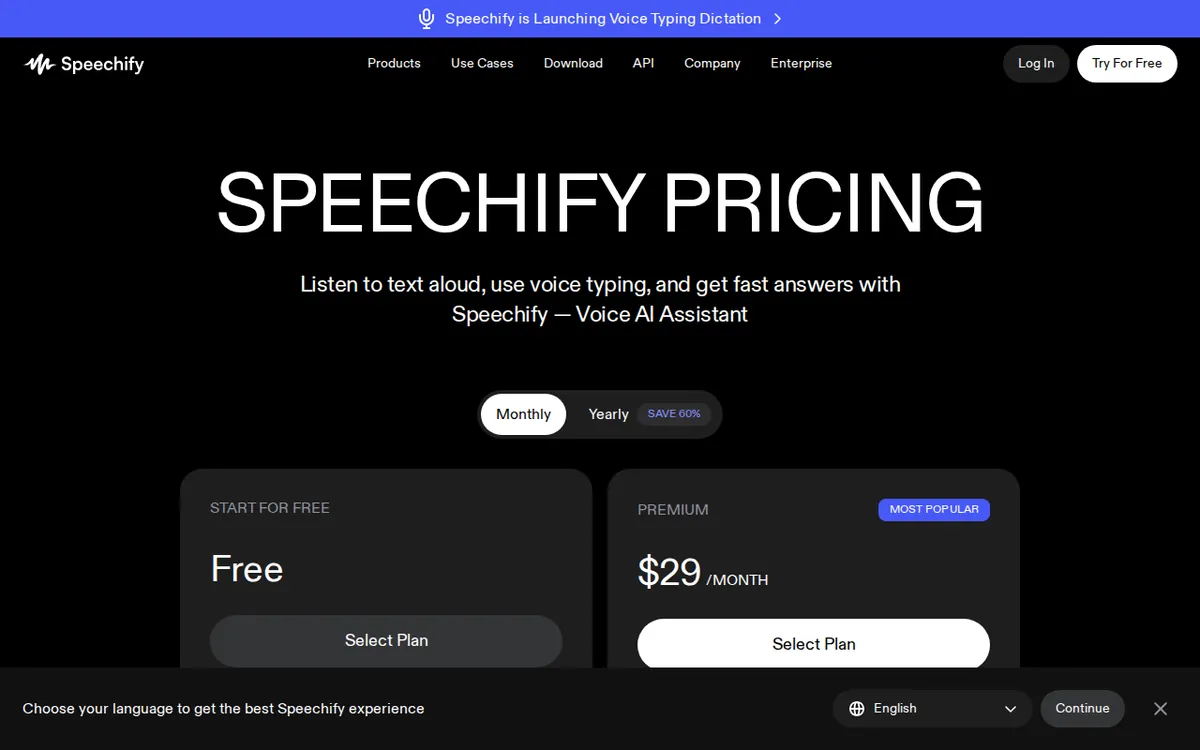
Figure: speechify.com official pricing page, captured 2026-10-07.
What Premium unlocks, and what it costs
Premium is priced at US$29 per month, billed monthly. There’s also an annual option at US$139 per year, which works out to roughly US$11.58 a month — about a 60% saving over paying monthly, according to Speechify’s own pricing page.
Here’s what the upgrade actually changes:
- 1,000+ natural-sounding voices across 60+ languages, including Chinese — a real step up from the free tier’s 10 robotic ones.
- Speed up to 5x, versus the free tier’s 1.5x ceiling.
- Unlimited document storage, replacing the 5-file cap.
- OCR scanning for printed books and paper documents.
- AI summaries and document Q&A.
- Offline downloads of audio files.
- Cloud integration with Google Drive, Dropbox, and OneDrive.
One thing Premium does not include: generating voiceover audio for videos or podcasts with commercial usage rights. That’s a separate product line called Speechify Studio, aimed at content creators rather than readers. Studio has its own plans — a Starter tier at US$19 a month and a Creator tier at US$49 a month — each measured in “credits” (a usage unit that gets consumed as you generate audio, roughly one credit per second of voiceover generated). These are entirely separate from your Premium reading subscription; upgrading one doesn’t touch the other. If your goal is just listening to documents rather than producing voiceover content, you can ignore Studio entirely.
The upgrade prompt you’ll hit early
Within a few minutes of installing the app, Speechify pushes you toward a trial of the annual US$139 plan. The trial requires a card up front, and it renews automatically into the full annual charge once the trial period ends. If you only want the free tier, the fix is simple: skip the trial offer when it appears, and if you did start one, turn off auto-renewal in your account settings before the trial window closes. This isn’t unusual for subscription apps, but it’s easy to miss when you’re just trying to get the app working.
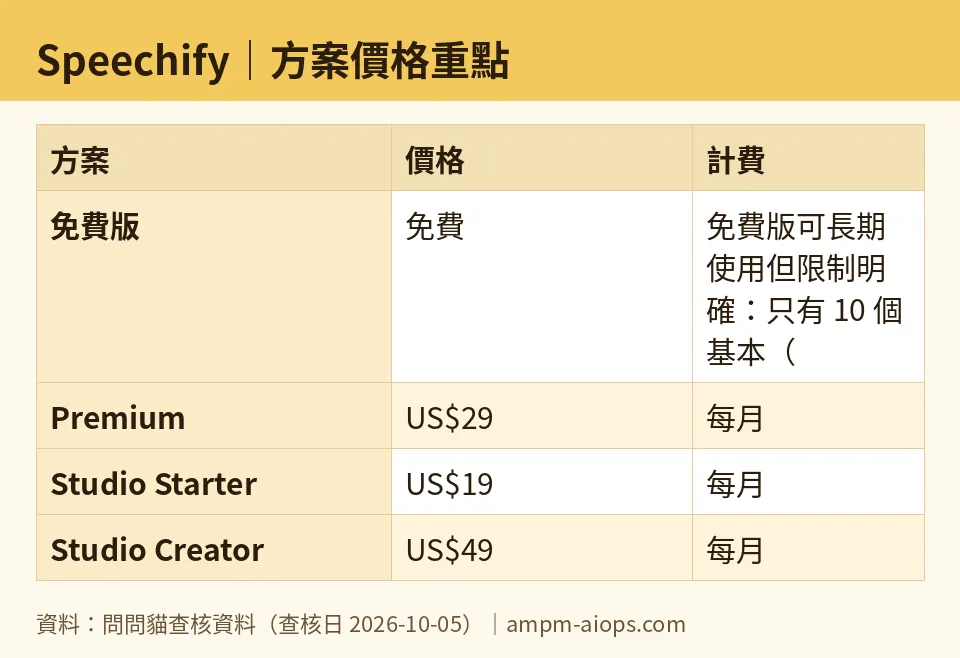
Figure: compiled by AMPM from its verified data (last verified 2026-10-05).
🔍 AMPM exclusive check
Nothing differed from the official page this time; every number here — the 10 free voices, 1.5x speed cap, 5-file storage limit, and the US$29 monthly / US$139 annual Premium pricing — matches Speechify’s own pricing page, checked 2026-10-05. The one thing worth flagging that the vendor page doesn’t spell out clearly: the free trial’s auto-renewal into the annual plan is the default path through signup, and you have to actively opt out rather than opt in. That’s standard industry practice, not a hidden trick, but it’s easy for a beginner to miss if they’re moving fast through onboarding.
Verdict: who should use it, who should skip it
Stick with the free tier if you only need to listen to the occasional article, email, or PDF, and 1.5x speed with a mechanical voice doesn’t bother you. The 5-document cap is manageable if you clear out files you’ve already finished.
Upgrade to Premium if you’re a heavy reader — students working through stacks of papers, commuters who want to burn through articles at higher speed, or anyone who needs accessibility support like OCR for physical books. The jump from 10 robotic voices to 1,000+ natural ones, plus 5x speed and unlimited storage, is a real quality-of-life change if you’re listening for hours a day. If you’re confident you’ll stick with it long-term, the annual plan at US$139 beats paying US$29 every month.
Skip Premium — and skip Studio entirely — if you’re not producing voiceover content for video or podcasts. Studio is a different product built for creators, priced and measured separately in credits, and has nothing to do with the reading experience most people come to Speechify for.
Written: 2026-10-07 Price last verified: 2026-10-05 Tool last health-checked: 2026-10-07
🔗 Related on AMPM
📎 Sources
All prices and quotas in this article come from AMPM’s verified dataset for Speechify (last verified 2026-10-05); primary sources:
🐾 Meet the cats: AMO and PIMI

AMPM is a Taiwan-based AI-tool pricing watchdog. Our motto: ask before you subscribe. Two cats argue every tool from two sides:
- ☀️ AMO — the budget-minded cat. Always asks: is the free tier enough, and is paying actually worth it?
- 🌙 PIMI — the performance-minded cat. Cares about whether it works well, fast, and gets your job done.

When they are done arguing, you know whether to pay. Every number is checked by us, with the verification date at the end.
🐾 Our sister sites also checked
Let's take a look at these
- Speechify Comprehensive Introduction: Pricing, Features, and Actual Limitations
- Speechify Is the free quota enough?
- Speechify Alternatives
- Comprehensive Free Quota List for All Tools
More verified articles on this tool
- [Verified] Speechify's free tier has three hard limits—can you live with 10 mechanical voices and 1.5x speed?
- What Speechify's Free Tier Actually Gives You: 10 Robotic Voices, 1.5x Speed, 5 Files
