[How-to] Supabase Free Tier Limits 2026: The Pause Clause Beginners Miss
- Free tier: Yes
- Cheapest paid plan: US$25/mo and up
- Free quota: Up to 2 active projects, 50,000 monthly active users (MAU), 500 MB …
- Last checked: 2026-10-23
Article last updated: 2026-10-23



Supabase is pitched as the open-source answer to Firebase — a full backend (the server-side plumbing your app runs on) built around Postgres, the long-standing open database engine, with vector search and auth bundled in. The free tier is real and roomy enough to launch a side project. But there is one line on the pricing page that quietly decides whether your weekend build is still running next Monday: a project with no activity for a week pauses itself. This guide gets you live, shows you exactly what the free tier can carry, and keeps you from waking up to a frozen database.
What the free tier actually lets you ship
Free on Supabase is not a toy. You get up to 2 active projects, which matters because each project is its own isolated database and backend. Inside each you have:
- 50,000 monthly active users (MAU) — distinct people who authenticate in a calendar month.
- 500 MB database space on Postgres.
- 1 GB file storage for images, uploads and the like.
- 5 GB of outbound data transfer (egress — data leaving Supabase’s servers to your users) plus a separate 5 GB of cached egress.
- 500,000 Edge Function invocations — an Edge Function is a small piece of server code that runs close to your users, and an invocation is one run.
That is enough to stand up a working app: a login system, a database, file uploads, and server logic. For a prototype, an internal tool, or a product hunting its first hundred users, you will hit the auth ceiling long before you hit most of the others — and 50,000 authenticated users a month is a high ceiling for something still free.
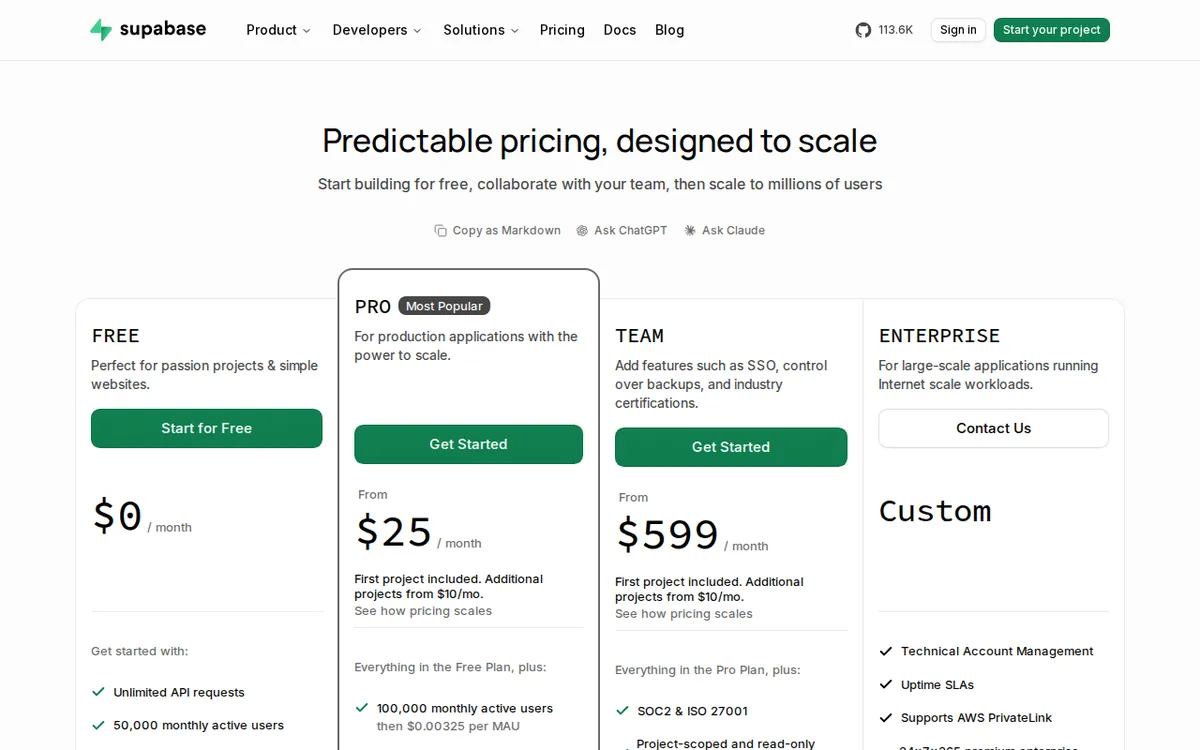
Figure: supabase.com official pricing page, captured 2026-10-23.
Get your first project running in a few steps
Supabase front-loads the setup so the awkward parts happen once. Here is the shortest path from zero to a live backend.
- Sign up at supabase.com and create an organization. The organization is the billing container — plans are priced per organization, not per project, so this is the box everything else lives in.
- Create a project. Pick a region close to where your users are (this affects speed), and set a strong database password. Save that password somewhere you will not lose it; resetting it later is a chore.
- Wait for Postgres to provision. It takes a couple of minutes. The dashboard tells you when it is ready.
- Build your first table. Use the Table Editor for a visual approach, or the SQL editor if you already think in SQL. This is a real Postgres database, so anything Postgres can do, it can do.
- Grab your API keys. Under project settings you will find the project URL and the anon key — the public credentials (the login details your front-end app uses to talk to the backend). Drop them into your app and you are connected.
- Turn on what you need. Auth for logins, Storage for files, Edge Functions for server logic. Each is a toggle plus a bit of config, not a separate account.
From there you are building against a live backend. The free tier does not cripple features to force an upgrade — you get the real auth system, the real storage, the real functions. What the free tier limits is scale and uptime, not capability.
The blockers that catch beginners — and how to clear them
The one-week auto-pause. This is the trap. A free project with no activity for a continuous week pauses itself. Nothing is deleted, but the backend goes cold, and your app’s requests start failing until you restore it. For a demo you show once a month, or a project you leave alone over a holiday, this bites. The fixes: keep the project genuinely active (even light, regular traffic counts), restore it manually from the dashboard when it pauses, or move to a paid plan, where projects never auto-pause. If you are building something you want running unattended, treat this clause as the real reason to upgrade — not the quotas.
The two-project ceiling. Free gives you two active projects. A separate staging copy of one app eats your second slot fast. Plan which two matter, or pause the one you are not actively using.
The 500 MB database. Half a gigabyte of Postgres sounds small, and it is if you are storing large text blobs or logging everything. Keep big files in Storage (which has its own 1 GB allowance) rather than stuffing them into database rows, and this stretches a long way.
Egress creep. The 5 GB of outbound transfer is per month. Serving large media directly, or a chatty API (the interface apps use to request data), can burn through it. If you are shipping images, lean on caching and on the separate 5 GB cached-egress bucket.
None of these require a credit card to work around at a small scale. They require you to know they exist before launch, not after.
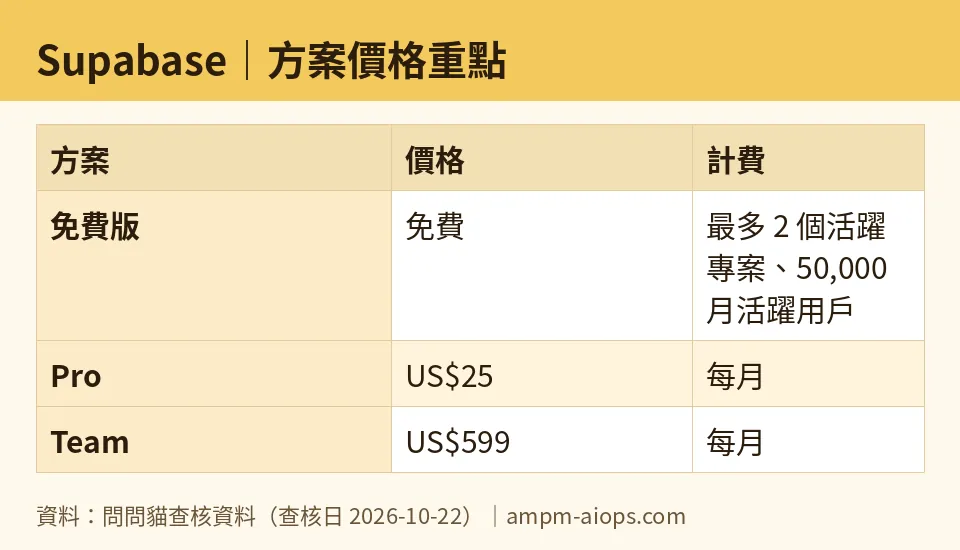
Figure: compiled by AMPM from its verified data (last verified 2026-10-22).
What moving to Pro actually buys
When free stops fitting, the next step is Pro at US$25 per month, per organization. Read that carefully: it is per organization, and it includes your first project plus a US$10 monthly compute credit (a prepaid allowance toward server power), which covers one Micro instance. Additional projects start at US$10 per month each. Pro raises the ceilings to 100K MAU, 8 GB database, 100 GB storage and 250 GB egress, and — the real headline — projects never auto-pause. Go over the included amounts and you pay as you go.
Above that sits Team at US$599 per month, per organization: everything in Pro plus SOC2 and ISO 27001 compliance support (security certifications enterprises ask for), single sign-on for the dashboard, 14-day daily backups, 28-day log retention, and a priority support SLA. That is a company tier, not a solo-developer tier.
Note that prices vary by country; we checked from Taiwan, and the US$ figures above are the ones Supabase publishes. The data we have carries no annual price, so we are not quoting one — if a yearly discount matters to you, confirm it on the pricing page.
🔍 AMPM exclusive check
We read the Supabase pricing page directly on 2026-10-22, and here is the honest state of it: the auto-pause clause is on the official page, so we cannot claim it as something the vendor hides. What we can tell you is that it is the single line beginners skim past, because it sits among the quota numbers rather than next to the “free forever” promise — and it is the one that turns a working project into a broken one. That is the gap worth flagging, even though the vendor technically states it.
Beyond that, be aware this is a first-pass verification on our side: we checked these figures once against the official page and have not yet run them through our usual multi-source cross-check. Every number in this piece matches what Supabase published on the date above, and nothing differed from the official page on this read. Because free quotas and commercial terms shift, treat the live pricing page as the final word if a decision rides on an exact figure.
Verdict: who should use it, who should skip it
Use the free tier if you are learning, prototyping, or building a project with regular traffic. The feature set is complete, 50,000 MAU is generous, and you can do real work without paying — as long as you respect the one-week rule and keep the project warm.
Move to Pro if you need a backend that stays up unattended, or you are past the free ceilings. The US$25 per organization that ends auto-pause is the clearest reason to pay, more so than any single quota.
Skip to Team only if you are a company that needs compliance certifications, SSO, or a support SLA. At US$599 per month, it is not a solo upgrade.
Skip Supabase entirely if you want a fully managed, zero-maintenance backend and never intend to touch SQL — the Postgres foundation is a strength, but it is still a database you are expected to understand.
Written: 2026-10-23 Price last verified: 2026-10-22 Tool last health-checked: 2026-10-23
🔗 Related on AMPM
📎 Sources
All prices and quotas in this article come from AMPM’s verified dataset for Supabase (last verified 2026-10-22); primary sources:
🐾 Meet the cats: AMO and PIMI

AMPM is a Taiwan-based AI-tool pricing watchdog. Our motto: ask before you subscribe. Two cats argue every tool from two sides:
- ☀️ AMO — the budget-minded cat. Always asks: is the free tier enough, and is paying actually worth it?
- 🌙 PIMI — the performance-minded cat. Cares about whether it works well, fast, and gets your job done.

When they are done arguing, you know whether to pay. Every number is checked by us, with the verification date at the end.
🐾 Our sister sites also checked
Read next
- Supabase Full breakdown: pricing, features and real-world limits
- Supabase Is the free quota enough?
- Supabase Alternatives
- Free plan limits for every AI tool we track
