[How-to] Surfer SEO Pricing: No Free Tier, so How Do You Try It Without Losing Money?
- Free tier: None
- Cheapest paid plan: US$49/mo and up
- Free quota: No free tier (as of 2026-08-28 from official pricing page): the main …
- Last checked: 2026-10-17
Article last updated: 2026-10-13



Price check update (2026-10-12)
- Then (written on 2026-10-08; matched the official site on 2026-09-08):
- Discovery US$49 (annual)
- Standard US$99 (annual)
- Pro US$182 (annual)
- Peace of Mind US$299 (annual)
- AI Search Analytics US$158 (annual)
- Enterprise US$999 (monthly)
- Now (verified on 2026-10-12):
- Discovery US$49 (annual)
- Standard US$99 (annual)
- Pro US$182 (annual)
- Peace of Mind US$299 (annual)
- AI Search Analytics US$82 (annual)
- Enterprise US$999 (monthly)
What you gain
- AI Search Analytics got cheaper by US$76 (48%): you save US$76 a year on the same plan, which helps
Plan description changes
AI Search Analytics: “Standalone plan (AI search tracking only): annual payment with a monthly average of US$158 (saving US$324), tracking 100 AI prompts, updated daily” → “Standalone plan (AI search tracking only): US$82/month billed yearly (US$95 billed monthly; yearly saves US$156), updated daily”
The original article below is kept as it was on 2026-10-08, as a record of that period. Use this section for decisions.
If you’ve landed on Surfer SEO’s homepage looking for a way to test it before paying, here’s the direct answer: there is no free tier. The “Start for Free” button on the homepage is a signup form, not a workspace. You still have to enter a card and pick a paid plan before you can open the Content Editor, the tool that actually does the SEO work. The only safety net is a 7-day refund window, and it comes with conditions that trip people up. This guide walks through what you get for your money, how to pick a plan without overpaying, and how to use that refund window correctly if Surfer turns out to be wrong for you.
Surfer SEO is a content optimization platform. Its main feature, the Content Editor, looks at the top-ranking pages for a keyword and gives you live suggestions as you write: target word count, how often to use certain terms, heading structure, and a “Content Score” that tracks how closely your draft matches what’s already ranking. Beyond that, Surfer includes keyword research, SERP (search engine results page — the list of results Google shows for a query) analysis, a content audit tool for existing pages, and AI Search Analytics, which tracks how often a brand shows up in AI answers like ChatGPT or Google’s AI Overviews.
What you actually get before paying a cent
Nothing on the main platform. No free documents, no free keyword lookups, no sandbox mode. Every plan is a paid subscription, billed monthly or annually.

Illustration: The initial button appears to offer a free trial, but leads straight to a paid gateway requiring immediate subscription.
What Surfer does offer for free are a few separate, smaller tools that live outside the main platform:
- A Chrome browser extension called Keyword Surfer, which shows rough search volume estimates on Google search pages. The estimates are described as imprecise, not the detailed data you get inside the paid tool.
- An AI Detector, which flags whether text looks AI-written.
- An AI Humanizer, which rewrites AI-flagged text to sound more natural.
- An AI Search Volatility Tracker.
These are useful as quick, free utilities, but none of them give you access to the Content Editor, keyword research, or SERP analysis that most people are actually looking for when they search “Surfer SEO pricing.” Treat them as a taste of the brand, not a trial of the product.
It’s also worth knowing Surfer previously ran a US$1, 7-day trial of the full platform. That offer has been discontinued. The only path in now is a full subscription.
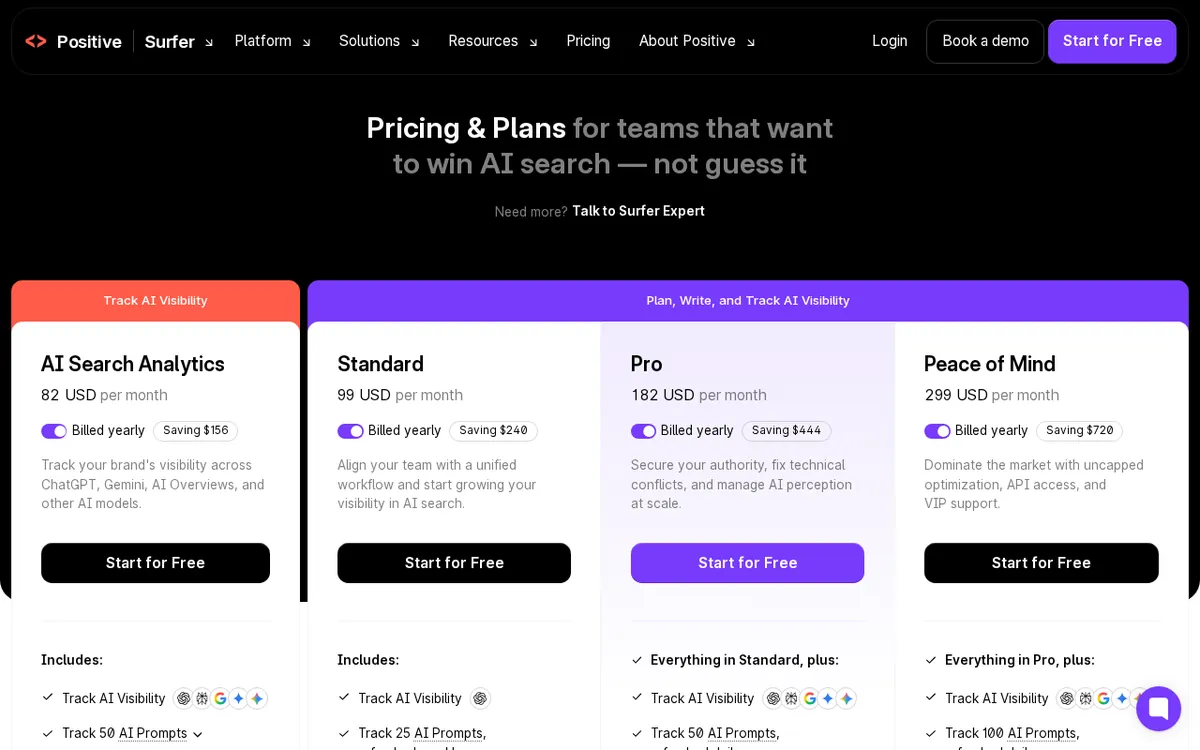
Figure: surferseo.com official pricing page, captured 2026-10-08.
Picking a plan: what the five tiers actually include
Surfer’s pricing page defaults to showing annual billing, which is cheaper per month than paying monthly — so if you’re comparing numbers, make sure you’re looking at the same billing cycle. Here’s what’s actually on offer, with annual month-equivalent pricing first and the monthly-billed price in parentheses:
Discovery — US$49/month billed annually (about US$59/month billed monthly). You get 120 documents per month (a “document” is one Content Editor session — one article or page you’re optimizing), tracking for 10 pages, and 1 seat (one person’s login). This includes Content Editor, keyword research, content audits, and SERP analysis. It does not include AI Search Analytics, multiple seats, brand workspaces, or API access (API is a way for other software to connect directly to Surfer’s data instead of using the web interface). For a solo blogger or a small site publishing a handful of pieces a month, this covers the basics.
Standard — US$99/month billed annually (about US$119/month billed monthly). 360 documents per month, tracking for 50 pages, 25 AI prompts (search terms Surfer monitors for AI-answer visibility) updated weekly, and 3 seats. This is Discovery’s full feature set plus AI Search Analytics and room for a small team.
Pro — US$182/month billed annually (about US$219/month billed monthly). This is the plan Surfer itself recommends. Same 360 documents as Standard, but tracking jumps to 200 pages, AI prompt tracking doubles to 50 and updates daily instead of weekly, you get 5 seats, and 5 “brand workspaces” (separate environments for managing different brands or clients). If you don’t need daily AI-visibility tracking or multiple brand workspaces, Standard does the same amount of writing work for less.
Peace of Mind — US$299/month billed annually (about US$359/month billed monthly). Unlimited documents (within reasonable use), tracking for 500 pages, 100 AI prompts updated daily, 10 seats, API access, and a dedicated success manager. This is the only standard plan with API access and unlimited documents — worth it only if you’re publishing well over 360 pieces a month or need to connect Surfer to other software.
AI Search Analytics — US$158/month (checked 2026-10-10: now US$82/month billed yearly) billed annually, standalone. This is a separate plan if all you want is AI-visibility tracking — 100 prompts, updated daily — without any of the writing tools. It excludes Content Editor, keyword research, and content audits entirely. If you need both tracking and writing tools, Pro is the better value since it bundles both.
Enterprise — from US$999/month, custom quotas and seats, requires talking to sales.
A practical way to choose: count how many pieces of content you actually publish in a month. If it’s under 120, start at Discovery. If you’re regularly over 360 or need daily AI-search tracking across many brands, Pro is where Surfer wants you anyway — it’s the plan listed as recommended on the pricing page.
How to use the 7-day refund window instead of a free trial
Since there’s no free trial, the refund window is the closest thing to “try before you buy.” Steps:
- Pick the lowest plan that covers your monthly document count — don’t overbuy just to get more AI-tracking features you won’t use in a week.
- Subscribe and start working immediately. Run a real piece of content through the Content Editor so you can judge the tool on actual output, not just the interface.
- If it’s not for you, email support@surferseo.com within 7 days of your first subscription to request the refund.
Common blockers:
- You’ve used Surfer before. The guarantee is explicitly for first-time subscribers. If you’ve had a Surfer account previously — even a cancelled one — you may not qualify. There’s no documented workaround; check with support before assuming you’re covered.
- You bought add-ons. Extra AI credits bought separately, or any overage charges, are excluded from the refund. If you want a clean refund, don’t purchase add-ons during your trial week.
- You wait past day 7. The window is strict. Set a calendar reminder the day you subscribe, not the day you remember you’re unhappy.
- You billed monthly thinking it’s the full price. Remember the pricing page shows annual pricing by default. If you signed up expecting the annual month-equivalent price and got charged the higher monthly rate, that’s not a refund issue — it’s a plan-selection issue. Check your receipt against the billing type you intended.
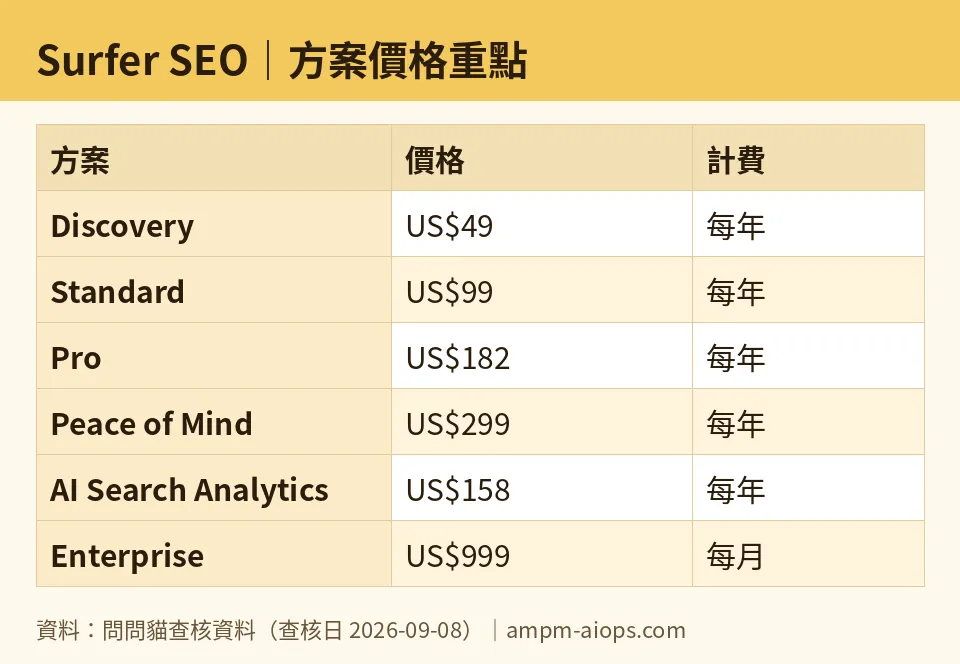
Figure: compiled by AMPM from its verified data (last verified 2026-09-08).
🔍 AMPM exclusive check
We went past Surfer’s pricing page to its support documentation to confirm exactly what the refund guarantee does and doesn’t cover — this is the part the pricing page itself doesn’t spell out. The pricing page advertises “7-day money-back guarantee” prominently, but doesn’t mention on that page that it’s limited to first-time subscribers, or that add-on purchases and overage fees are carved out. That detail only shows up in Surfer’s help-center article (#5700307). We also confirmed, by checking historical offers against the current page, that the old US$1/7-day trial no longer exists — anyone who remembers that offer from past research needs to update that assumption. Everything else — plan prices, quotas, and billing structure — matched the official pricing page exactly as of our check.
Verdict: who should use it, who should skip it
Surfer SEO is worth it if you’re already committed to regularly optimizing content against SERP data and you’re ready to pay from day one — the Discovery plan at US$49/month (annual) is reasonable for a solo operator publishing a modest volume, and Pro at US$182/month is a fair price for an agency juggling multiple brands with daily AI-visibility tracking. Skip it, or at least wait, if you were hoping to test it for free: there is no free tier and no free trial, only a conditional refund that excludes returning users and add-on purchases. If your main interest is quick keyword-volume checks rather than full content optimization, the free Keyword Surfer Chrome extension covers that without any subscription at all.
Written: 2026-10-08 Price last verified: 2026-09-08 Tool last health-checked: 2026-10-08
🔗 Related on AMPM
📎 Sources
All prices and quotas in this article come from AMPM’s verified dataset for Surfer SEO (last verified 2026-09-08); primary sources:
🐾 Meet the cats: AMO and PIMI

AMPM is an independent AI-tool pricing watchdog tracking official prices worldwide. Our motto: ask before you subscribe. Two cats argue every tool from two sides:
- ☀️ AMO — the budget-minded cat. Always asks: is the free tier enough, and is paying actually worth it?
- 🌙 PIMI — the performance-minded cat. Cares about whether it works well, fast, and gets your job done.

When they are done arguing, you know whether to pay. Every number is checked by us, with the verification date at the end.
🐾 Our sister sites also checked
Let's take a look at these
- Surfer SEO Comprehensive Introduction: Pricing, Features, and Actual Limitations
- Surfer SEO Is the free quota enough?
- Surfer SEO Alternatives
- Comprehensive Free Quota List for All Tools
More verified articles on this tool
- [Verified] Surfer SEO Free Tier: What the Trial Really Covers Before You Pay
- Surfer SEO's Listed Prices Are Annual Averages: What You Really Pay Month to Month
- Surfer Advertises a Huge Affiliate Commission. Is It Real? The 2026 Fine Print
