Ask Cat › AI Tool Summary › Taskade
[How-to] Taskade's Free Tier Gives 6,000 AI Credits, But You Have to Earn Half of Them First
- Free tier: There is
- Cheapest paid plan: US$10/mo and up
- Free quota: Free tier includes 1 user, up to 3 AI apps, one-time 6,000 AI credits …
- Last checked: 2026-10-07
Article last updated: 2026-10-07



Taskade is a project-management workspace that bundles lists, outlines, mind maps, and kanban boards with built-in AI agents (automated assistants you configure to do a task, like drafting a status update or triaging a to-do list) and an “AI automations” feature that runs steps without you clicking through them manually. It also has a tool called Genesis that generates small AI apps from a prompt. If you’re checking Taskade’s free tier before committing, the headline number — 6,000 AI credits — is real, but it’s not sitting there waiting for you the moment you sign up.
AI credits are Taskade’s internal currency: every AI action (generating text, running an automation step, querying an agent) burns some number of credits. The free tier hands you 6,000 of them, but only as a one-time grant, not a monthly refill. Here’s the part the pricing page doesn’t make loud: you don’t start with 6,000. You start with less, and you have to do two specific things to get the rest.
The two steps that unlock your 6,000 credits
Taskade’s free plan breaks the 6,000 credits into pieces:
- Verifying your email address adds 1,000 credits.
- Building your first AI app (using Genesis, Taskade’s app generator) adds 5,000 credits.
Add those together and you get the full 6,000. Skip either step and you’re sitting on a partial balance. This matters because a lot of people sign up, poke around the interface, and never click the “verify email” link sitting in their inbox — which means they’re running on a fraction of what the free tier actually offers.
And once you’ve burned through the 6,000, that’s it. Unlike most freemium AI tools that refill your quota every month, Taskade’s free credits are one-time only. There’s no reset. To get a recurring monthly allowance, you need a paid plan — the cheapest one, Pro, adds 50,000 AI credits every month, refreshed on schedule.
Beyond credits, the free tier caps you at 1 user, a maximum of 3 AI apps, 1 AI agent, 3 AI automations, and 250MB of storage. You do get access to 500+ community templates with no restrictions, and — notably — there’s no limit on how many end users can use an app you publish, even on the free plan. Commercial use is allowed on the free tier too, so you can build something and sell access to it without upgrading. The catch: anything you publish on the free tier carries a Taskade watermark. That only goes away once you’re on Pro or above.
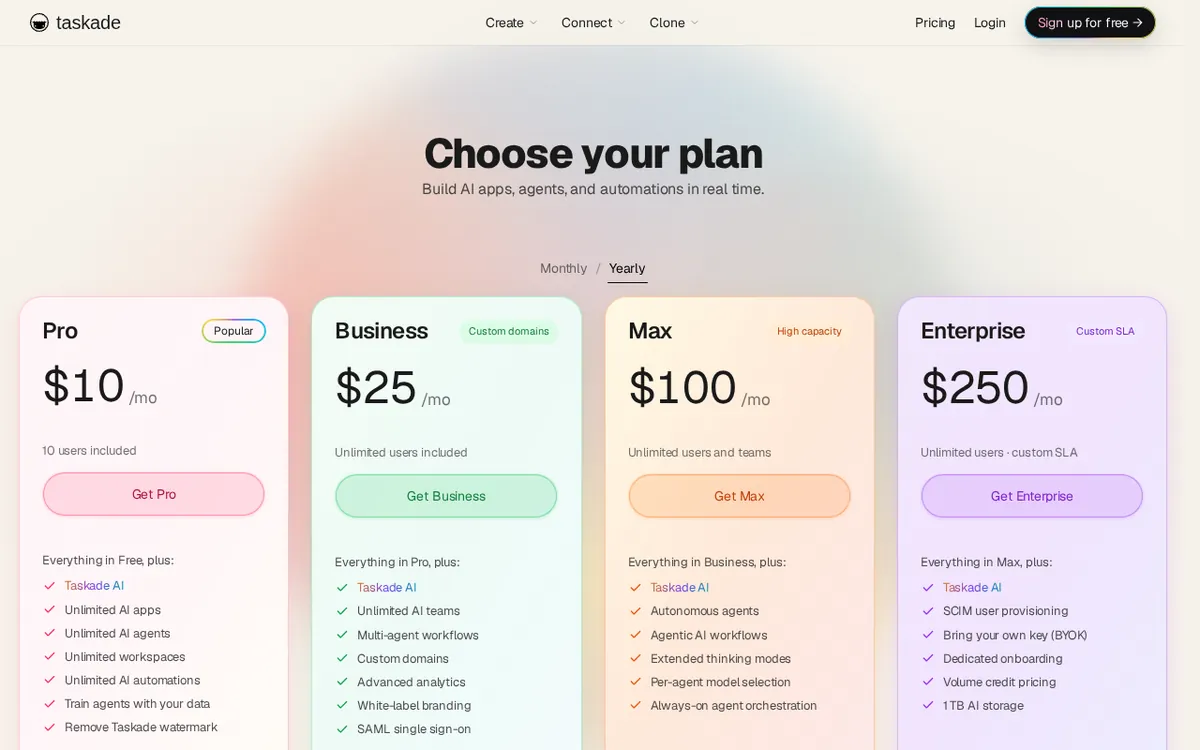
Figure: taskade.com official pricing page, captured 2026-10-07.
What actually changes when you pay
If you outgrow the one-time 6,000 credits, Pro is the entry point: US$120 per year, which works out to US$10 a month if you pay annually. Taskade’s official pricing states the annual plan saves 50% compared to paying monthly, but the exact monthly-billing price isn’t published in a way we could verify directly — so take “roughly double” as the vendor’s own framing, not a number we confirmed ourselves.
Pro gets you 10 seats (seats just means user accounts under one plan), 50,000 AI credits every month, unlimited AI apps, unlimited AI agents and automations, 100GB of storage, access to 15+ frontier AI models (Taskade lets you pick between GPT, Claude, and Gemini model families depending on the task), watermark removal, and agents that can run in the background around the clock.
Business jumps to US$300 a year (US$25/month equivalent) and removes the seat count entirely — unlimited members on one flat price, which matters a lot once your team passes 10 people, since Pro caps out there. Business also adds multi-agent teams (several agents working together rather than solo), 1TB storage, a custom domain, white-labeling, API and webhook access (an API lets other software talk to your Taskade apps programmatically; a webhook lets Taskade notify other software when something happens), an admin console, and double-speed AI generation.
Max, at US$1,200 a year (US$100/month equivalent), is built for teams that want agents working with less supervision — it adds autonomous agents that plan, execute, and iterate on their own, an “extended thinking” mode, per-agent model selection, and 400,000 monthly credits.
Enterprise starts at US$3,000 a year (US$250/month equivalent) and goes up via custom quotes, with 1,100,000 monthly credits, SAML SSO (single sign-on, letting employees log in with their company identity provider instead of a separate password), SCIM user provisioning, BYOK (bring your own API key, so you can use your own licensed access to GPT, Claude, or Gemini instead of Taskade’s pooled access), multi-workspace management, seven-tier role permissions, a dedicated customer success manager, and a custom SLA (service-level agreement — a contractual uptime/response-time guarantee).
One thing worth flagging if you’ve read older reviews of Taskade: a lot of posts floating around still quote US$29, US$69, or US$149 pricing. Those numbers are gone. The current structure — US$10/US$25/US$100/US$250 monthly equivalents on annual billing — fully replaced them, and if you’re pricing this out, ignore anything citing the old figures.
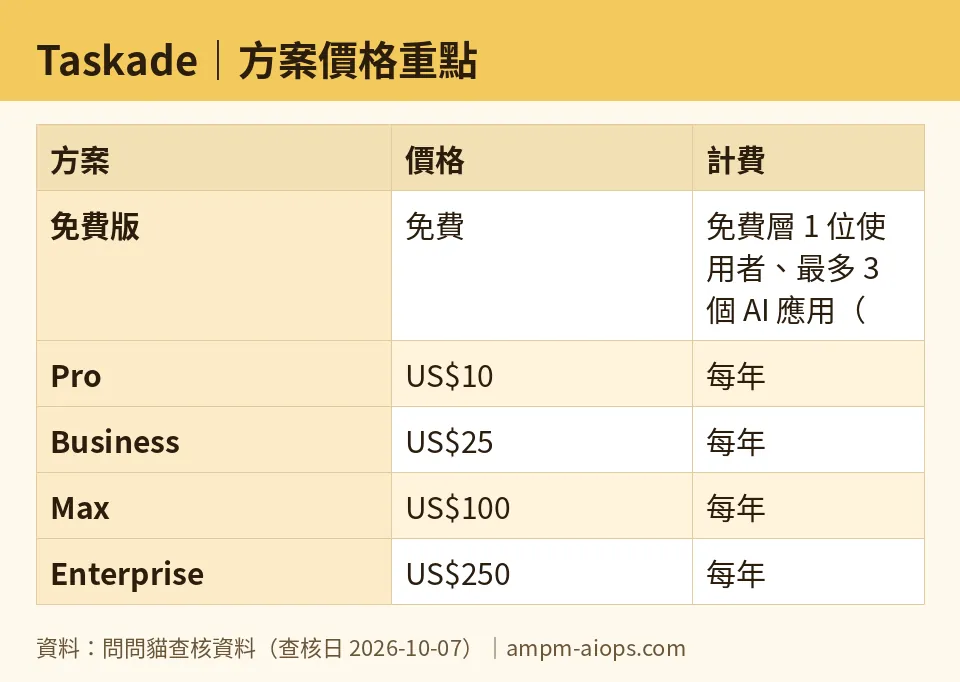
Figure: compiled by AMPM from its verified data (last verified 2026-10-07).
🔍 AMPM exclusive check
The vendor’s pricing page advertises “6,000 free AI credits” as a flat, unconditional number. What it doesn’t foreground is that this 6,000 is a sum of two separate unlocks — 1,000 for email verification, 5,000 for building your first AI app — rather than a balance sitting in your account the second you register. A new user who signs up and starts using Taskade without verifying their email or touching Genesis is working with a smaller pool than the headline figure suggests, and could easily conclude the free tier is stingier than it actually is. We also confirmed directly from Taskade’s plan comparison table that published-app end users are unlimited on every tier, including free — a detail that’s easy to miss since most competing tools restrict free-tier publishing. Everything else in this piece — the per-plan credit amounts, storage limits, member caps, and annual pricing — matches Taskade’s official pricing and plan-matrix pages as checked on 2026-10-07.
Verdict: who should use it, who should skip it
Taskade’s free tier works for someone testing one project with light AI use: a solo user building a handful of automations or trying Genesis once to see what an AI app looks like. The one-time nature of the 6,000 credits means it’s not a tool you can lean on indefinitely for free — once they’re gone, you’re either paying or doing everything manually again. If you forget the email verification step, you’re also quietly shortchanging yourself by 1,000 credits for no reason.
For teams, the jump to Pro at US$10/month (billed annually) is where Taskade starts making sense, mainly because of the monthly credit refill and unlimited agents/automations. Business is the better value once headcount passes 10 people, since it drops the per-seat structure entirely for a flat price. Max and Enterprise are built for teams running autonomous agent workflows or needing enterprise compliance features like SSO and BYOK — if you’re not running agents unsupervised or managing a large org, you likely won’t use what those tiers add.
Skip Taskade if you need a tool with a recurring free allowance — its single, non-renewing 6,000-credit grant is a harder ceiling than month-to-month free tiers offered elsewhere.
Written: 2026-10-07 Price last verified: 2026-10-07 Tool last health-checked: 2026-10-07
🔗 Related on AMPM
📎 Sources
All prices and quotas in this article come from AMPM’s verified dataset for Taskade (last verified 2026-10-07); primary sources:
🐾 Meet the cats: AMO and PIMI

AMPM is a Taiwan-based AI-tool pricing watchdog. Our motto: ask before you subscribe. Two cats argue every tool from two sides:
- ☀️ AMO — the budget-minded cat. Always asks: is the free tier enough, and is paying actually worth it?
- 🌙 PIMI — the performance-minded cat. Cares about whether it works well, fast, and gets your job done.

When they are done arguing, you know whether to pay. Every number is checked by us, with the verification date at the end.
🐾 Our sister sites also checked
Let's take a look at these
- Taskade Comprehensive Introduction: Pricing, Features, and Actual Limitations
- Taskade Is the free quota enough?
- Taskade Alternatives
- Comprehensive Free Quota List for All Tools
More verified articles on this tool
- [Verified] Taskade's free 6,000 credits are one-time, not monthly—is paying worth it?
- Taskade's Real Credit Price: Business Is the Cheapest per 1,000, and Max Costs More per Credit Than Pro
- Taskade's Free 6,000 AI Credits Are One-Time, Not Monthly: Only US$10 Pro Refills 50,000 Every Month (Checked Sept 2026)
