[How-to] TextExpander Free Plan: How to Get Productive Before You Hit the Snippet Wall
- Free tier: Yes
- Cheapest paid plan: US$6/mo and up
- Free quota: The permanent free plan is limited to 5 active Snippets (you can …
- Last checked: 2026-11-04
Article last updated: 2026-11-04



Most people install TextExpander, create a handful of shortcuts, and then stop. That is not a discipline problem. It is a design problem. The free plan gives you 5 active Snippets — a Snippet is a saved block of text that expands from a short trigger you type — and lets you swap out only 1 Snippet every 2 weeks. If you burn your five slots on day one, you are stuck with them for a while.
This guide is for beginners who want to get real work done on the free tier, understand exactly where it stops, and decide whether paying makes sense. Every number here comes from our verified check on 2026-11-03.
What the free plan actually gives you
The permanent free plan caps you at 5 active Snippets. You can replace 1 Snippet every 2 weeks. That replacement clock is the part most people miss. It is not a daily reset or a monthly reset — it is a rolling two-week window per swap.
The free tier also supports up to 5 team members and 3 teams. That sounds generous until you realize the Snippet limit applies across the whole account, not per person. Five people sharing five Snippets is not a team workflow. It is a demo.
New accounts get a 30-day preview of paid features. Use that window to test the things you cannot test later: nested Snippets (a Snippet that calls another Snippet inside it), scripting, and device sync. Once the preview ends, those features lock.
The paid tiers, for reference: Pro is US$6 per seat per month billed monthly, or US$5 per month billed annually at US$60 per year prepaid. Business is US$12 per seat per month billed monthly, or US$10 per month billed annually at US$120 per year prepaid. Pro removes the Snippet cap and adds device sync, nested Snippets, and scripting. Business adds team collaboration, Google SSO, guest sharing, activity history, and team analytics.
Prices vary by country; we checked from Taiwan.
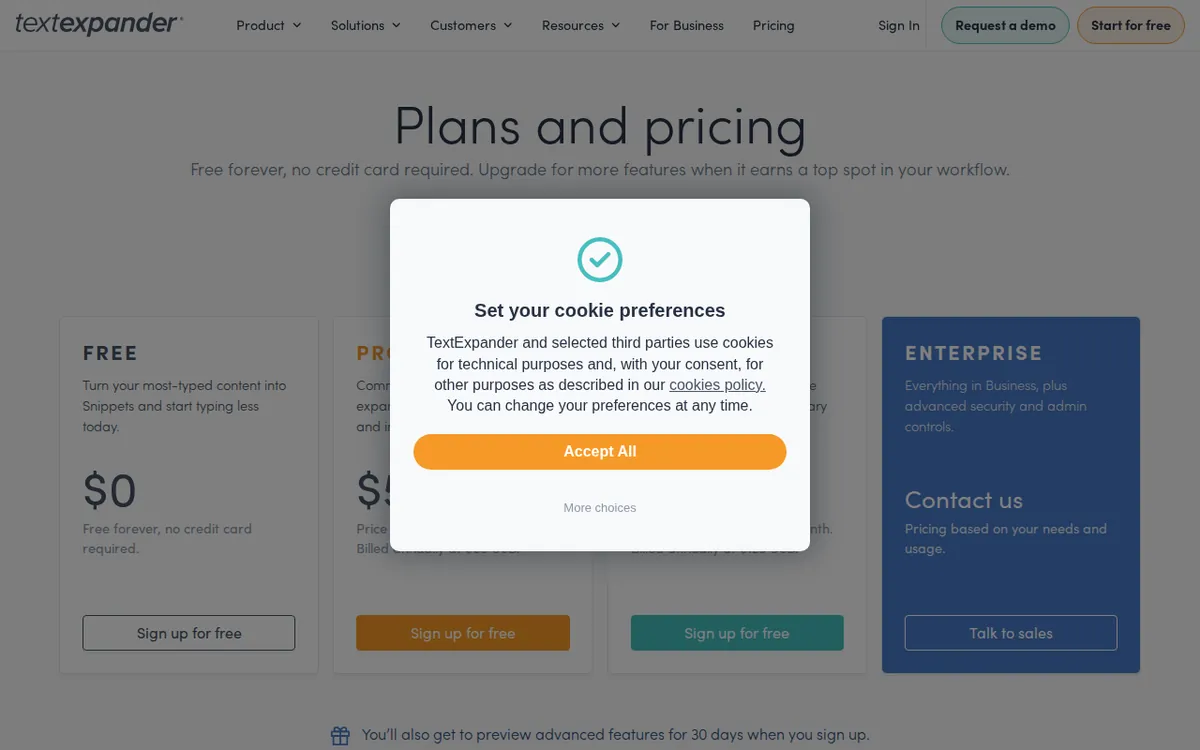
Figure: textexpander.com official pricing page, captured 2026-11-04.
How to set up your five slots so they last
The mistake is treating all five slots as equal. They are not. Some Snippets you will use fifty times a day. Others you will use once a week. Rank them before you type anything.
Step 1: Audit your repeated text for one week. Before you create a single Snippet, spend a few days noting what you retype. Email sign-offs. Meeting links. Your address. Refund policy paragraphs. Support macros. The trigger phrases you type most often are your first candidates.
Step 2: Reserve slot one for your highest-frequency expansion. This is usually a sign-off or a greeting. Something you type dozens of times daily. The payoff per slot is highest here.
Step 3: Use slot two for a multi-line block you cannot memorize. A standard reply, a scheduling link with context, a boilerplate paragraph. Long text that you would otherwise paste from a notes app.
Step 4: Slot three goes to something with variables. If your free plan supports basic fill-in fields, use it for templates where one or two words change each time. If it does not, use this slot for a second high-frequency phrase.
Step 5: Slots four and five are your flex slots. Do not fill them on day one. Leave them open for two weeks. Whatever you find yourself retyping during that period earns the slot. This is the single most important habit on the free plan.
Step 6: Plan your swap calendar. You get 1 replacement every 2 weeks. If you know a Snippet is temporary — a project code, a seasonal message — schedule its replacement before you create it. Do not waste a slot on something you will want to change next week.
Common blockers and how to fix them
Blocker: you filled all five slots and now need a sixth. You cannot add it. You must wait for your next swap window or upgrade. The fix is planning, not workarounds. If you genuinely need more than five active Snippets, the free plan is not the right tool for that workflow.
Blocker: the 30-day preview ended and features disappeared. Nested Snippets and scripting stop working. If you built anything that depends on them, it will break. Check what you built during the preview before it expires. Rebuild anything critical as a flat Snippet if possible.
Blocker: team members cannot see your Snippets. The free plan supports up to 5 members and 3 teams, but sharing behavior depends on plan features. Team collaboration is a Business-tier feature. On free, expect limited or no sharing.
Blocker: you want to test before committing. The 30-day preview is your test window. Use it to evaluate whether the paid features actually matter for your work. Do not upgrade blind.
Blocker: you are not sure the free tier is enough. Track your usage for two weeks. If you hit the swap limit and still need changes, you have your answer.
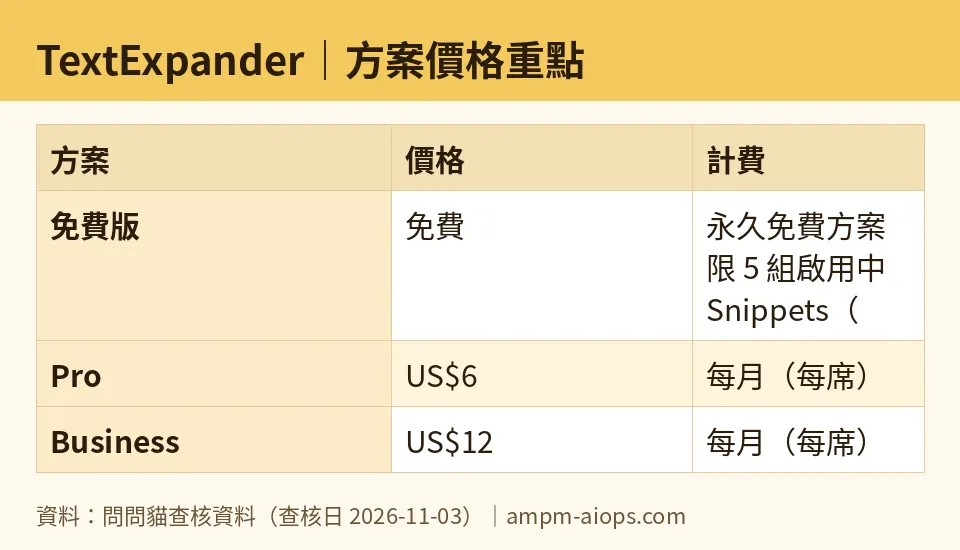
Figure: compiled by AMPM from its verified data (last verified 2026-11-03).
🔍 AMPM exclusive check
Nothing differed from the official page this time; every number below matches it, checked 2026-11-03. The free limit of 5 active Snippets with 1 replacement every 2 weeks, the 5-member and 3-team caps, the 30-day preview, and both paid tier prices all match the vendor’s pricing page as read on that date.
One note on our verification status: this tool was flagged as an auto-entry challenger candidate. The data has been through one verification round, not a three-way manual cross-check. The free-tier limits and commercial terms should be confirmed against the vendor’s page at the moment you sign up. Our automated checks ran daily from 2026-10-24 through 2026-11-03 and found no changes to the numbers during that period.
☀️ AMO, the budget-minded cat

Five Snippets is not nothing. If your repeated text is concentrated — a sign-off, a scheduling link, a support macro, an address, a standard intro — five slots cover most of your daily typing. The question is whether the 2-week swap limit hurts you.
For a solo user with stable text patterns, the free plan can work indefinitely. You set up five Snippets, you rarely change them, and you never pay. That is a real outcome. The 30-day preview lets you test the paid features without committing, and when it ends you simply keep using your five slots.
The math on Pro: US$6 per seat per month billed monthly, or US$5 per month billed annually at US$60 per year prepaid. That is the price of removing the cap and adding device sync, nested Snippets, and scripting. If you are swapping Snippets every two weeks because you keep hitting the limit, you are paying in friction instead of dollars. At that point Pro is cheaper than the workaround.
Business at US$12 per seat per month billed monthly, or US$10 per month billed annually at US$120 per year prepaid, only makes sense if you need team collaboration, Google SSO, guest sharing, activity history, or team analytics. A solo user does not need any of that. A five-person team on free is technically supported, but the shared Snippet limit makes it impractical for real collaboration.
The honest budget answer: start free, use the 30-day preview to test Pro features, and only upgrade if you are actually hitting the swap limit or need sync across devices. Do not upgrade because the preview made the paid tier feel nice. Upgrade because the free tier stopped working.
🌙 PIMI, the performance-minded cat

Does the free plan actually work well? For five Snippets, yes. Expansion is fast, and the core mechanic — type a trigger, get your text — does not degrade on the free tier. The limits are structural, not performance-based.
The performance ceiling is the 5-Snippet cap combined with the 2-week swap rule. If your workflow needs more than five active expansions, you will feel the ceiling immediately. Nested Snippets and scripting are Pro features, and those are where the tool gets genuinely powerful — a Snippet that calls other Snippets, or one that runs a script, turns TextExpander from a text replacer into a small automation layer. On free, you do not get that.
Device sync is also Pro. If you work across a laptop and a phone, the free tier will not keep your Snippets in sync. That is a real workflow break, not a minor inconvenience.
The 30-day preview is the right way to evaluate performance. Build a nested Snippet. Write a script. Sync across two devices. See whether the speed and reliability justify US$6 per seat per month billed monthly, or US$5 per month billed annually at US$60 per year prepaid. If you are on a team and need shared Snippets, SSO, or activity history, Business at US$12 per seat per month billed monthly, or US$10 per month billed annually at US$120 per year prepaid, is the tier that unlocks those.
For a beginner, the free plan performs fine within its limits. The question is whether your work fits inside five Snippets. If it does, you lose nothing. If it does not, the paid tier is where the tool actually does its job.
Verdict: who should use it, who should skip it
Use the free plan if you have a small, stable set of repeated text — under five items — and you do not need sync across devices or team sharing. It costs nothing and it works.
Skip the free plan if you need more than five active Snippets, if you swap text frequently, if you work across multiple devices, or if you need team collaboration. The 2-week swap limit will frustrate you within a month.
Upgrade to Pro if you hit the Snippet cap or need device sync, nested Snippets, or scripting. Upgrade to Business only if you need team features, SSO, guest sharing, activity history, or analytics. Use the 30-day preview to test before you pay.
Written: 2026-11-04 Price last verified: 2026-11-03 Tool last health-checked: 2026-11-04
🔗 Related on AMPM
📎 Sources
All prices and quotas in this article come from AMPM’s verified dataset for TextExpander (last verified 2026-11-03); primary sources:
🐾 Meet the cats: AMO and PIMI

AMPM is a Taiwan-based AI-tool pricing watchdog. Our motto: ask before you subscribe. Two cats argue every tool from two sides:
- ☀️ AMO — the budget-minded cat. Always asks: is the free tier enough, and is paying actually worth it?
- 🌙 PIMI — the performance-minded cat. Cares about whether it works well, fast, and gets your job done.

When they are done arguing, you know whether to pay. Every number is checked by us, with the verification date at the end.
🐾 Our sister sites also checked
Read next
- TextExpander Full breakdown: pricing, features and real-world limits
- TextExpander Is the free quota enough?
- TextExpander Alternatives
- Free plan limits for every AI tool we track
