[How-to] Topaz Labs pricing in 2026: One App, or the Whole Suite?
- Free tier: No
- Cheapest paid plan: US$69/mo and up
- Last checked: 2026-10-15
Article last updated: 2026-10-21



Topaz Labs is not one product with one price. It is five price points wearing the same logo, and the fastest way to overpay is to click the biggest plan because it looks like the “complete” one. This guide gets you productive without that mistake. You pick the job first — photos, video, or just making an image bigger — and the plan picks itself.
First, two words you’ll hit immediately. Subscription means you pay every month or every year, and access stops when you stop paying; there is no one-time “buy it forever” option on these plans. Suite means the bundle that includes everything Topaz makes, versus a single app that does one job.
What each plan actually buys you
Topaz splits its desktop apps into single tools and full bundles. Here is the whole menu as the official pricing page showed it on 2026-10-15.

Illustration: Bundling multiple individual tools pushes the scale down further than simply getting the complete all-in-one suite.
Single apps:
- Topaz Gigapixel — image upscaling, meaning it enlarges a photo without turning it into mush. US$29/month, or US$149/year.
- Topaz Photo — broader photo cleanup (sharpening, noise removal, upscaling). US$39/month, or US$199/year.
- Topaz Video — video enhancement and upscaling, the part of the lineup most people buy Topaz for. US$59/month, or US$299/year.
Full bundles:
- Topaz Studio — the personal, everything-included suite. US$69/month, or US$399/year. The data lists the yearly plan as working out to US$33.25 a month.
- Topaz Studio Pro — the commercial, everything-included suite, licensed for business use. This one is annual only — US$799/year, listed at US$66.58 a month. There is no monthly option.
Notice what that tells you. If you only ever enlarge images, Gigapixel at US$29/month is the floor. If you need photo and video both, the two single apps run US$39 and US$59 a month — set those side by side against Studio at US$69/month and the bundle starts making sense the moment you want more than one tool. I’m not adding anything up for you; the numbers are there to line up yourself.
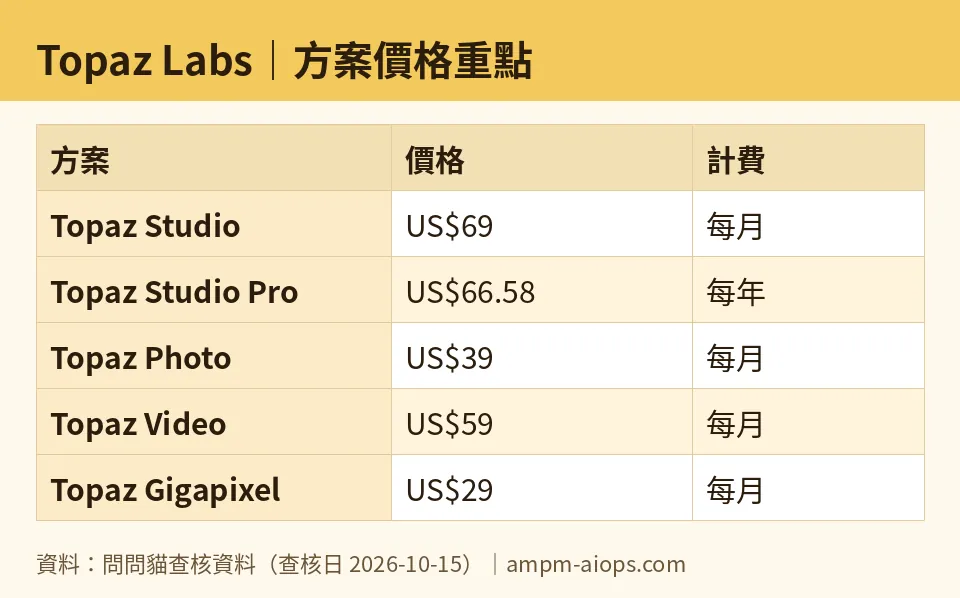
Figure: compiled by AMPM from its verified data (last verified 2026-10-15).
How to pick without overbuying
Work through it in order. It takes about a minute.
Step 1 — Name the job. Are you cleaning up photos, cleaning up video, or only making images physically larger? Topaz’s apps map almost one-to-one to those answers. “Only larger” is Gigapixel. “Photos, the works” is Photo. “Video” is Video.
Step 2 — Count your jobs. One job, one single app. Two or more jobs, compare your single apps against Studio. The bundle only earns its price once you’d otherwise be paying for two or three apps anyway.
Step 3 — Decide personal or commercial. This is the trap most beginners miss. Studio is the personal suite. The moment your output is for paid client work or a business, the suite you’re pointed at is Studio Pro — and that’s the annual-only US$799/year plan. Don’t assume the cheaper Studio covers commercial use; the split exists for a reason.
Step 4 — Pick monthly or yearly. Every app and Studio give you both. Monthly is the safe way to test a workflow for a short project. Yearly is listed at a lower effective rate — Studio’s yearly comes out to US$33.25 a month in the data versus US$69 month-to-month — but it locks you in. If you’re not sure the tool fits your pipeline yet, start monthly.
The Web and Mobile promo is a different animal
Here’s where the pricing page gets genuinely confusing, and it’s the thing to slow down on.
Separate from the desktop apps above, Topaz runs a Web and Mobile line, and it’s on a limited-time promo. The page says “save up to 50%” but does not publish an end date, so treat the discount as something that can vanish without notice.
The promo prices:
- Web Image — US$12/month (was US$19)
- Web Video — US$19/month (was US$29)
- Web Pro — US$35/month (was US$59)
Yearly versions on promo:
- Image — US$109/year (was US$199)
- Video — US$199/year (was US$299)
- Pro — US$329/year (was US$599)
These are cheaper than the desktop apps, and that’s exactly why people get tripped up. Web and Mobile is not the same product as the desktop Studio/Photo/Video/Gigapixel apps — different platform, and you should not assume a Web plan gives you the full desktop app. If your work lives in the desktop apps, the desktop prices are your prices. The Web promo is attractive, but check what it actually unlocks before you buy on price alone.
Common blockers, and what to do
“I want to try before I pay.” The official pricing page does not publish a free tier or a free quota. Plan your budget around paying from day one; don’t build a workflow on the assumption of a free allowance that the page doesn’t promise.
“Which suite is which?” Personal is Studio. Commercial is Studio Pro, and it’s annual-only. Get this wrong and you’ve either underbought a license for client work or overbought a US$799/year plan you didn’t need.
“The cheap plan on the page doesn’t match what I installed.” You’re probably looking at the Web/Mobile promo, not the desktop apps. Match the plan to the platform you actually use.
“The discount felt urgent.” It’s a “save up to 50%” banner with no published deadline. Don’t let an unstated countdown rush a yearly commitment.
🔍 AMPM exclusive check
Three things the pricing page does not spell out plainly, which our check surfaced:
No free tier is published. The official site shows no free plan and no free quota as of 2026-10-15. If you’ve read elsewhere that you can run Topaz for free, the pricing page does not back that up. Budget to pay.
Studio Pro is annual-only. The commercial suite has no monthly option — it’s US$799/year or nothing. The page lists an effective US$66.58/month, but you cannot actually pay month-to-month at that tier. Easy to miss when every other plan offers both.
The promo prices belong to a separate product line. The eye-catching US$12–US$35/month numbers are Web and Mobile, not the desktop apps most Topaz buyers are shopping for, and the “save up to 50%” promo carries no published end date. Lining those cheap numbers up next to desktop Studio is apples to oranges.
One caveat we won’t hide: Topaz entered our tracker as a challenger candidate, and these figures come from a single verification pass on 2026-10-15 — not yet our full three-way manual cross-check. Confirm the current free terms and commercial licensing on the official page before you pay, because this is the kind of lineup vendors reshuffle.
Verdict: who should use it, who should skip it
Use a single app if your work is narrow and honest about it. Only upscaling images? Gigapixel at US$29/month. Only cleaning photos? Photo at US$39/month. Only video? Video at US$59/month. Don’t pay for doors you’ll never open.
Use Topaz Studio (US$69/month or US$399/year) if you genuinely juggle two or three of those jobs for personal work. Once you’d be stacking single apps anyway, the personal suite is the cleaner call.
Use Topaz Studio Pro (US$799/year, annual only) only if your output is commercial and you need the business license. If that’s you, the price isn’t optional — it’s the cost of being allowed to sell the result.
Look hard at Web and Mobile if you want the lowest sticker and can live within what the browser/phone version actually does — just confirm it’s not a stripped-down shadow of the desktop app before you commit, and remember the promo could end any day.
Skip Topaz entirely if you were counting on a free way in to test it. There isn’t one on the page today, so if “try it free first” is a hard requirement, this isn’t your tool this month.
The whole decision comes down to one honest answer: how many jobs do you have? Answer that, and you’ll never overpay for a suite you only use a third of.
Written: 2026-10-21 Price last verified: 2026-10-15 Tool last health-checked: 2026-10-16
🔗 Related on AMPM
📎 Sources
All prices and quotas in this article come from AMPM’s verified dataset for Topaz Labs (last verified 2026-10-15); primary sources:
🐾 Meet the cats: AMO and PIMI

AMPM is a Taiwan-based AI-tool pricing watchdog. Our motto: ask before you subscribe. Two cats argue every tool from two sides:
- ☀️ AMO — the budget-minded cat. Always asks: is the free tier enough, and is paying actually worth it?
- 🌙 PIMI — the performance-minded cat. Cares about whether it works well, fast, and gets your job done.

When they are done arguing, you know whether to pay. Every number is checked by us, with the verification date at the end.
🐾 Our sister sites also checked
Read next
- Topaz Labs Full breakdown: pricing, features and real-world limits
- Topaz Labs Is the free quota enough?
- Topaz Labs Alternatives
- Free plan limits for every AI tool we track
