[Review] Is Topaz Labs Worth It? A Sale With No End Date and No Free Plan
- Free tier: No
- Cheapest paid plan: US$69/mo and up
- Last checked: 2026-10-15
Article last updated: 2026-11-04



Topaz Labs sells AI tools that sharpen photos and video and enlarge them without turning them to mush. Its Gigapixel and Video AI products are described as the benchmark in this niche. The pricing page is currently shouting “save up to 50%”. It does not say when the sale ends.
This is an AMPM review. We did not run the software. We read the verified pricing data, and every point below traces back to it. The angle: the tools may be good, but the buying experience asks you to commit money before you can try anything, and the sale clock is vague.
What you are actually buying
Topaz Labs is a subscription business. You pay monthly or yearly, and when you stop paying, you lose access. The product line is split by job, which helps if you only need one thing.
The page lists five desktop plans (software you install on your own computer):
- Topaz Gigapixel: US$29 a month, or US$149 a year. Gigapixel is the photo enlarger. Upscaling means adding pixels so a small image can be printed or shown large.
- Topaz Photo: US$39 a month, or US$199 a year.
- Topaz Video: US$59 a month, or US$299 a year.
- Topaz Studio: US$69 a month, or US$399 a year. The page lists it as the full set for personal use. The yearly price works out to US$33.25 a month.
- Topaz Studio Pro: yearly only, US$799 a year, or US$66.58 a month. This is the full set for commercial use.
Two things stand out. Studio is a personal edition and Studio Pro is the commercial one. If you make money from the output, read the licence terms before you pick the cheaper plan. And Studio Pro has no monthly option at all.
There are also web and mobile plans, which run in a browser or on a phone. Those are the ones on sale.
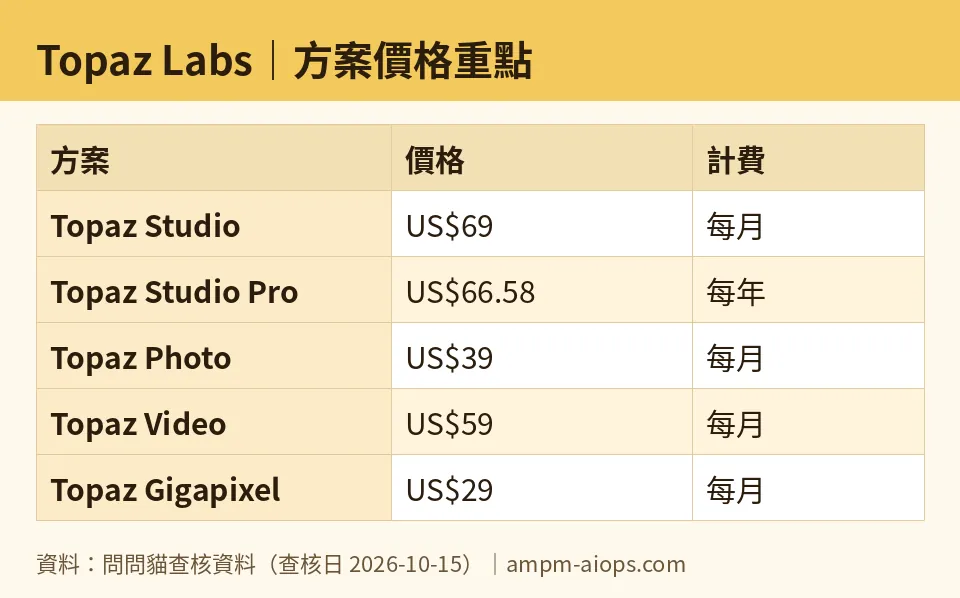
Figure: compiled by AMPM from its verified data (last verified 2026-10-15).
The sale: real prices, no end date
The web and mobile plans carry a limited-time promotion. The banner says “save up to 50%”. Here are the listed prices.
Monthly:
- Web Image: US$12 (was US$19)
- Web Video: US$19 (was US$29)
- Web Pro: US$35 (was US$59)
Yearly:
- Web Image: US$109 (was US$199)
- Web Video: US$199 (was US$299)
- Web Pro: US$329 (was US$599)
Note the words “up to”. The banner is the best case. Work out the actual gap on the plan you want before the banner decides for you. Also note what the sale does not cover. In our data, the sale applies to web and mobile plans. The desktop prices above carry no promo mark.
The page gives no deadline. That cuts both ways. Nothing says the price jumps tomorrow, so there is no stated reason to rush. But nothing promises the price will stay either.
Three annoyances and one real strength
1. There is no free plan, and the page does not say whether there is a trial. Our data records no free tier. It lists the free allowance as “not published on the official site”. For software whose whole value is visual quality, that is a real problem. You cannot judge the output without feeding it your own files. You are asked to pay first.
2. The sale is vague. “Up to 50%” with no end date is a pressure tactic that avoids making a firm promise. It also covers only part of the range. Someone who wants the desktop Gigapixel will not find any discount in our data.
3. The page does not spell out what each plan includes. The plan-level detail in our data is thin. The includes and excludes fields came back empty. We can tell you the prices. We cannot tell you from this data exactly how Studio differs from buying Photo plus Video separately, or what limits the web plans carry. You have to dig on the vendor’s site, and with eight named plans (five desktop, three web) that is a chore.
The strength: you can pay for one job. Not everyone needs the full suite. If you only enlarge photos, Gigapixel at US$29 a month or US$149 a year is a narrow, cheaper entry. Video users can take Video alone. Few creative suites let you split the bill this cleanly.
🔍 AMPM exclusive check
Our automated read of the official pricing page was on 2026-10-15, with a health check on 2026-10-16. Nothing we read contradicted the page’s own prices. Every figure in this article matches it.
What we can add is what the page leaves out, and that is the useful part:
- No end date on the sale. The page says limited time and never says limited to when.
- No published free allowance. We looked for one. The data field reads “not published”.
- No plan contents in our data. The price list is verified. The feature-by-feature comparison is not.
- One pass only. Topaz Labs entered our tracking as a challenger candidate. This data has been read once by a bot and has not been cross-checked by hand against three sources. Treat the prices as accurate on the date given and confirm them on the page before paying.
Prices vary by country, and we checked from Taiwan.
☀️ AMO, the budget-minded cat

Is free enough? Free does not exist here. The data lists no free tier, so the question becomes: what is the cheapest honest way in?
For a single job, the single-tool plans win. Gigapixel is the lowest desktop entry at US$29 a month. Pay yearly and it is US$149 a year. Photo is US$39 a month or US$199 a year. Video is US$59 a month or US$299 a year.
On the web side, the sale makes the entry cheaper still. Web Image is US$12 a month, down from US$19. Yearly, it is US$109, down from US$199. That is the lowest price in the whole data set.
Is paying worth it? Only if you have a recurring need. A subscription punishes occasional users. If you have one wedding album to rescue, a single month of Photo at US$39 is plainer than a yearly plan. If you do this every week, the yearly prices start to make sense. Studio’s yearly rate averages US$33.25 a month, against US$69 if you pay monthly. That gap is big, and it is a reason to be sure before you commit either way.
Skip Studio Pro unless you need the commercial licence. It is US$799 a year with no monthly escape hatch. And do not let “limited time” speed you up. No end date is published, so take a day and pick the plan that matches your actual job.
🌙 PIMI, the performance-minded cat

Does it work well, and fast? We cannot answer that from this data, and we will not pretend to. Our data contains no speed figures, no resolution caps, no output limits. We did not run the software. All we have is the vendor’s positioning: Gigapixel and Video AI are called the benchmark in AI image and video enhancement. Treat that as a reputation, not a test result.
What the data does tell us is how the product is organised. Photo, Video and Gigapixel are separate plans, so you can pick the tool built for your file type. The web plans split the same way: Image at US$12 a month on sale, Video at US$19, and Pro at US$35, down from US$59. Pro is the top web tier. Studio Pro, at US$799 a year, is the top desktop tier. We cannot tell you from our data whether web matches desktop on quality or speed. That is the first thing to find out.
Without a free tier, the only safe test is a paid month. Take the single tool that matches your work: Photo at US$39 or Video at US$59 monthly. Feed it your worst files, the noisy, soft, low-resolution ones. Judge the result. Cancel if it falls short. Do not start with a yearly plan or with Studio Pro. If the output convinces you, move to yearly pricing afterwards.
Verdict: who should use it, who should skip it
Use it if you enlarge or clean up photos or video regularly and want a dedicated tool for it. The per-job plans keep the cost down. Start monthly, test on your hardest files, then decide whether yearly is worth it.
Use the web plans if you want the lowest entry price and can live with a browser tool. The sale prices are the lowest in the data, but confirm what the web plans include first, because our data does not say.
Skip it if you only need an occasional fix, because a subscription is a poor fit. Skip it if you will not pay before trying, because there is no free tier. And skip Studio Pro unless you truly need commercial rights and can commit for a year.
Our honest read: the prices are clear, the sale is not, and the product’s quality is unverified by us. That makes the pricing page better at selling than at informing.
Written: 2026-11-04 Price last verified: 2026-10-15 Tool last health-checked: 2026-10-16
🔗 Related on AMPM
📎 Sources
All prices and quotas in this article come from AMPM’s verified dataset for Topaz Labs (last verified 2026-10-15); primary sources:
🐾 Meet the cats: AMO and PIMI

AMPM is a Taiwan-based AI-tool pricing watchdog. Our motto: ask before you subscribe. Two cats argue every tool from two sides:
- ☀️ AMO — the budget-minded cat. Always asks: is the free tier enough, and is paying actually worth it?
- 🌙 PIMI — the performance-minded cat. Cares about whether it works well, fast, and gets your job done.

When they are done arguing, you know whether to pay. Every number is checked by us, with the verification date at the end.
🐾 Our sister sites also checked
Read next
- Topaz Labs Full breakdown: pricing, features and real-world limits
- Topaz Labs Is the free quota enough?
- Topaz Labs Alternatives
- Free plan limits for every AI tool we track
