[How-to] TopMediai Free vs Paid: What the Trial Lets You Make Before You Pay
- Free tier: Yes
- Cheapest paid plan: US$15.99/mo and up
- Free quota: Register to get initial trial credits (website hasn't disclosed …
- Last checked: 2026-11-02
Article last updated: 2026-10-25



TopMediai packs several tools under one login — voice cloning (making a synthetic copy of a specific voice), text-to-speech (typing text and getting spoken audio back, usually shortened to TTS), plus music and video generation. That breadth is the selling point and the trap. You can drain your balance fast if you don’t know what each job costs. So the order matters: run the free trial first, learn where your balance goes, and only then decide if any paid plan fits. This guide gets a first-timer producing something usable, then marks the one renewal structure that catches people out.
Everything here runs on credits — a prepaid balance you spend on each generation. One click of “generate” subtracts some amount from that balance. TopMediai does not publish how many credits a single video or TTS job costs, which is exactly why a free dry run beats guessing.
What the free tier actually lets you try
Sign up and TopMediai drops some starter trial credits into your account. Here is the honest part: the vendor does not post the exact free number anywhere we could find. On the day we checked, the signup grant was enough to test the tools a few times — a handful of short TTS clips or a couple of tool runs — not enough to finish a real project. Treat it as a taster, not a free tier you can live on.
What you can realistically do on the free balance:
- Type a few sentences into TTS and hear how the voices sound in your language.
- Try one short voice-clone or music snippet to judge quality.
- Click into the video generator to see the interface and output style before you commit credits to a full render.
What you cannot assume for free: the no-watermark export and commercial license (permission to use the output in paid or business work) are called out only on the paid monthly plan in TopMediai’s own plan notes. So plan on free outputs carrying a watermark (a visible mark stamped on the file) and being for personal testing only. Confirm this on your own account before you rely on a free clip anywhere public.
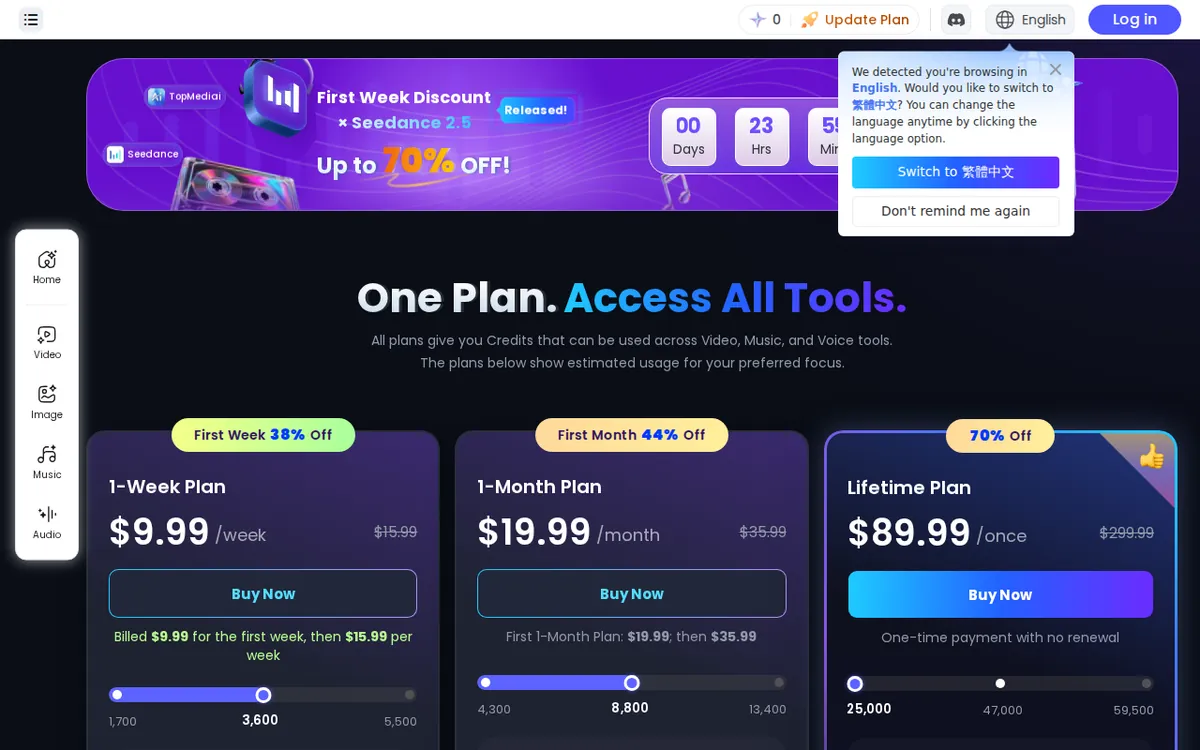
Figure: topmediai.com official pricing page, captured 2026-10-25.
A first run in four steps
- Create an account and go straight to the text-to-speech tool. It is the cheapest, fastest way to see the product work and to watch your credit balance move.
- Paste a short script — two or three sentences. Pick a voice, generate, and listen. Note how much the balance dropped. That single number tells you more about real cost than any plan page.
- Download the result. Check whether it has a watermark and what file format you get. This is the moment to confirm, not after you have paid.
- Only now open the video or voice-clone tool. These are heavier and eat more of your balance, so you want to understand the per-job drain before you spend trial credits on them.
Common blockers and quick fixes:
- Balance gone before you finished: the video and clone tools cost far more per run than TTS. Do your experimenting in TTS first and save the heavy tools for when you know exactly what you want.
- Watermark on the output: that points to a free or lower tier. The no-watermark export is tied to the paid monthly plan in the vendor’s notes.
- Voice sounds off in your language: try a different voice from the list before concluding the tool can’t do it — quality varies a lot between voices.
- Not sure a job is worth the credits: generate the shortest possible version first, confirm it’s what you want, then regenerate at full length.
Where the credits go — and the weekly renewal to watch
TopMediai sells three paid tiers. Prices vary by country; we checked from Taiwan.

Illustration: Stacked weekly payments quickly outweigh the cost of a full monthly plan over time.
The 1-Week Plan lists at US$15.99 for the week, with a first-week promo of US$9.99. It carries 3,000 credits for the week, which TopMediai describes as roughly 84 videos or about 600,000 characters of TTS. Read “1-Week” literally: this is a weekly-renewing subscription, and the US$9.99 is a first-week offer. After that first week it renews at the US$15.99 list rate. If you only needed it for one project, set a reminder to cancel — this is the line item people forget.
The 1-Month Plan lists at US$23.99 a month, with a first-month promo of US$11.99 (half off). It comes with 3,750 credits for the month, and this is the tier where TopMediai’s notes spell out commercial license and no-watermark export. If you intend to use the output in real work, this is the entry point that says so in writing — not the weekly plan.
The Lifetime Plan lists at US$329.99 as a one-time purchase, no recurring fee, with a promo price of US$99.99. It grants a single batch of 27,000 credits. Note the word “single”: that reads as a one-time allotment, not a monthly refill forever. Before treating lifetime as unlimited, confirm on your account whether those 27,000 credits top up or simply run down once and stop.
A note on the promos: TopMediai runs a permanent countdown-style discount on its pricing page. A ticking timer that never really expires is a nudge, not a deadline. Decide on the plan’s value at list price first; treat the promo as a bonus if it happens to be live when you buy.
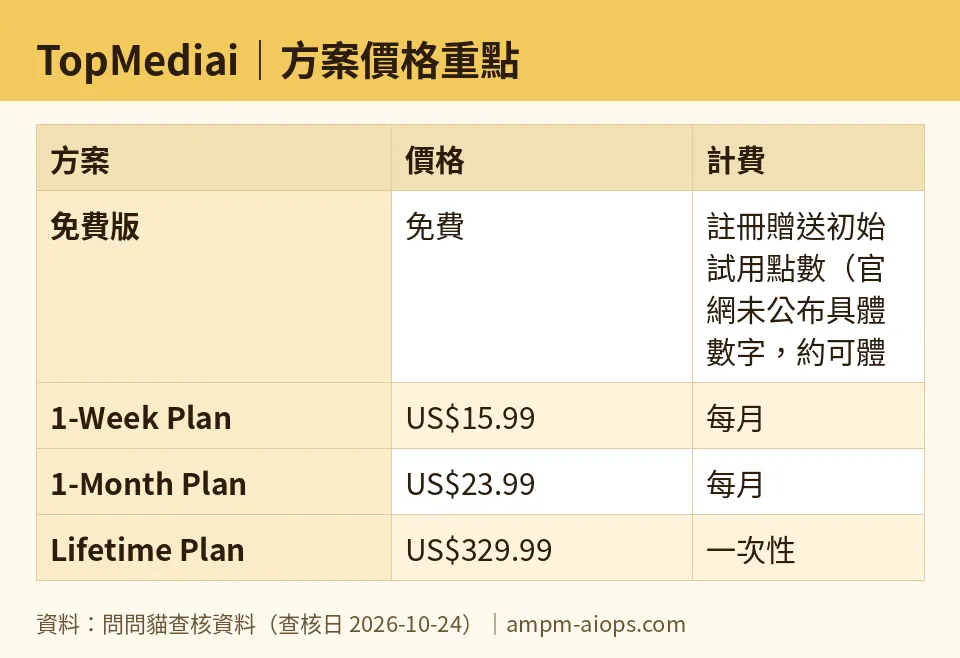
Figure: compiled by AMPM from its verified data (last verified 2026-10-24).
🔍 AMPM exclusive check
Straight talk: TopMediai entered our tracker as an automatic challenger candidate, and we have run only one round of checking on it — not yet our usual three-way manual cross-check. Here is what that means for you.
What we confirmed against the official pricing page on 2026-10-24: the three plan names, the list prices (US$15.99 weekly, US$23.99 monthly, US$329.99 lifetime), the promo prices (US$9.99, US$11.99, US$99.99), and the credit amounts (3,000 weekly, 3,750 monthly, 27,000 lifetime).
What the vendor does not spell out, and we therefore could not verify:
- The free signup credit amount. It is not posted; our “a few runs” figure is what we saw on one account, not a published number.
- The cost in credits of one video or one TTS job. TopMediai gives a rough “84 videos or 600,000 characters” equivalence for the weekly 3,000 credits but publishes no per-job rate, so we do not compute one.
- Whether the lifetime 27,000 credits refill. The notes say “single” batch; we flag it as a one-time allotment until the vendor says otherwise.
Where our read differs from the surface impression: the “1-Week Plan” is a recurring weekly charge, not a one-off week pass, and the cheap US$9.99 applies to the first week only. We call that out because the plan name invites the opposite assumption.
Because this is a one-round check, treat the free limit and the commercial terms as “confirm on the official page at the moment you buy.” We would rather say that plainly than overstate our confidence.
Verdict: who should use it, who should skip it
Use it if you want one login that covers TTS, voice cloning, music and video, and you are willing to run the free credits first to learn the per-job cost. The 1-Month Plan is the sensible paid entry for most people: it is the tier that names commercial license and no-watermark export, and the first-month half-price offer lowers the risk of a bad fit.
Lean toward the Lifetime Plan only if you have tested quality on the monthly plan, you know 27,000 credits covers your needs, and you have confirmed whether that batch refills.
Skip the 1-Week Plan unless you have a single short project and you will cancel before it renews. The weekly auto-charge is the easiest way to pay more than you meant to.
Skip TopMediai entirely if you need a published, predictable per-output price before you commit. That number isn’t on the page, and for some buyers that alone is a dealbreaker.
Written: 2026-10-25 Price last verified: 2026-10-24 Tool last health-checked: 2026-10-25
🔗 Related on AMPM
📎 Sources
All prices and quotas in this article come from AMPM’s verified dataset for TopMediai (last verified 2026-10-24); primary sources:
🐾 Meet the cats: AMO and PIMI

AMPM is a Taiwan-based AI-tool pricing watchdog. Our motto: ask before you subscribe. Two cats argue every tool from two sides:
- ☀️ AMO — the budget-minded cat. Always asks: is the free tier enough, and is paying actually worth it?
- 🌙 PIMI — the performance-minded cat. Cares about whether it works well, fast, and gets your job done.

When they are done arguing, you know whether to pay. Every number is checked by us, with the verification date at the end.
🐾 Our sister sites also checked
Read next
- TopMediai Full breakdown: pricing, features and real-world limits
- TopMediai Is the free quota enough?
- TopMediai Alternatives
- Free plan limits for every AI tool we track
