[How-to] Topview Pricing 2026: The One Number the Site Leaves Blank
- Free tier: No
- Cheapest paid plan: US$24/mo and up
- Free quota: The official website has not disclosed a regular free generation plan …
- Last checked: 2026-10-24
Article last updated: 2026-10-24



Most tool guides open with “start on the free plan.” Topview doesn’t hand you one. You pay before the tool makes a single video. So the beginner question here isn’t “is the free tier enough” — there is no free tier — it’s two sharper ones: what does the cheapest paid plan actually make, and can you predict the cost of one video before you spend money? The first has a clear-ish answer. The second is where Topview’s own pricing page goes quiet, and that gap is the reason to keep reading.
Topview is an AI agent — software that runs a multi-step job for you without you clicking through each step — that turns an e-commerce product link plus some copy into a short marketing video. You paste a link, add your text, and it assembles a clip you can then edit on a built-in canvas. Handy if you push out product videos for ads or social feeds. Awkward if you wanted to kick the tires for free first, because you can’t.
One housekeeping note before the numbers: prices can vary by country, and we checked from Taiwan. Every figure below is the US$ price shown on Topview’s pricing page.
Start here: there is no free plan, so pick your entry point
This is the part the tool keeps vague, so let’s be blunt. Topview does not publish a standing free generation plan. To make a video you either subscribe to a paid plan or buy credits. The only “free” you’ll run into is a small test allowance tied to an external plugin or the open-source 3D Builder — not a real free tier you can build on. Treat Topview as paid from minute one.
The paid plans run on credits — prepaid units you spend each time the tool generates something. The entry plan, Plus, is US$24 a month and includes 100 credits a month. That gets you the basic video-generation agent and the editing canvas. If you pay for a year up front, Topview lists Plus at about US$18 a month instead.
Here’s the catch baked into that sentence: 100 credits a month. The plan note describes that as roughly enough to make “a few” short videos. It does not tell you how many credits one video costs. So before you pay, you cannot actually work out whether 100 credits is three videos or ten. Hold that thought — it comes back in the exclusive check.
The other plans, briefly, so you know what the ladder looks like:
- Business — US$58/month (about US$44/month on annual billing). More credits than Plus, though the page doesn’t state the exact number for this tier, plus a commercial license — the legal right to use the videos in paid work like ads — and advanced multi-shot generation with asset integration.
- Ultra — US$112/month (about US$50/month on annual billing). 500 credits a month, the lowest cost per credit of any plan per Topview, up to 12 jobs running at once, and a priority spot in the generation queue.
- Team — US$118 per seat/month (about US$56 per seat/month on annual). A seat is one paid user login. Each seat gets 500 credits a month, with shared workspaces and multi-seat management.
Two things worth flagging on that list. First, Ultra’s annual rate (about US$50/month) is a steep drop from its US$112 monthly sticker — a bigger annual gap than the other plans show, so if you know you’ll use it heavily, the yearly commitment is where the value sits. Second, Business is the plan that unlocks commercial use. On Plus you are generating videos, but the commercial license shows up at the Business tier, so if these clips are going into paid ads, read Topview’s terms before you rely on Plus output.
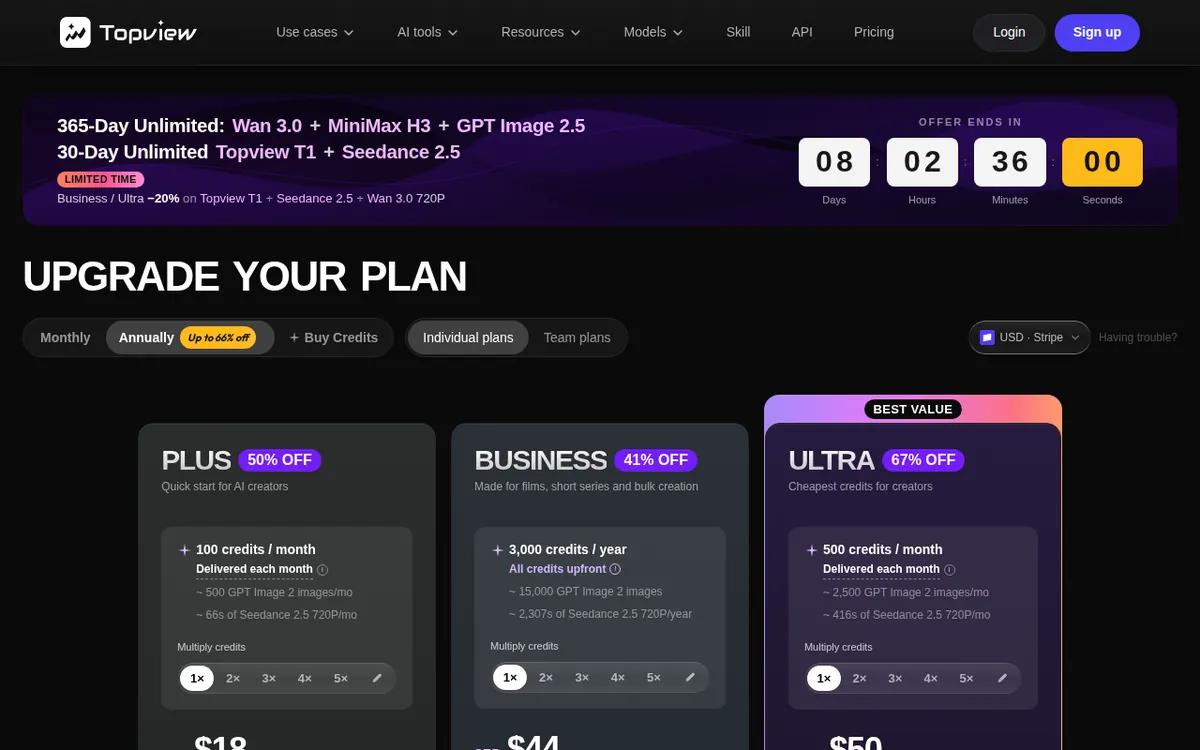
Figure: topview.ai official pricing page, captured 2026-10-24.
Your first video, step by step
Once you’re on a paid plan, the flow is short:
- Grab a product link. Topview is built around e-commerce URLs, so start with a live product page you want to promote.
- Paste the link and add your copy. Drop in the URL and the text or angle you want the video to carry — the hook, the selling point, the call to action.
- Let the agent generate. This is the step that spends credits. The agent pulls the product details and assembles a draft clip.
- Edit on the canvas. Plus and up include an editing canvas, so you can adjust the draft rather than accept whatever comes out first.
- Export and reuse. Pull the finished clip for your channel. If it’s going into paid advertising, confirm you’re on a plan with the commercial license first.
That’s the productive loop. Nothing here is hard. The friction is entirely about credits — how fast you burn them and how little the site tells you up front.
Common blockers and how to get around them
“I don’t know how many videos my credits buy.” This is the big one and there’s no clean fix, because Topview doesn’t publish a per-credit cost. Our advice: on Plus, generate one video, check how many of your 100 credits it consumed, and extrapolate from that real number. Don’t plan a month of content before you’ve seen what a single generation costs you in practice.
“I ran out of credits mid-month.” Credits are a monthly allowance, not unlimited runs. If 100 on Plus isn’t enough, the jump is to Ultra’s 500 — but that’s US$112 monthly, a large step. Before upgrading, confirm from your own usage that you genuinely need five times the credits, not just a few more.
“My videos can’t go in ads.” The commercial license lives at Business and above. If you started on Plus and now need to run the clips as paid ads, you’ll need to move up. Check this before a campaign, not after.
“I’m running a batch and it’s slow.” Only Ultra lists concurrency — up to 12 jobs at once — and a priority queue. On lower plans, expect to generate one at a time and wait your turn at busy times. For a solo user doing a handful of videos, this rarely matters. For an agency pushing volume, it does.
“My teammates need access.” Sharing and seat management are the Team plan’s job. Don’t try to run a group off one Plus login; buy seats if more than one person needs to generate.
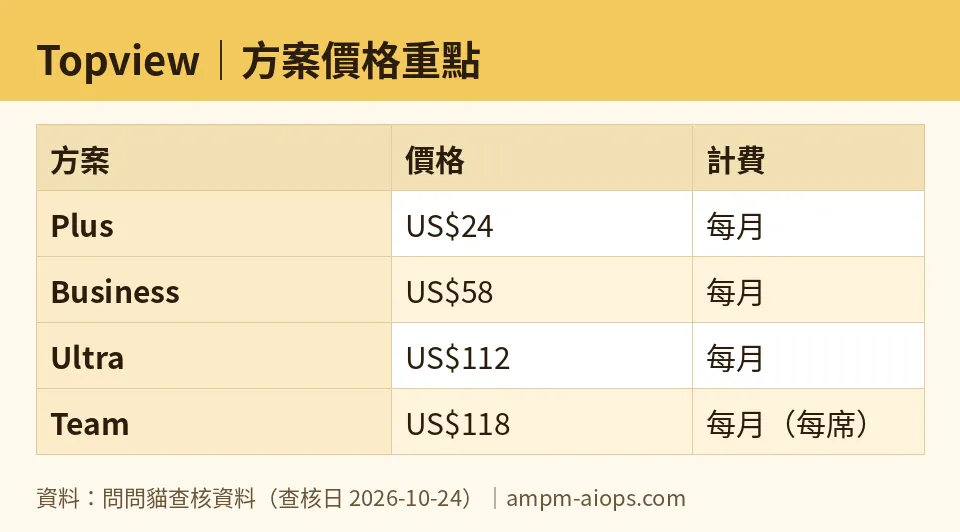
Figure: compiled by AMPM from its verified data (last verified 2026-10-24).
🔍 AMPM exclusive check
Here is what we verified that Topview’s pricing page does not spell out.
The page sells Plus on “100 credits” and frames that as enough for a few short videos — but it never states how many credits a single video costs. There is no per-credit conversion published anywhere we looked. That means a first-time buyer genuinely cannot calculate cost-per-video before paying. The Chinese edition of this piece flagged the same thing: the box where that number should sit is left blank by the vendor. We will not invent a conversion to fill it, and neither should any review that respects your money — generate one video and read your own credit meter.
A second gap: Business is sold on “more credits” than Plus, but the page gives no number for that tier. So the credit jump from Plus to Business is unquantified on the official page. Ultra (500) and Team (500 per seat) do carry numbers; Business does not.
One point of honesty about our own depth here. Topview came into our database as an auto-entered challenger candidate, and this data has been through a single verification round — not yet our usual three-way human cross-check. Every number above matches what the official site showed on the check date, but treat the free-allowance and commercial-terms details as “confirm against the live page today,” especially if you’re about to commit to an annual plan.
Verdict: who should use it, who should skip it
Use it if you make e-commerce product videos regularly and the paste-link-to-clip workflow fits how you actually sell. If that’s you, start on Plus at US$24, measure your real credit cost on the first video, and only climb the ladder once your own usage proves you need the credits, the commercial license, the concurrency, or the seats.
Skip it — or wait — if you wanted a free tier to evaluate the quality risk-free (there isn’t one), or if you need to budget cost-per-video before you buy (you can’t, until the vendor publishes a per-credit rate). Casual users and anyone who only needs the occasional clip will find the no-free-trial, credits-first model an expensive way to find out whether the output is any good.
The tool is capable. The pricing page is just less forthcoming than it should be — so go in paying attention to your credit meter, not the marketing copy.
Written: 2026-10-24 Price last verified: 2026-10-24 Tool last health-checked: 2026-10-24
🔗 Related on AMPM
📎 Sources
All prices and quotas in this article come from AMPM’s verified dataset for Topview (last verified 2026-10-24); primary sources:
🐾 Meet the cats: AMO and PIMI

AMPM is a Taiwan-based AI-tool pricing watchdog. Our motto: ask before you subscribe. Two cats argue every tool from two sides:
- ☀️ AMO — the budget-minded cat. Always asks: is the free tier enough, and is paying actually worth it?
- 🌙 PIMI — the performance-minded cat. Cares about whether it works well, fast, and gets your job done.

When they are done arguing, you know whether to pay. Every number is checked by us, with the verification date at the end.
🐾 Our sister sites also checked
Read next
- Topview Full breakdown: pricing, features and real-world limits
- Topview Is the free quota enough?
- Topview Alternatives
- Free plan limits for every AI tool we track
