[Use cases] VEED Free Tier: Which Exports Work and Which AI Tools Don't
- Free tier: Yes
- Cheapest paid plan: US$20/mo and up
- Free quota: US$0 with a VEED watermark on every export, a 10-minute export length …
- Last checked: 2026-10-20
Article last updated: 2026-10-10



VEED is a browser-based video editor — no software to install — that auto-generates captions, removes backgrounds, and translates videos using AI. Its pricing page tells you to “start for free, upgrade to get powerful features.” We opened the full comparison table (the one most visitors never expand) and checked every number against three real use cases: a student cutting a class project, a freelancer editing client work, and a small team shipping weekly content. The free tier covers short, simple edits fine. It is not built for repeated use of VEED’s AI features, and that’s where the free tier turns into a trap if you need more than one pass at something like background removal.
What VEED actually gives you for free
The free plan is US$0, no time limit on the account itself, but every export carries a VEED watermark in the corner. VEED’s own FAQ says the only way to remove it is to pick a paid plan — there’s no free workaround. Beyond the watermark, the hard caps are: a 10-minute limit per exported video, 720p export quality (1080p and 4K are paid-only), 2GB of cloud storage, a 1GB limit per uploaded file, and a stock media library VEED itself labels “Limited.”
For AI features specifically, the free quotas are: auto captions at 10 minutes per month, text-to-speech up to 10 minutes per month (this draws from credits — a usage currency that gets spent per AI action), AI video generation in the Gen-AI Studio up to 12 seconds per month, and AI image generation up to 100 images per month (also spends credits). None of these reset mid-cycle — VEED’s FAQ confirms credits and minutes refresh in full when your billing period renews, but unused amounts don’t carry over.
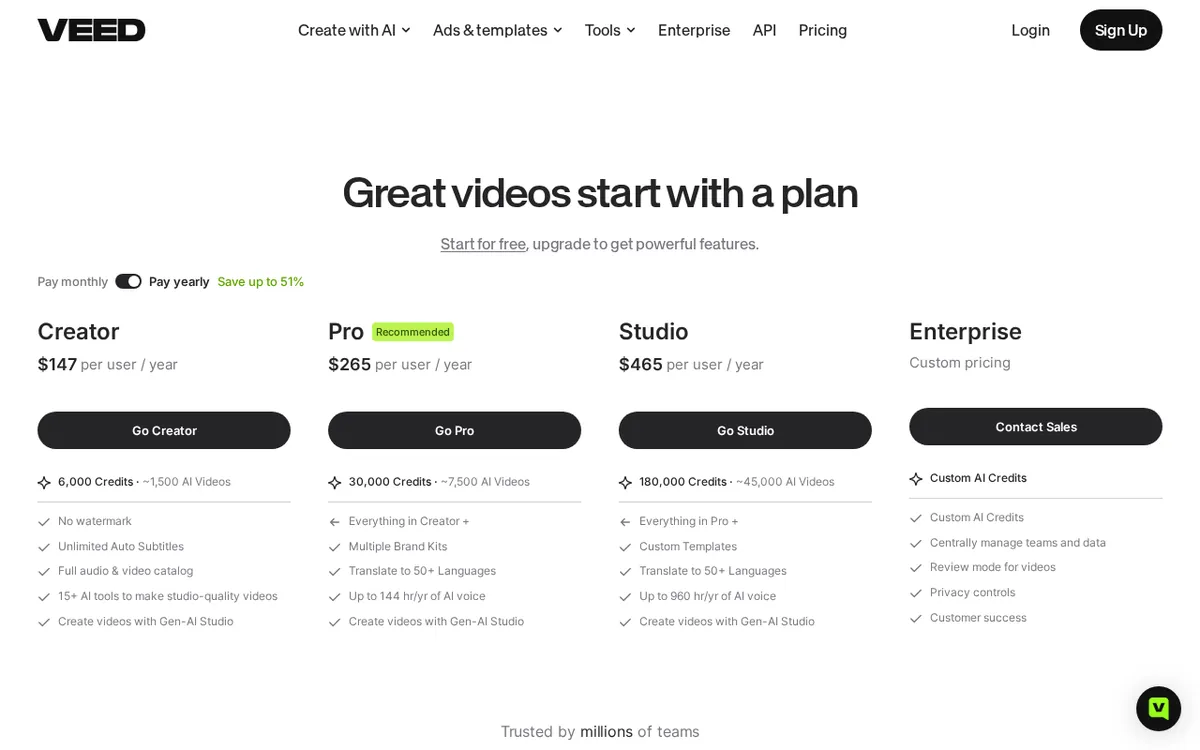
Figure: veed.io official pricing page, captured 2026-10-10.
Where the free plan quietly stops working
This is the part that doesn’t jump out from the headline pricing table. A separate list of AI editing tools — Voice Clone, Text Behind Person, AI B-Roll, Clean Audio, filler-word removal, silence removal, Eye Contact, and background removal — are all marked “Try once” on the free plan. That means you get exactly one use of background removal, ever, before it’s locked behind a paid plan. If you’re cutting one video for a class assignment, that’s a non-issue. If you’re a content creator who wants to remove a background on every upload, the free tier handles it exactly once and then stops.
VEED also doesn’t publish commercial usage rights for the free plan anywhere on its site. If you’re planning to sell or monetize what you make on the free tier, there’s no stated license covering that — it’s simply absent from the pricing page and FAQ.
Who should pay, and for which plan
Paid plans are priced per seat — the plan price multiplies by however many editors you add to your workspace. There are three published tiers, each with monthly and annual billing:

Illustration: Key AI tools lock permanently after a single attempt, snapping like a one-time wand and demanding an upgrade.
- Creator: US$20 per seat per month, 500 credits (VEED’s own estimate: about 125 AI-generated videos). Paid annually, it averages US$10/month, US$116 total for the year, with 6,000 credits for the year.
- Pro: US$44 per seat per month, 2,500 credits (about 625 videos), plus AI voice generation up to 12 hours per month. Annually it averages US$21/month, US$257 total for the year, 30,000 credits and 144 hours of AI voice for the year.
- Studio: US$70 per seat per month, 15,000 credits (about 3,750 videos), AI voice up to 80 hours per month. Annually it averages US$35/month, US$414 total for the year, 180,000 credits for the year.
- Enterprise: price not published; VEED’s FAQ states a minimum of 3 seats, custom quote only.
The annual toggle on VEED’s pricing page is labeled “Save up to 51%,” and it’s not just a price cut — the credit allowance jumps too (Creator goes from 500 credits/month to 6,000/year, which works out to 500/month either way, but Pro and Studio annual credits scale up more than proportionally with the discount). All paid plans include a free trial, and VEED’s FAQ specifies no credit card is required to start one. There’s no time-limited promo, no first-month discount, and no promo code on the page.
Student: cutting one video under 10 minutes for a class project, the free tier technically works — 720p and a watermark are usually tolerable for a one-off assignment. If the watermark or 10-minute cap is a dealbreaker, Creator at US$20/month (or US$10/month billed annually) is the cheapest fix.
Freelancer: editing client videos regularly, the “Try once” limit on background removal and other AI tools makes the free tier impractical past the first job. A freelancer doing weekly turnaround with translation needs (VEED’s translation covers 50+ languages on Pro) would fit Pro at US$44/month, or US$21/month billed annually — US$257 for the year.
Small team: cost scales per seat, so three editors on Creator would run three times US$20/month before any discount. For heavier output, Studio at US$70/seat/month supplies 15,000 credits and 80 hours of AI voice per seat per month. Teams needing custom contracts or more than a handful of seats should ask for Enterprise pricing — VEED doesn’t publish it, but the FAQ confirms a 3-seat minimum.
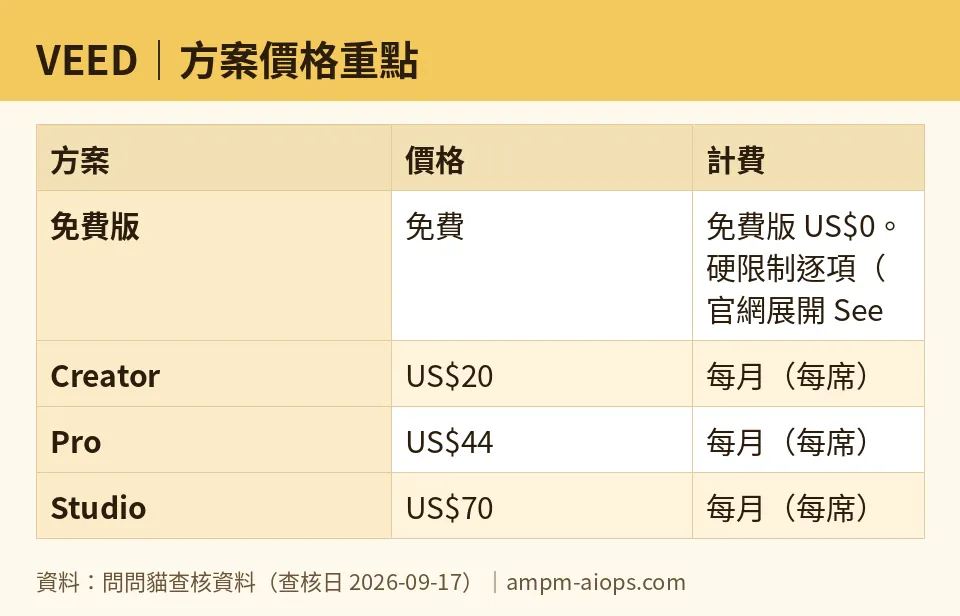
Figure: compiled by AMPM from its verified data (last verified 2026-09-17).
🔍 AMPM exclusive check
VEED’s main pricing table shows the headline limits — watermark, 10-minute exports, 720p, storage — clearly enough. What it doesn’t surface up front is the “Try once” restriction on AI editing tools like background removal, Voice Clone, and Eye Contact. That detail only appears if you click to expand the full “See all features” comparison table under the Free column — it’s not mentioned in the plan summary cards most visitors see first. We also confirmed directly from VEED’s FAQ that credits and AI minutes do not roll over between billing cycles, and that the free plan’s commercial usage rights are not stated anywhere on the site — not in the pricing table, not in the FAQ. Everything else — the credit counts, seat-based pricing, and annual discount — matched the official page exactly as published, checked 2026-08-09 on veed.io/pricing.
☀️ AMO, the budget-minded cat

Free is free, but it’s a one-shot deal for the tools that actually make VEED worth opening. I can live with a watermark on a single 10-minute clip and 720p resolution — that’s a fair trade for US$0. What I can’t get past is “Try once” on background removal. Use it once, and it’s gone until you pay. That’s not a generous trial, that’s a locked door disguised as a feature list. If you only need VEED for one video, ever, the free tier is genuinely enough — 10 minutes, 2GB storage, and a 1GB upload cap cover a single project fine. But the moment you want to remove a background twice, the free tier isn’t “limited,” it’s finished. At that point the real comparison is Creator at US$20/month versus US$10/month if you commit to a year (US$116 total, 6,000 credits for the year). For anyone testing whether VEED is worth paying for at all, I’d start every free trial with the one tool I actually need tested first — because you don’t get a second attempt to check if background removal even works well for your footage.
🌙 PIMI, the performance-minded cat

Forget the free tier’s watermark for a second — the real question is whether the paid plans deliver enough AI capacity to actually work. Pro’s numbers are solid: 2,500 credits a month (about 625 videos by VEED’s own estimate) and 12 hours of AI voice generation monthly for US$44/month, or US$21/month annually. That’s VEED’s own recommended plan, and the credit jump from Creator’s 500 to Pro’s 2,500 — five times the volume — backs that up. Studio pushes further: 15,000 credits (about 3,750 videos) and 80 hours of AI voice per month for US$70/seat. If you’re running AI-heavy workflows — auto captions, translation into 50+ languages, voice cloning — the free tier’s 10-minutes-of-captions-per-month and 12-seconds-of-AI-video-per-month quotas aren’t enough to evaluate real throughput. You need at least Creator’s 500 credits to see how the credit system behaves under actual use, since credits reset every billing cycle and never carry over — burn them slow or lose them. For teams, per-seat pricing means performance scales with cost: more seats on Studio means more parallel output, but also a straight multiplication of US$70 per person per month.
Verdict: who should use it, who should skip it
Use the free tier if you need exactly one short video — under 10 minutes, 720p is acceptable, and a watermark doesn’t matter. Skip it, and go straight to Creator (US$20/month, or US$10/month annual) if you need the watermark gone or want to use any AI editing tool more than once. Freelancers and regular creators should look at Pro (US$44/month, or US$21/month annual) for the translation and AI voice allowance. Teams with real volume or multiple editors should budget per seat on Studio (US$70/seat/month) or request an Enterprise quote if they need more than VEED’s published tiers cover.
Written: 2026-10-10 Price last verified: 2026-09-17 Tool last health-checked: 2026-10-10
🔗 Related on AMPM
📎 Sources
All prices and quotas in this article come from AMPM’s verified dataset for VEED (last verified 2026-09-17); primary sources:
🐾 Meet the cats: AMO and PIMI

AMPM is an independent AI-tool pricing watchdog tracking official prices worldwide. Our motto: ask before you subscribe. Two cats argue every tool from two sides:
- ☀️ AMO — the budget-minded cat. Always asks: is the free tier enough, and is paying actually worth it?
- 🌙 PIMI — the performance-minded cat. Cares about whether it works well, fast, and gets your job done.

When they are done arguing, you know whether to pay. Every number is checked by us, with the verification date at the end.
🐾 Our sister sites also checked
Read next
- VEED Full breakdown: pricing, features and real-world limits
- VEED Is the free quota enough?
- VEED Alternatives
- Free plan limits for every AI tool we track
More verified articles on this tool
- [Verified] VEED Free Plan vs Paid 2026: What the Free Tier Locks Away — Is Paying Worth It?
- [News] VEED Animate Launches, but VEED Still Won't Say What's in the Free Tier
