Ask Cat › AI Tool Summary › VEED
[Verified] VEED Free Tier Caps Videos at 10 Minutes and 720p — Is Paying Worth It?
- Free tier: There is
- Cheapest paid plan: US$20/mo and up
- Free quota: US$0 with a VEED watermark on every export, a 10-minute export length …
- Last checked: 2026-09-17
Article last updated: 2026-10-03



VEED is a browser-based video editor — no software to install — that handles auto-captioning, background removal, and translation inside one timeline. This piece checks what the free tier actually lets you keep, because the headline “free” plan and the real free tier are not the same thing once you open VEED’s full feature comparison table.
We pulled every number directly from veed.io/pricing (last checked 2026-09-17) and cross-read the FAQ for the fine print the comparison grid doesn’t spell out. Here’s what a reader typing “VEED free tier limits” into a search bar actually needs to know before uploading a file.
What the free plan actually locks away
VEED’s free tier costs US$0, and on the surface it looks usable: you get 2GB of cloud storage and can upload single files up to 1GB. But every video you export carries a VEED watermark in the corner — VEED’s own FAQ says the only way to remove it is to pick a paid plan. Export length tops out at 10 minutes per video, and export quality caps at 720p; 1080p and 4K are paid-only. The stock media library is marked “Limited” rather than fully open.
The AI features follow the same pattern of looking available but being heavily rationed. Auto-captioning is capped at 10 minutes a month. Text-to-speech (AI voice generation) also tops out at 10 minutes a month and draws from a “credits” pool — a prepaid usage allowance that gets spent per action. The Gen-AI Studio video generator gives you 12 seconds a month. AI image generation allows up to 100 images a month, also paid for in credits. A longer list of editing tools — Voice Clone, Text Behind Person, AI B-Roll, Clean Audio, filler-word removal, silence removal, Eye Contact, and background removal — are all marked “Try once” on the free tier, meaning exactly one use each, not an ongoing monthly allowance.
None of this resets gradually either. VEED’s FAQ states that credits and the subtitle/translation minute allowances refresh in full when a subscription renews, but they don’t roll over — unused minutes or credits just disappear at the next cycle.
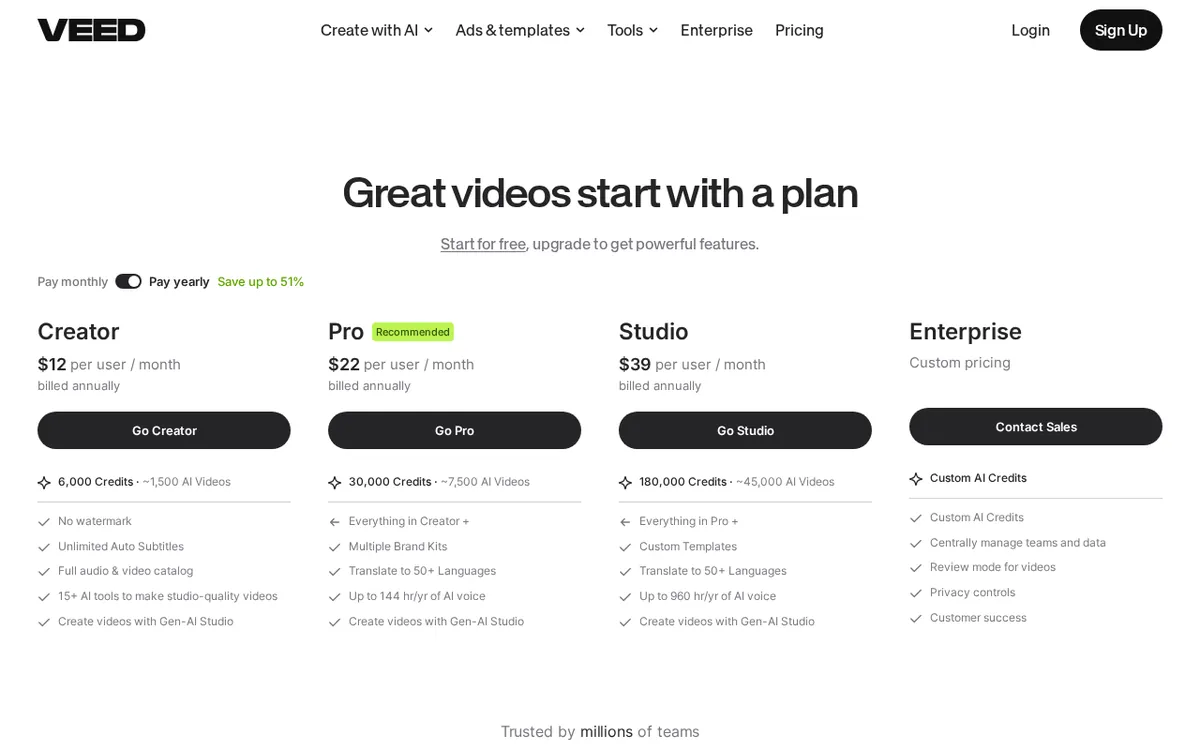
Figure: veed.io official page, captured 2026-10-03.
Credits, seats, and what “per seat” pricing means
VEED’s paid tiers are subscriptions billed per seat — the plan price multiplies by however many editors you add to your workspace, not a flat team rate. Creator runs US$20 per person per month for 500 credits, which VEED estimates covers around 125 AI-assisted videos. Pro is US$44 per person per month for 2,500 credits (about 625 videos) plus up to 12 hours of AI voice generation a month. Studio is US$70 per person per month for 15,000 credits (about 3,750 videos) and up to 80 hours of AI voice a month. Enterprise has no published price — the FAQ only notes it requires a minimum of 3 seats.
All three named tiers include a free trial, and VEED’s FAQ states the trial doesn’t require a credit card.
Monthly vs annual: the real gap
Switching the pricing page toggle to annual billing doesn’t just lower the monthly rate — it also multiplies the credit allowance. Creator’s annual plan works out to a US$10 monthly average (US$116 billed per year) but jumps to 6,000 credits — twelve times the monthly plan’s 500. Pro’s annual average is US$21 a month (US$257 per year) for 30,000 credits and 144 hours of AI voice per year. Studio’s annual average is US$35 a month (US$414 per year) for 180,000 credits and effectively 960 hours of AI voice capacity across the year (80 hours × 12 months’ worth of allowance). There’s no time-limited sale, no first-month discount, and no promo code on the pricing page — the only lever is the monthly/annual switch.
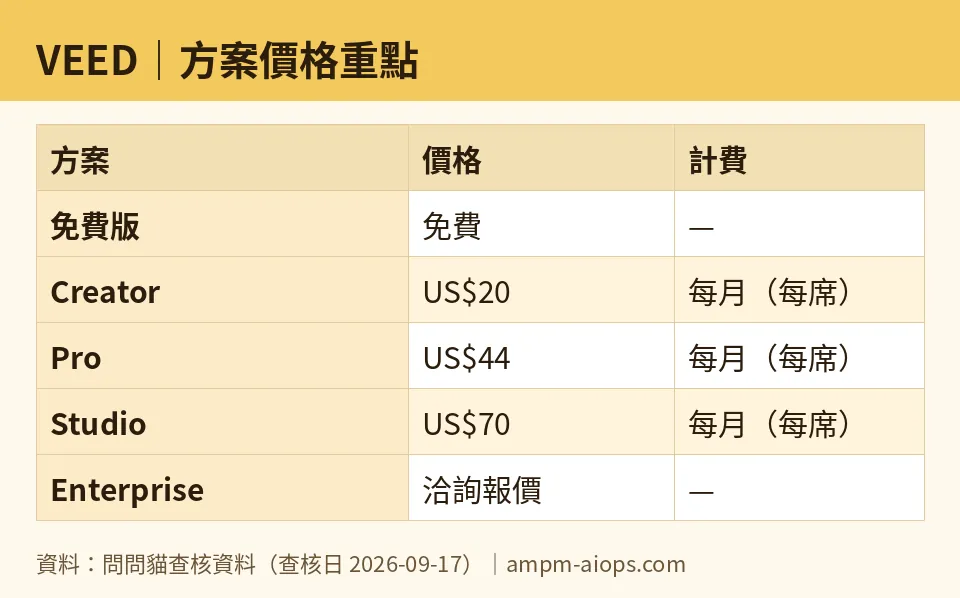
Figure: compiled by AMPM from its verified data (last verified 2026-09-17).
🔍 AMPM exclusive check
The watermark rule, the “Try once” labels, and the 10-minute/720p caps aren’t on VEED’s headline free-plan summary card — you only see them by clicking “See all features” to expand the full comparison table. A reader who just glances at the pricing page’s top-level cards would miss all of it.
One number is worth flagging on its own. VEED’s annual-billing toggle banner advertises “Save up to 51%” site-wide. But VEED’s own plan page separately states the Pro tier’s annual rate (US$21/month average vs. US$44/month) saves 52% — a point above the “up to 51%” headline claim. It’s a minor inconsistency, but it means the banner actually understates Pro’s own annual discount.
Two more things the comparison table states but easy to miss: credits and caption/translation minutes do not roll over between billing cycles — they reset in full, which is good, but anything unused is simply gone. And VEED does not publish any commercial-use license terms for the free tier anywhere we could find — if you need to know whether a free-tier export is clear for commercial use, the pricing and FAQ pages don’t answer it.
Nothing else differed from the official page this time; every other number above matches veed.io/pricing as checked on 2026-09-17.

☀️ AMO, the budget-minded cat
I want free to actually mean usable, and VEED’s free tier is usable for exactly one thing: trying the tool once. A 10-minute export cap and 720p ceiling are fine for a quick social clip, but the watermark on every single export is the real dealbreaker — there’s no way around it without paying, full stop. The “Try once” tag on Voice Clone, AI B-Roll, Clean Audio, and the rest means you get to test-drive each feature exactly once before it’s gone for the month. That’s a demo, not a free plan.
If I were actually going to use VEED regularly, I wouldn’t stop at free — I’d go straight to annual billing on whichever tier fits, because the annual credit multiplier is the best value move hiding on this page. Creator’s annual plan turns US$10/month into 6,000 credits instead of 500 — twelve times the allowance for roughly the same monthly spend doubled. That math only works if you commit to a year, which is a real risk if your video output is seasonal. For someone making one or two short clips a month, free covers it as long as the watermark and 720p cap are tolerable. For anyone exporting client work, the watermark alone forces an upgrade — there’s no cheap one-off unlock, only the US$20/month Creator subscription (US$10/month if you commit annually).

🌙 PIMI, the performance-minded cat
My question is whether this actually does the job, not whether it’s cheap. On that front, the free tier is a hard no for real output: 720p export quality is below modern delivery standards for most clients, and the 10-minute auto-caption allowance runs out almost immediately if you’re producing anything beyond a single short clip monthly. The AI feature set looks broad on paper — Voice Clone, Eye Contact correction, AI B-Roll — but “Try once” access means you can’t evaluate whether these actually perform well across more than a single clip before the month resets.
Where VEED gets serious is Pro and Studio. Pro’s 2,500 monthly credits (about 625 videos by VEED’s own estimate) plus 12 hours of AI voice generation a month is enough for a weekly content creator who needs translation into 50+ languages and multiple Brand Kits — VEED’s plan notes call Pro the officially recommended tier, and the credit allowance backs that up at 5 times Creator’s pool. Studio’s 15,000 credits and 80 hours of AI voice a month is built for a team pushing volume, not a solo creator. If your workflow depends on 1080p or 4K exports, that’s gated behind any paid tier, full stop — free tier output isn’t an option regardless of budget. For performance-first users, the real decision isn’t free-vs-paid, it’s Pro-vs-Studio, and that comes down to whether 625 videos a month is your ceiling or your floor.
Verdict: who should use it, who should skip it
Use the free tier only to confirm VEED’s interface and auto-caption quality work for you — not to produce anything you’ll publish, because the watermark and 720p cap make free-tier exports unusable for client or brand work. If you need clean exports at all, Creator at US$20/month (or US$10/month billed annually) is the real entry point, and it’s enough for roughly 125 videos a month per VEED’s own credit estimate. Skip straight to Pro if translation across 50+ languages or AI voice generation beyond occasional use matters — its 2,500 credits and 12 hours of AI voice a month are built for weekly output, and the annual rate drops to US$21/month. Studio and Enterprise only make sense for teams already producing at volume; Enterprise specifically requires at least 3 seats and has no public price, so it’s a sales conversation, not a self-serve decision.
Written: 2026-10-03 Price last verified: 2026-09-17 Tool last health-checked: 2026-10-03
🔗 Related on AMPM
📎 Sources
All prices and quotas in this article come from AMPM’s verified dataset for VEED (last verified 2026-09-17); primary sources:
🐾 Meet the cats: AMO and PIMI

AMPM is a Taiwan-based AI-tool pricing watchdog. Our motto: ask before you subscribe. Two cats argue every tool from two sides:
- ☀️ AMO — the budget-minded cat. Always asks: is the free tier enough, and is paying actually worth it?
- 🌙 PIMI — the performance-minded cat. Cares about whether it works well, fast, and gets your job done.
When they are done arguing, you know whether to pay. Every number is checked by us, with the verification date at the end.
🐾 Our sister sites also checked
Let's take a look at these
- VEED Comprehensive Introduction: Pricing, Features, and Actual Limitations
- VEED Is the free quota enough?
- VEED Alternatives
- Comprehensive Free Quota List for All Tools
