Ask Cat › AI Tool Summary › Velo
[Review] Velo Free Tier Pricing: Downloads Keep a Watermark by Default, 15 Minutes a Month Won't Go Far
- Free tier: There is
- Cheapest paid plan: US$49/mo and up
- Free quota: 15 Velo minutes per month, with 1 seat, 1 voice clone and 1 avatar …
- Last checked: 2026-10-05
Article last updated: 2026-10-07



Velo turns raw material — screen recordings, documents, or a URL — into a short business video with an AI avatar (a digital on-screen presenter) reading your script. AMPM’s angle here is the free tier pricing: what you actually get for nothing, and where the numbers quietly force you toward a paid plan. The short version: the free tier gives you 15 “Velo minutes” a month, and the video files you download carry a watermark by default — something that’s easy to miss if you only skim the features list.
What 15 Velo Minutes Actually Buys You
Velo’s free plan runs on a monthly quota called “Velo minutes.” These minutes get spent on generating video, rendering, narration, translation, and any AI avatar or automated workflow step — not just final video length. The free allowance is 15 minutes a month, with one seat (one person’s login), one cloned voice, and one avatar video per month. You still get the full editor, prompt-to-video, document-to-video, and basic screen-recording cleanup — the feature set isn’t crippled, the quota is. Secondary reviews we checked (Futurepedia and Nubiapage) both flag the same thing: 15 minutes a month resets each month and doesn’t roll over, so anything you don’t use is gone, not banked for later.
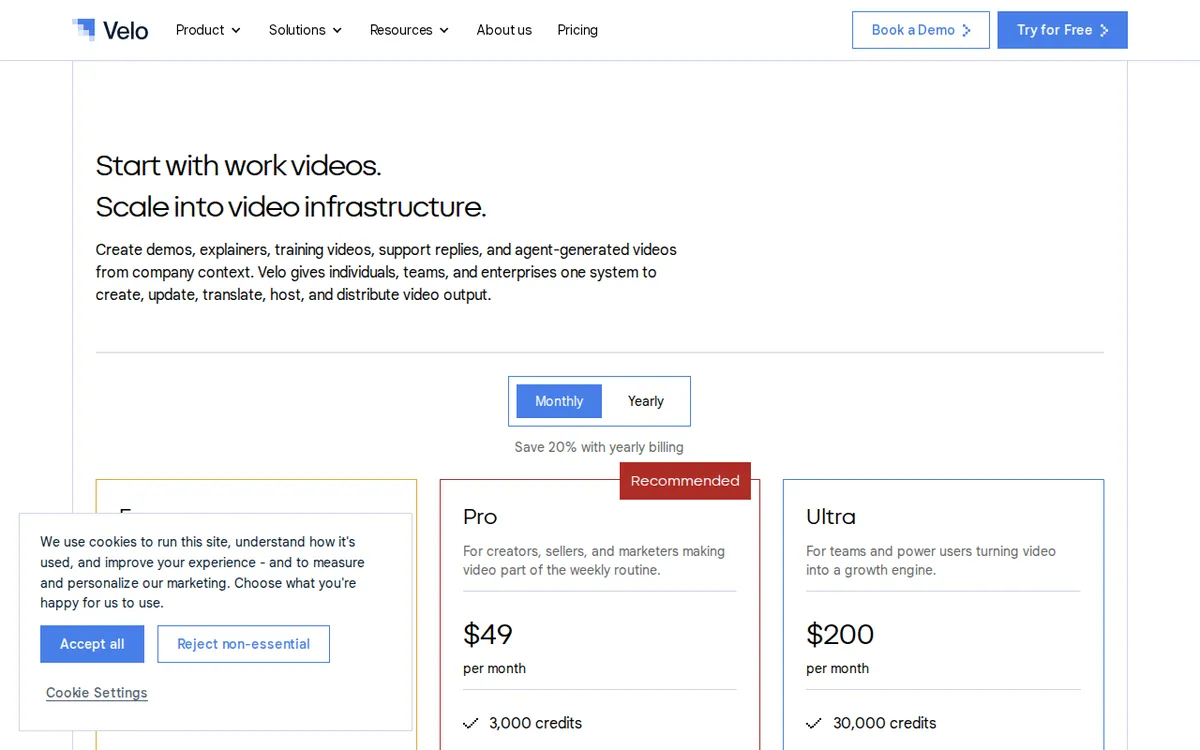
Figure: usevelo.ai official pricing page, captured 2026-10-07.
The Watermark Catch: Share vs. Download
This is the part the pricing page states but easy to miss if you’re skimming for the headline free tier number. Velo’s own wording draws a line between two actions. If you share a video via a link, it goes out “without watermarks.” If you download the file to your computer, Velo’s official line is “watermarked downloads by default” — on the free plan, and apparently as a baseline behavior the paid plans override. Removing the watermark from a downloaded file requires upgrading to Pro. So a free user who only ever shares a link never sees a watermark; a free user who needs the actual video file for editing elsewhere, uploading to a different platform, or sending as an attachment, gets one stamped on it.
Pro and Ultra: What More Money Actually Unlocks
Pro costs US$49 a month and bumps the quota to 60 Velo minutes a month, keeps 1 seat, raises voice clones to 3, keeps 1 avatar video, and removes the download watermark. Velo’s own plan notes describe Pro as able to produce a 3-minute avatar video, with 3 script-edit retries and 3 voice regenerations included.
Ultra costs US$200 a month: 600 Velo minutes a month, 3 seats, unlimited voice clones, and 3 avatar videos. Ultra also unlocks a “VeloTwin” — a personalized AI avatar modeled on you, not just a stock avatar — plus up to 3 team members collaborating, 10 script-edit retries, 10 voice regenerations, and (per Velo’s own plan description) enough quota to produce a 30-minute avatar video.
There’s also an Enterprise tier, priced only by custom quote — nothing public. The one discount Velo advertises is 20% off for annual billing (“Save 20% with yearly billing”), but the site doesn’t publish the actual annual dollar figure, so we’re not going to do that math for you — we’re reporting prices exactly as listed, not computing our own annual total.
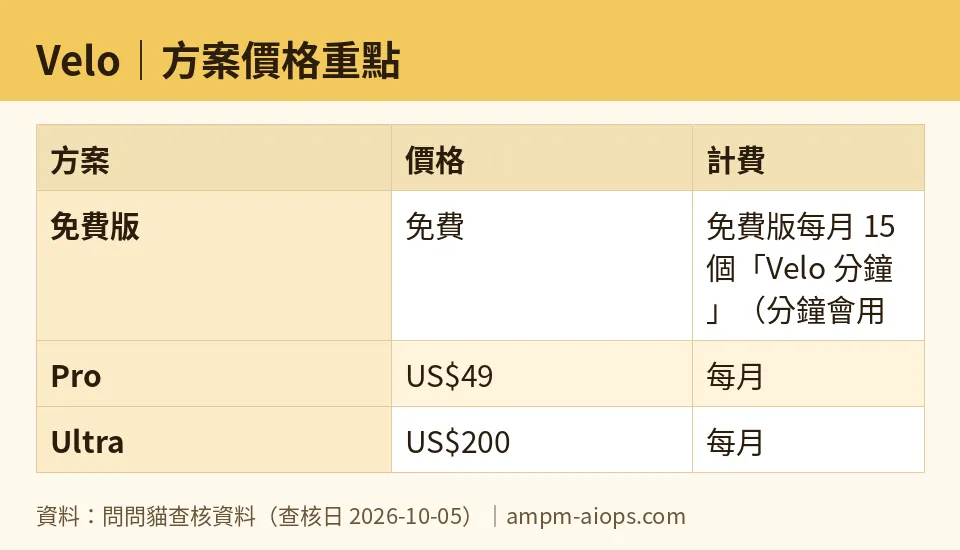
Figure: compiled by AMPM from its verified data (last verified 2026-10-05).
🔍 AMPM exclusive check
Reading past the pricing page into the fine print turned up two things the official page doesn’t spell out cleanly.
First, the watermark rule is split by action, not by plan alone — “share” and “download” get different default treatment even on the same free account. A reader who only sees “share videos without watermarks” on the homepage could reasonably assume downloads are the same; they’re not, by Velo’s own wording.
Second, independent reviews (not Velo’s own site) describe the free quota as something closer to a trial allotment than a sustainable free tier — our secondary sources note the 15-minute monthly allowance is tight enough that “actual use is nearly impossible” at that level. Velo’s official pricing page is silent on a few things a buyer would want up front: what happens once you burn through your 15 minutes mid-month, the exact day your quota resets, and whether the free tier can be used commercially at all. We checked for these three answers directly on the vendor’s pricing page and found none of them published. Our secondary-source checks suggest free-tier use isn’t really built for commercial output, but since that’s not confirmed on Velo’s own site, treat it as a secondary-source read, not an official policy. Everything else — the US$49 and US$200 price points, the minute quotas, seat counts, and voice-clone limits — matched the official pricing page exactly as of our check on 2026-10-05.
One more thing worth flagging: a third-party claim floating around suggests you can pay US$9.99 to strip the watermark without a full Pro upgrade. We looked for this on Velo’s own site and found nothing — it traces to a single unverified source, so we’re not treating it as real.
☀️ AMO, the budget-minded cat

Fifteen minutes a month sounds free until you actually try to use it. Velo spends those minutes on generation, rendering, narration, translation, and avatar work — not just raw video runtime — so a single real project can burn through the whole month’s allowance fast. And since the quota resets monthly without rolling over, anything you don’t use just disappears; there’s no way to stockpile minutes for a bigger project later. You do get the full editor, prompt-to-video, and document-to-video tools for free, plus one voice clone and one avatar video a month, which is enough to kick the tires. But the moment you need an actual downloadable file instead of a shareable link, the free tier hands you a watermarked video — budget users who need clean files for client delivery or cross-posting are stuck paying US$49/month for Pro just to get a watermark-free download, on top of needing more than 15 minutes to do anything substantial. For genuinely occasional use — one short video, shared as a link, once in a while — free is fine. For anything recurring, the free tier functions more like a demo than a real tool, and the US$49 Pro tier’s 60-minute quota (four times the free allowance, per Velo’s own plan page) is the realistic entry point if you’re paying at all.
🌙 PIMI, the performance-minded cat

The feature set on Velo’s free tier is surprisingly complete — full editor, prompt-to-video, document-to-video, and screen-recording cleanup are all there without paying. What’s gated isn’t capability, it’s throughput: 15 minutes a month, one seat, one voice clone, one avatar video. If you’re testing whether Velo’s avatar quality and video output are good enough for your workflow, the free tier lets you actually run the pipeline end to end, not just watch a demo. Where performance-minded users will hit a wall is scale and polish: Pro’s 60 minutes supports roughly a 3-minute avatar video per Velo’s own numbers, and watermark-free downloads only unlock there. Ultra’s 600 minutes, 3 seats, unlimited voice clones, and a personalized VeloTwin avatar are built for teams producing volume, with enough quota for a 30-minute avatar video and up to 10 script-edit and voice-regeneration retries for refining output. If your bar is “does this actually produce a polished, downloadable, watermark-free business video I can ship,” the free tier can’t get you there — that requires at minimum the US$49 Pro plan, and heavy or team use pushes toward the US$200 Ultra plan with its much larger quota and collaboration seats.
Verdict: who should use it, who should skip it
Use Velo’s free tier if you want to test the actual editor and avatar pipeline, you’re fine sharing video via link instead of downloading a file, and one video a month covers your need. Skip the free tier — and budget for at least Pro at US$49/month — if you need a downloadable, watermark-free file, need more than a single avatar video a month, or need more than 15 minutes of generation/rendering/narration work in a given month. Teams needing multiple seats, a personalized avatar, or high-volume output should look straight at Ultra’s US$200/month tier; Velo doesn’t publish a lighter team option between the two.

Illustration: Online playback stays completely clean, but downloading the finished video file immediately stamps a visible watermark over everything.
Written: 2026-10-07 Price last verified: 2026-10-05 Tool last health-checked: 2026-10-07
🔗 Related on AMPM
📎 Sources
All prices and quotas in this article come from AMPM’s verified dataset for Velo (last verified 2026-10-05); primary sources:
🐾 Meet the cats: AMO and PIMI

AMPM is a Taiwan-based AI-tool pricing watchdog. Our motto: ask before you subscribe. Two cats argue every tool from two sides:
- ☀️ AMO — the budget-minded cat. Always asks: is the free tier enough, and is paying actually worth it?
- 🌙 PIMI — the performance-minded cat. Cares about whether it works well, fast, and gets your job done.

When they are done arguing, you know whether to pay. Every number is checked by us, with the verification date at the end.
🐾 Our sister sites also checked
Let's take a look at these
- Velo Comprehensive Introduction: Pricing, Features, and Actual Limitations
- Velo Is the free quota enough?
- Velo Alternatives
- Comprehensive Free Quota List for All Tools
