[Use cases] Velo Free vs Paid: Is the No-Watermark Claim Actually Free?
- Free tier: Yes
- Cheapest paid plan: US$49/mo and up
- Free quota: 15 Velo minutes per month, with 1 seat, 1 voice clone and 1 avatar …
- Last checked: 2026-10-24
Article last updated: 2026-10-16



Velo makes short business videos with AI avatars — you feed it a screen recording, a document, or a URL, and it turns that into a polished clip with a virtual presenter talking it through. The free plan advertises “no watermark” sharing, which sounds like a clean win. It isn’t quite that simple, and the gap between what you can show someone and what you can actually hand them is the part worth slowing down on.
What the Free Plan Actually Lets You Do
Velo’s free tier gives you 15 “Velo minutes” a month. That’s the unit the platform uses to meter everything — generating a clip, rendering it, adding narration, translating it, building an avatar segment, or running an automated workflow (an “agent” task) all draw from the same 15-minute pool. You get one seat (one login, for one person), one voice clone (a saved copy of a voice the AI can reuse later), and one avatar video per month.
Fifteen minutes doesn’t go far once you count script retries, re-renders, and voice regeneration. For a single finished clip with any back-and-forth, you could burn through the month’s allowance fast. Velo’s official pricing page doesn’t say what happens once you hit zero, when exactly the clock resets, or whether the free tier can be used for commercial work at all — none of that is spelled out.
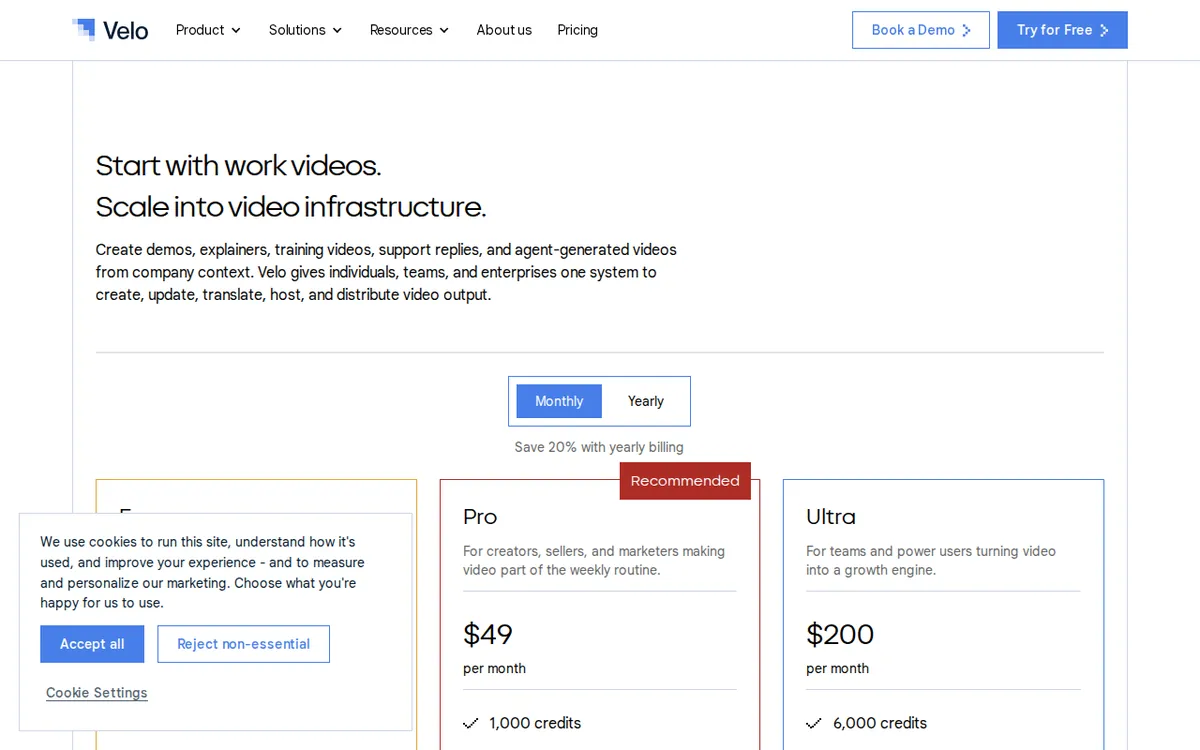
Figure: usevelo.ai official pricing page, captured 2026-10-16.
The Watermark Split Nobody Reads Closely
Here’s the detail that actually matters for anyone comparing plans. Velo’s own wording is “share videos without watermarks” — but separately, “watermarked downloads by default.” Those are two different outputs. If you send someone a shareable link to view the video in their browser, it’s clean, no watermark. If you download the actual video file to your computer, it comes with a watermark baked in, unless you’re on the Pro plan.

Illustration: Viewing online via link remains spotless, but saving a physical file immediately applies an indelible mark.
That distinction decides who the free tier works for. A student sharing a link for a class presentation never notices it. A freelancer who needs to hand a client an actual video file to upload elsewhere runs straight into the watermark.
Pro vs Ultra: Where the Money Buys You Something
The paid tiers scale mostly on volume and seats, not on new creative features. Pro is US$49 a month, billed monthly, and gives you 60 Velo minutes a month — four times the free allowance — plus watermark-free downloads, 3 voice clones, 1 avatar video, access to all public AI avatars, 3 script edit retries, and 3 voice regenerations. It’s still a single seat, so it’s built for one person working alone.
Ultra jumps to US$200 a month for 600 Velo minutes — forty times what the free tier gives you — with 3 seats, unlimited voice clones, 3 avatar videos, 10 script edit retries, 10 voice regenerations, and the ability to build a custom “VeloTwin” (a personalized AI avatar modeled on a specific person, rather than picking from Velo’s public avatar library). Up to 3 people can collaborate on an Ultra account.
There’s also an Enterprise tier, but Velo doesn’t publish a price for it — you’d need to request a quote directly. And if you’re tempted by annual billing, the official page does advertise “save 20% with yearly billing,” but it never states what that annual total actually comes to. We’re not going to do that math for you and call it official, because Velo hasn’t.
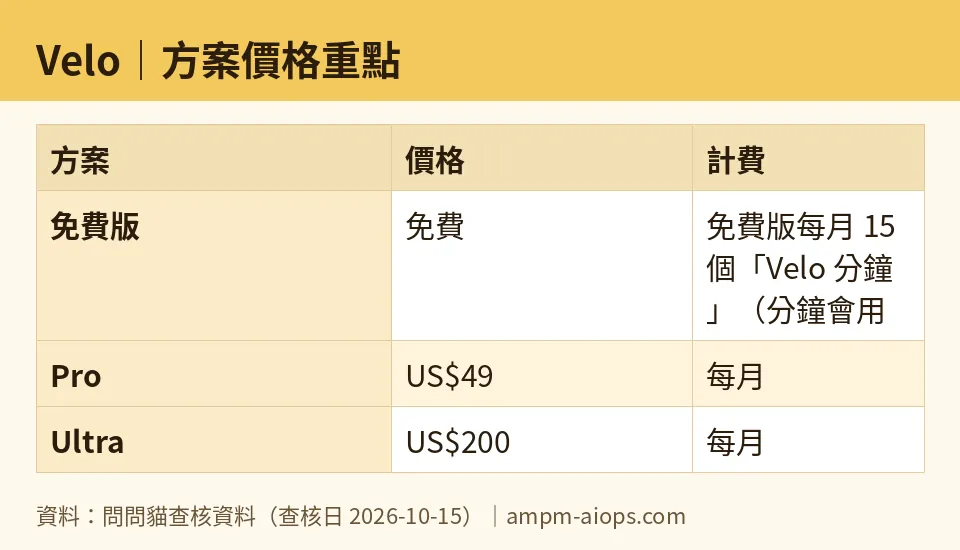
Figure: compiled by AMPM from its verified data (last verified 2026-10-15).
🔍 AMPM exclusive check
Velo’s pricing page is upfront about the headline numbers — the 15 free minutes, the US$49 and US$200 price points, the seat and voice-clone counts. What it leaves out is the operational detail that decides whether the free tier is usable at all. The official page never states its reset day, never says what happens to your account once the 15 minutes are gone mid-month, and never confirms whether free-tier output can be used commercially.
Our check found that the monthly free allowance doesn’t carry over — unused minutes don’t roll into the next month, so there’s no way to bank a quiet month and spend it later. Based on how the plan is structured and what Velo discloses, we’re treating free-tier commercial use as unconfirmed rather than assuming it’s allowed, since the vendor doesn’t say either way.
The watermark split is real and matches what Velo states on its own page — share links are clean, downloaded files are watermarked unless you’re paying for Pro or above. That part checked out exactly as advertised when we looked at it on 2026-10-15. Nothing else differed from the official numbers.
☀️ AMO, the budget-minded cat

Fifteen minutes a month is not a workflow, it’s a trial. I get why Velo gives it away — you need to see the avatar and hear the voice clone before you’ll believe this works — but don’t mistake it for a tool you can actually run a side hustle on. Once you’re making anything regularly, you’re either paying or you’re stuck sharing links instead of handing over files, which is its own kind of limitation if a client expects an actual video asset.
The free tier’s biggest trap isn’t the watermark, it’s the non-cumulative reset. If you only need a video every couple of months, you’re still capped at 15 minutes each time that quota comes around — there’s no way to save up three quiet months and spend 45 minutes on a bigger project. That’s a real constraint for occasional users, and the official page doesn’t warn you about it anywhere.
If you’re going to pay, Pro at US$49 a month is the only sane entry point, because it’s the plan that removes the download watermark — which is the actual blocker, not the minute count, for most people doing client work. Ultra at US$200 a month only makes sense once you need multiple seats or a custom avatar; paying four times more just for extra minutes you won’t use is money wasted. And remember: the 20%-off annual deal exists, but Velo won’t tell you the final number, so don’t commit to annual billing assuming you know what it costs — you don’t, until you’re at checkout.
🌙 PIMI, the performance-minded cat

What actually matters here is whether the output holds up, and the plan structure tells you a lot about where Velo wants you to spend. Free gives you one avatar video and one voice clone — enough to judge quality, not enough to iterate. Script edit retries and voice regenerations are rationed too: free tier gets none listed, Pro gives you 3 of each, Ultra gives you 10. If your first draft isn’t right — and first drafts rarely are — you’ll feel that ceiling fast on the free plan.
The seat structure is the real tell for teams. Pro is strictly a solo plan — one seat, no collaboration — so even a two-person freelance team can’t share a Pro account properly; you’d each need your own, at US$49 apiece, or jump straight to Ultra. Ultra’s 3 seats and up-to-3-person collaboration is built for exactly the scenario where multiple people are touching the same videos, plus it’s the only tier with custom VeloTwin, meaning you can build an avatar of an actual specific person instead of using Velo’s stock library. That’s the feature that separates “generic AI presenter” from “this looks like our own spokesperson,” and it’s locked to the top plan.
On raw capacity, Ultra’s 600 Velo minutes a month versus Pro’s 60 is a real gap — forty times the free allowance, ten times Pro’s. If your output volume is high — think weekly content, not occasional — Pro’s 60 minutes disappears quickly once you factor in retries and re-renders. Enterprise exists above all of this for whoever needs more, but Velo won’t say what it costs, so budget for a sales call, not a sticker price.
Verdict: who should use it, who should skip it
A student making one presentation video a month can stay on free — share the link instead of downloading, and 15 minutes covers a single clip with minimal back-and-forth. A freelancer doing regular client work needs Pro at US$49 a month at minimum, purely to kill the download watermark; anything less and you can’t deliver a usable file. A small team of two or three people, especially one that wants a consistent branded avatar rather than a stock one, should look at Ultra at US$200 a month — Pro’s single seat won’t fit a team, and the custom VeloTwin only exists on Ultra. Anyone with volume or seat needs beyond that is looking at an Enterprise quote Velo hasn’t published, so expect a conversation before a number.
Written: 2026-10-16 Price last verified: 2026-10-15 Tool last health-checked: 2026-10-16
🔗 Related on AMPM
📎 Sources
All prices and quotas in this article come from AMPM’s verified dataset for Velo (last verified 2026-10-15); primary sources:
🐾 Meet the cats: AMO and PIMI

AMPM is a Taiwan-based AI-tool pricing watchdog. Our motto: ask before you subscribe. Two cats argue every tool from two sides:
- ☀️ AMO — the budget-minded cat. Always asks: is the free tier enough, and is paying actually worth it?
- 🌙 PIMI — the performance-minded cat. Cares about whether it works well, fast, and gets your job done.

When they are done arguing, you know whether to pay. Every number is checked by us, with the verification date at the end.
🐾 Our sister sites also checked
Read next
- Velo Full breakdown: pricing, features and real-world limits
- Velo Is the free quota enough?
- Velo Alternatives
- Free plan limits for every AI tool we track
More verified articles on this tool
- [FAQ] Velo Pricing: How Far the Free Tier Goes, and Is Pro Worth It?
- [Pitfalls] Velo Pricing and Free Tier Limits: What the Monthly Quota Really Costs You
- [Review] Velo Free Tier: The Watermark on Downloads, and Why the Monthly Quota Won't Go Far
