[How-to] Vidnoz free vs paid: where the free plan actually stops you
- Free tier: Yes
- Cheapest paid plan: US$26.99/mo and up
- Free quota: Free: 30 points quota per day (approximately enough to generate a …
- Last checked: 2026-11-02
Article last updated: 2026-10-25



Vidnoz is an AI avatar video tool — you type a script, pick a digital presenter, and it generates a talking video with a synthetic voice. The free plan is real and good enough to learn the whole workflow on. But it runs on a daily budget that quietly decides whether you ever need to pay. This guide gets a beginner producing a first video, shows exactly what the free tier can and can’t do, and flags the two catches the pricing page doesn’t make obvious. Prices vary by country; we checked from Taiwan.
First, one word you’ll see everywhere: points. Points are Vidnoz’s in-app currency — you spend them each time you generate a video. The free plan refills a small amount every day. Every limit below comes back to how many points you get and how fast they run out.
Start on the free plan: what you can actually make
The free tier gives you 30 points a day. That’s roughly enough for 60 seconds of avatar video per day. Here’s the fastest path to a finished clip:
- Sign up for free at vidnoz.com.
- Pick a basic avatar — a pre-built digital presenter the free plan can use.
- Paste your script. The free plan caps you at 2,000 characters per scene (a scene is one block of script tied to one shot). For most talking-head intros, 2,000 characters is plenty.
- Choose a voice and generate.
- Export. On free, video comes out at 720p (standard HD) with a watermark — the Vidnoz logo stamped on the frame.
You also get 5 photo avatars per day on free. A photo avatar means you upload a still photo of a face and Vidnoz turns it into a presenter that talks. Five a day is enough to test whether your own photo, or a stock headshot, animates cleanly before you commit to anything.
So the free tier is a full rehearsal of the paid product: same avatars workflow, same script-to-voice pipeline, same export. What changes on paid is scale and polish, not the basic steps.
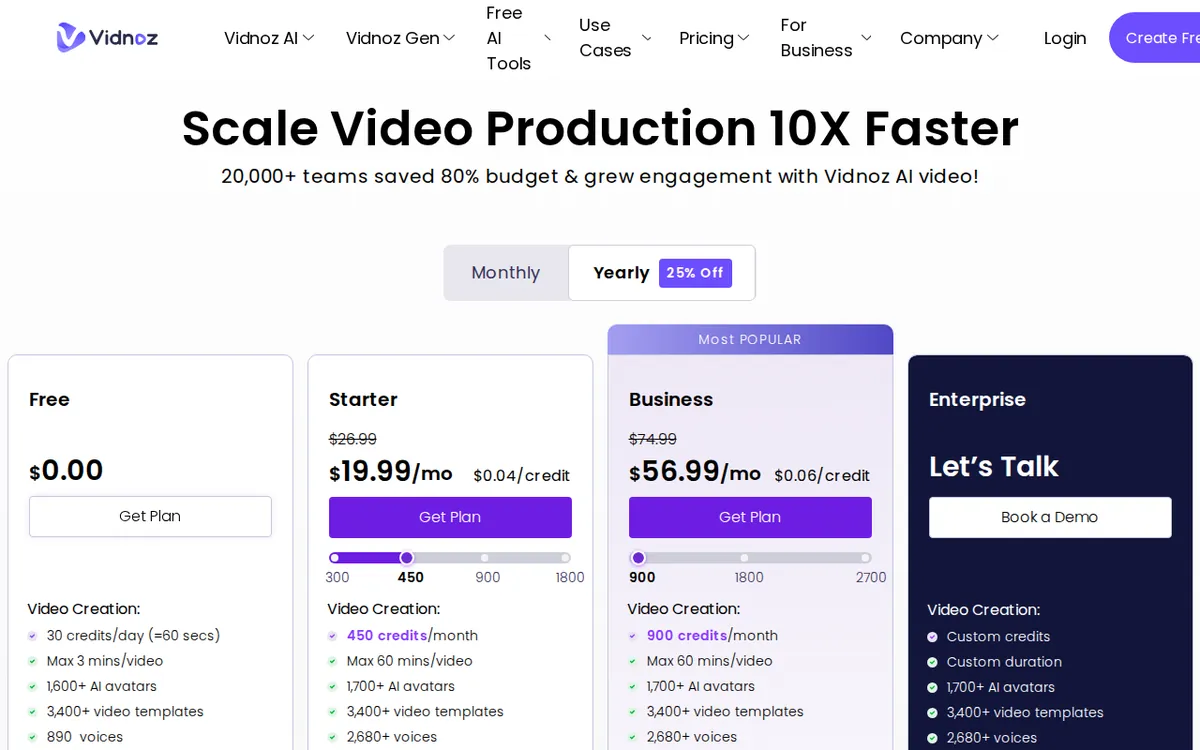
Figure: vidnoz.com official pricing page, captured 2026-10-25.
Where the free plan stops you
Four walls, in the order you’ll hit them.
Illustration: Higher tiers consume credits at the exact same rate per minute; upgrading merely unlocks length and feature locks.
The daily points run out fast. 30 points ≈ 60 seconds of video. If you’re iterating — regenerating a clip because the pacing was off, or testing two voices — you can burn a day’s allowance on a single 45-second intro. This is the limit most people hit first.
The clip-length cap doesn’t match the daily budget. Vidnoz lets a single free clip run up to 3 minutes. But a day’s 30 points only cover about 60 seconds. So the 3-minute ceiling is mostly theoretical on free — you can’t fund a full 3-minute clip from one day’s points. Plan for one short clip per day, not one long one.
The watermark and 720p. Fine for learning and private drafts. Not fine for anything client-facing, a product page, or a paid course. The logo stays and the resolution stays at 720p until you upgrade.
Photo avatars are capped at 5 a day. Good for testing. A blocker if your actual project is turning a catalog of faces into presenters.
None of these break the free tier as a learning tool. They’re all the same signal: the free plan is built to teach you the product, then push you to paid once you need real output.
Starter vs Business: what the money buys
Two paid plans. Both are monthly subscriptions. There’s no annual price in the data we pulled, so we won’t quote one — check the pricing page if you want a yearly rate.
Starter — US$26.99/month. Vidnoz runs a standing first-month promo of US$19.99 on its own site (more on that catch below). Starter gives you 450 points a month, which Vidnoz estimates at about 15 minutes of regular avatar video. The single-clip ceiling jumps to 60 minutes, export goes to 1080p (full HD) with no watermark, and you unlock emotional voice (voices that read with tone instead of flat narration) and SCORM export (a packaging format that lets a video drop straight into course-training systems). If you make e-learning, SCORM alone may be the reason to pick Starter.
Business — US$74.99/month. First-month promo of US$56.99 on the site. Business gives you 900 points a month — about 30 minutes of regular video — and adds the features teams and creators actually ask for: unlimited photo avatars (no more 5-a-day cap), AI Voice Clone (a synthetic copy of a specific voice), video translation (re-voicing a clip into another language), and team collaboration.
The jump from Starter to Business roughly doubles your monthly points, but you’re mostly paying for the unlocked features — Voice Clone, translation, unlimited photo avatars, team access — not just more minutes. If you don’t need those, the extra points alone probably don’t justify the price gap.
🔍 AMPM exclusive check
Two things the pricing page shows but doesn’t spell out, plus one honesty note.
The promo prices are first-month only. The US$19.99 (Starter) and US$56.99 (Business) figures are first-month promotional rates, not the ongoing cost. The list prices — the ones you’ll actually pay from month two — are US$26.99 and US$74.99. If you’re budgeting past the first month, use the list prices, not the promo you saw at checkout.
The free “3-minute clip” and the free “30 points/day” fight each other. The pricing page advertises a 3-minute single-clip cap on free and a 30-point daily allowance separately. Put together, a day’s points fund about one minute, so the 3-minute number oversells what one day on free can produce. We flag this because it’s the kind of detail that sends people to the upgrade button faster than they expected.
One honesty note. Vidnoz entered our tracker as a challenger candidate, and we’ve run one verification round on it, not our usual three-way manual cross-check. Every number above matched the official site on 2026-10-24, but free quotas and commercial terms on tools like this change often — confirm the live numbers on vidnoz.com/pricing.html before you pay.
Verdict: who should use it, who should skip it
Use the free tier if you want to learn AI avatar video end to end, you’re making short clips (a minute or so at a time), and a watermark and 720p don’t matter — drafts, internal demos, learning. It’s one of the more complete free plans in this category precisely because it mirrors the full workflow.
Pay for Starter if you need clean 1080p with no watermark, emotional voice, or SCORM export for e-learning — and roughly 15 minutes of video a month covers your output. Just budget on the US$26.99 list price, not the promo.
Pay for Business if you specifically need Voice Clone, video translation, unlimited photo avatars, or team collaboration. If you only need more minutes and none of those, the gap over Starter is hard to justify.
Skip Vidnoz entirely if your job is long-form video. The free plan can’t fund a full 3-minute clip in a day, and even paid is sold in minutes-per-month — this is a tool for short, repeatable avatar clips, not a long-video workhorse.
Written: 2026-10-25 Price last verified: 2026-10-24 Tool last health-checked: 2026-10-25
🔗 Related on AMPM
📎 Sources
All prices and quotas in this article come from AMPM’s verified dataset for Vidnoz (last verified 2026-10-24); primary sources:
🐾 Meet the cats: AMO and PIMI

AMPM is a Taiwan-based AI-tool pricing watchdog. Our motto: ask before you subscribe. Two cats argue every tool from two sides:
- ☀️ AMO — the budget-minded cat. Always asks: is the free tier enough, and is paying actually worth it?
- 🌙 PIMI — the performance-minded cat. Cares about whether it works well, fast, and gets your job done.

When they are done arguing, you know whether to pay. Every number is checked by us, with the verification date at the end.
🐾 Our sister sites also checked
Read next
- Vidnoz Full breakdown: pricing, features and real-world limits
- Vidnoz Is the free quota enough?
- Vidnoz Alternatives
- Free plan limits for every AI tool we track
