Ask Cat › AI Tool Summary › Warp
[How-to] Warp Pricing: The Free Tier Has No Fixed Quota — Here's What Replaces It
- Free tier: There is
- Cheapest paid plan: US$20/mo and up
- Free quota: The official website does not disclose the specific free quota …
- Last checked: 2026-10-06
Article last updated: 2026-10-07



Warp is a terminal app that’s turned itself into an AI coding agent — you type what you want, and it writes and runs commands for you. It has a free tier, and if you’re trying to figure out whether that free tier is actually usable or just a trial wrapped in marketing language, here’s the one fact that matters: Warp’s free plan does not hand you a fixed monthly quota of AI usage. We checked the official pricing page and confirmed it directly, then went plan by plan to see what you actually get at each price point.
What “free” means when there’s no quota
Most free coding tools tell you exactly what you get: “50 messages a month,” “3 projects,” something countable. Warp’s free tier doesn’t do that. Instead, the official page lists what free users get in vague, capped terms: “limited cloud agents access,” “limited Warp Drive and collaboration feature access,” and “limited cloud conversation storage.” None of those come with a number attached.
The one area where Warp is specific — and this is the part worth slowing down on — is credits. A credit is Warp’s unit for metering AI usage: every time the AI agent does something (runs a command, generates a suggestion, holds a conversation), it burns credits. Paid plans come with a monthly credit allowance built into the price. The free plan does not. Free users “reload credits at pay-as-you-go rates,” meaning there’s no bucket of credits included — you top up and pay for what you use, at whatever Warp’s standard per-credit rate is.
That’s a different shape of “free” than most people expect. You’re not getting X free credits a month and then being asked to upgrade. You’re getting access to the app with no credits pre-loaded, and any real AI usage means paying as you go unless you upgrade to a plan that includes a monthly allowance.
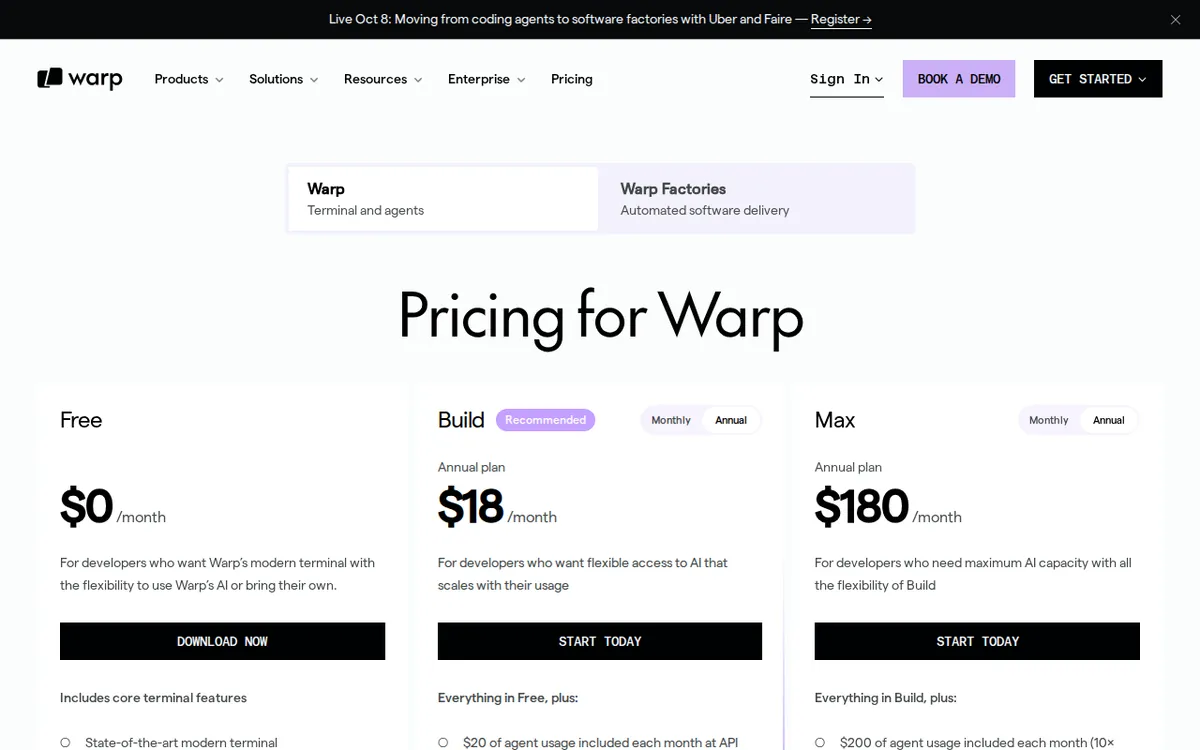
Figure: warp.dev official pricing page, captured 2026-10-07.
The three paid plans, compared
Once you’re ready to pay, Warp has three plans. Here’s what’s actually on the page, no extrapolation:
Build — US$20 a month, billed monthly. Pay annually instead and the monthly average drops to US$18 (a 10% discount baked into the annual commitment). Build includes 1,500 credits a month, plus AI commands and agent features, plus Warp Drive collaboration access.
Max — US$200 a month, billed monthly, or US$180 a month average if you pay annually. Max includes 18,000 credits a month — about 12 times what Build gives you — plus everything in Build. This plan is built for people running AI agents hard and often, not casual terminal users who ask for the occasional command.
Business — US$50 per person per month, billed monthly, or US$45 per person per month paid annually. Each seat (seat = one paid user license on the team plan) gets 1,500 credits a month, same as Build. Business caps out at 25 seats, so it’s built for small teams, not large engineering orgs.
Notice the pattern: Build and Business give the same 1,500 credits per user; Business just adds team management and collaboration tools on top, at a higher per-seat price. Max is the only plan that meaningfully changes the credit allowance, and it changes it by a lot — 12 times more than Build, for 10 times the monthly price.
Common blockers beginners hit — and what to do
If you’re just starting with Warp’s free tier, here’s where people get stuck:
“I ran out of credits and didn’t see it coming.” This is the free tier’s core trap. Because there’s no stated starting allowance, you can’t predict ahead of time how much AI use you’ll get before you hit a paywall for more credits. The fix: treat the free tier as a trial for seeing whether you like Warp’s interface and workflow, not as a sustainable way to run an AI agent daily. If you’re using the AI features more than occasionally, budget for Build from the start rather than discovering the pay-as-you-go reload cost mid-task.
“I can’t tell if a feature is ’limited’ because of my plan or because of a bug.” Warp’s own language — “limited cloud agents access,” “limited Warp Drive and collaboration feature access” — doesn’t define the limit. If something cloud-related (agent access, shared workspaces, conversation history) stops working or looks capped, that’s expected free-tier behavior, not necessarily broken software. Check your account’s usage/credit screen in the app before assuming it’s a glitch.
“Should I pay monthly or annually?” Every paid plan is cheaper per month if you commit annually: Build drops from US$20 to an US$18 monthly average, Max from US$200 to US$180, Business from US$50 to US$45 per seat. If you’re confident you’ll stick with Warp past a month or two, annual billing is the better deal on the numbers alone. If you’re not sure yet, stay monthly until you’ve actually burned through a normal month of credits and know your usage pattern.
“Which plan do I actually need?” If you’re one person using Warp’s AI agent for regular coding work, Build’s 1,500 monthly credits is the baseline paid tier. If you’re running agents constantly — long sessions, heavy automation, multiple concurrent tasks — Max’s 18,000 credits exists specifically for that. If you’re coordinating a small team (up to 25 people) and need shared Warp Drive access, Business is priced for that use case, not for solo users.
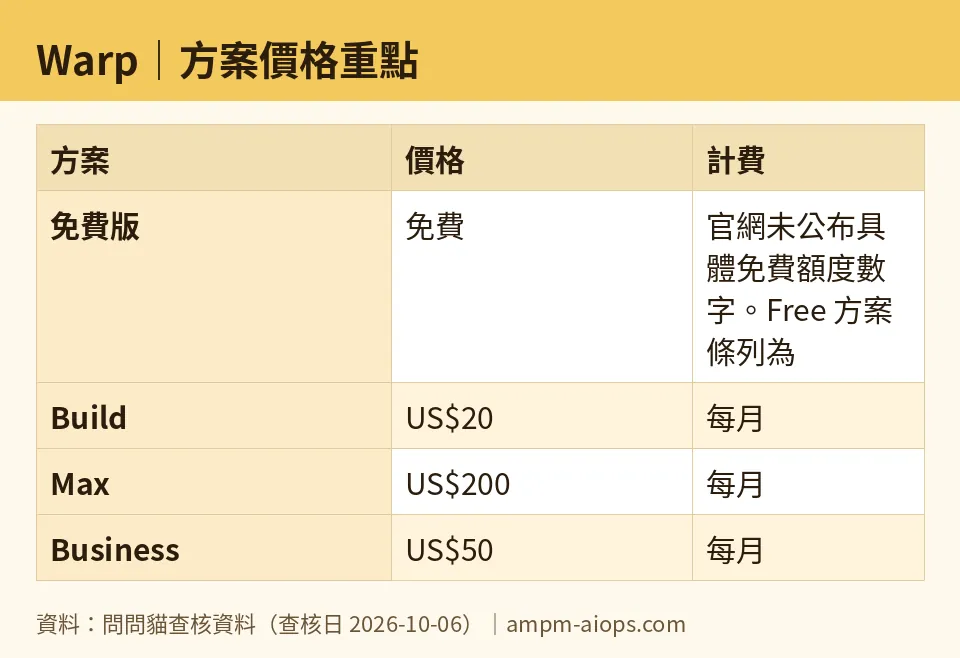
Figure: compiled by AMPM from its verified data (last verified 2026-10-06).
🔍 AMPM exclusive check
Here’s where our check adds something the vendor page doesn’t spell out. Warp’s pricing page lists the free plan’s features in qualitative terms only — “limited cloud agents access,” “limited Warp Drive and collaboration feature access,” “limited cloud conversation storage” — with no numeric caps published anywhere on the page as of our check. Most tools in this category (AI coding assistants) publish a specific free number: X messages, X requests, X tokens. Warp doesn’t. The only concrete mechanism disclosed for free users is pay-as-you-go credit reloading, which is a billing behavior, not a usage ceiling. Readers comparing Warp’s free tier against competitors using a specific number should know they’re comparing an unstated limit against a stated one — that’s not the same comparison, even though both get called “free tier.”
Verdict: who should use it, who should skip it
Use Warp’s free tier if you want to try the terminal interface and agent workflow before spending money, and you’re prepared to pay as you go the moment you want real AI usage — there’s no included credit cushion to lean on.
Skip the free tier, and go straight to Build at US$20 a month (US$18 on annual billing), if you already know you’ll use the AI agent regularly. The 1,500 monthly credits give you a predictable allowance instead of per-use billing uncertainty.
Go to Max (US$200 a month, US$180 annual average) only if you’re running AI agents heavily enough to need 18,000 monthly credits — that’s a 12x jump from Build, aimed at power users, not casual ones.
Business (US$50 per seat monthly, US$45 annual, capped at 25 seats) makes sense only for small teams that specifically need Warp Drive’s shared collaboration features — it doesn’t give individual users more credits than Build does, just a team layer on top.
Written: 2026-10-07 Price last verified: 2026-10-06 Tool last health-checked: 2026-10-07
🔗 Related on AMPM
📎 Sources
All prices and quotas in this article come from AMPM’s verified dataset for Warp (last verified 2026-10-06); primary sources:
🐾 Meet the cats: AMO and PIMI

AMPM is a Taiwan-based AI-tool pricing watchdog. Our motto: ask before you subscribe. Two cats argue every tool from two sides:
- ☀️ AMO — the budget-minded cat. Always asks: is the free tier enough, and is paying actually worth it?
- 🌙 PIMI — the performance-minded cat. Cares about whether it works well, fast, and gets your job done.

When they are done arguing, you know whether to pay. Every number is checked by us, with the verification date at the end.
🐾 Our sister sites also checked
Let's take a look at these
- Warp Comprehensive Introduction: Pricing, Features, and Actual Limitations
- Warp Is the free quota enough?
- Warp Alternatives
- Comprehensive Free Quota List for All Tools
More verified articles on this tool
- [Head-to-head] Warp US$20/month vs YYLO free and open-source: which AI terminal fits your workflow
- Warp's Free Plan Has No AI Included — Here's How to Turn AI On With Your Own API Key (BYOK)
